Table of Contents
This guide covers acer timelinex adds a new line of chips, a better battery with practical context and easy-to-follow details. Use it to understand the subject and apply the information confidently.
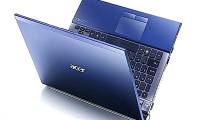
 The Acer TimelineX Core i3 - 370M chip has a 6, 000 mAh battery (Photo: Code Super).
Acer has just equipped this ultra-thin line of new configurations, including Intel Core i3 - 370M (2. 4 GHz) processor, 2GB DDR3 standard RAM, 320GB SATA hard drive, Intel HD graphics chip (ATI option Mobility Radeon HD 5470). The new version comes preinstalled with Microsoft Windows 7 Home Premium operating system.
In addition, this Acer TimelineX line also has a 6, 000 mAh battery, ensuring continuous operation over 8 hours. To achieve such impressive capabilities, Acer has equipped a PowerSmart button. When this button is pressed, the machine automatically handles the remaining operations to minimize power to a minimum, enhancing maximum operating time. The 8-hour number, however, can only be achieved under the ideal test conditions, but Acer TimelineX needs to exceed the 6-hour mark. Users can also upgrade to 9-cell battery pack for theoretical operation time up to. 11 hours 30 minutes.
The new version is still impressive with its slim design (less than 2. 5 cm), super light (less than 2 kg), and is the thinnest and lightest 14-inch laptop on the market.
 The new Acer TimelineX chip version remains the same ultra-thin design at the range 14 inch screen (Photo: Code Super).
Acer TimelineX version using the chip is being sold for VND 15. 9 million (excluding VAT), with a 500GB mobile hard drive worth VND 1. 7 million (from now until the end of January 31, 2011). ).
FAQ
What should I check before following these steps?
Confirm device and software compatibility, save important data, and make sure you have the required permissions, files, and account access.
Why might the process not work?
Common causes include outdated software, missing permissions, incompatible hardware, an unstable connection, or completing a step in the wrong order.
Can I undo the changes if necessary?
That depends on the tool or setting. Use built-in restore options when available, keep a backup, and record the original configuration first.
Related Articles
 Free 500GB Hard Drive When Buying Acer TimelineX Laptop4 minutes read
 Acer Upgraded TimeLineX, Priced from 599 USD3 minutes read
 Acer Released Many Models of Core i5 Chips3 minutes read
 Acer Nitro 5 (2021) Detailed Review: a Completely New Design12 minutes read
 Acer Swift 3 S, Ultra-light Laptop and 11-hour Battery Life3 minutes read
 Acer Has Released the First Three Core i3 Laptops in Vietnam6 minutes read
Reader Comments 0
Sign in with email or Google to join the discussion.