Table of Contents
YouTube videos can include several audio tracks in one upload. When a creator provides a dubbed version, viewers can choose it through Settings > Audio track in the video player. The available languages depend on that video; changing YouTube's interface language does not create a missing dub.
Choose a video's audio language
- Open the video and select the player's gear icon.
- Choose Audio track, if the option is present.
- Select the language you want, or choose the original track.
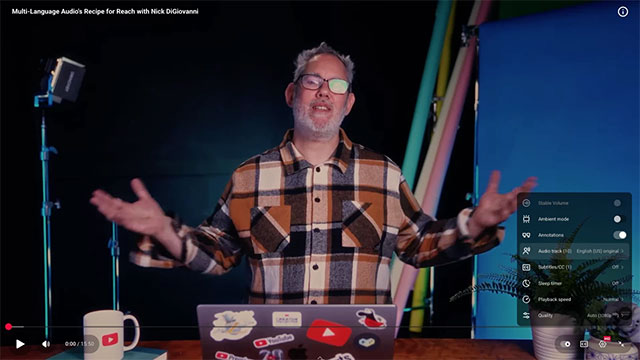
If there is no Audio track menu or your language is absent, that version may not be available for the video. Captions are a separate option: turn on subtitles if you need translated text instead of a different spoken track.
You can also set preferred languages for audio, titles, and descriptions in your account's language or playback settings. This is separate from the app's display language. For an unwanted dub, see switching YouTube back to original audio.
What changed in the 2025 expansion
On September 10, 2025, YouTube announced that it was expanding multi-language audio to millions of creators. The feature had previously been tested with a smaller group.
In that announcement, YouTube reported that creators uploading multi-language audio received, on average, more than 25% of watch time from views in the video's non-primary language, based on its July 2025 data. This measures the language of playback, not whether viewers were native speakers. It also does not guarantee an increase in views for every channel.
YouTube also described localized thumbnail testing at the time. Current creator documentation includes multi-language thumbnails for long-form videos, so the old “testing” description should not be read as a permanent status.
Uploaded dubs and automatic dubbing are different
Multi-language audio lets a creator attach prepared recordings to a video. Automatic dubbing is a separate feature that generates translated speech. Both can appear as selectable audio tracks, but their production process and quality can differ.
A translated track may contain mistakes, especially with names, technical terms, humor, or ambiguous speech. Check the original audio or reliable captions when the wording matters.
What creators should prioritize
Start with languages supported by actual audience demand and have a fluent reviewer check the translation and timing. Keep titles, descriptions, captions, and spoken content consistent. A single video with several tracks can be easier to maintain than separate uploads, but dubbing quality still matters.
References: YouTube's 2025 expansion announcement, creator guidance, and viewer language settings.
Related Articles
 Is YouTube's new AI feature 'Ask' really useful?
 7 things you can do to 'save' YouTube
 YouTube launches multilingual dubbing on its platform
 YouTube's AI-powered voiceover feature is now available to more creators
 YouTube launched Video Chapters, a very useful video rewrite support feature
 YouTube rolls out more non-skippable ads, making viewers wait even longer to enjoy videos
Reader Comments 0
Sign in with email or Google to join the discussion.