Table of Contents
This guide provides a clear, practical overview of YouTube allows users to download videos on web browsers, with useful context, important details, and straightforward takeaways for everyday readers.
However, recently some users have shared with Android Police news site that Youtube is providing the option to download videos on the web browser. This feature is being offered by YouTube to users who have signed up for Youtube Premium accounts in India, France and some other parts of the world.
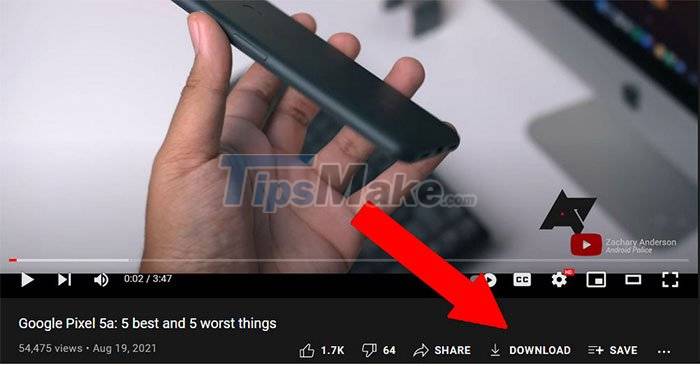
For now, you can also try out this useful new YouTube feature by visiting youtube.com/new, note you must have a YouTube Premium account.

You will then see a Download button appear in the toolbar below the title of the video. To download videos, users simply need to click this button. Google also allows users to choose to download videos in a variety of qualities with a maximum of 1080p in Settings. In addition, users can also delete all downloaded content.

Downloaded videos can be played back at youtube.com/feed/downloads.
This beta feature will end on October 19. This feature will work on Windows, MacOS, and Chrome OS.
Hopefully after the testing period, this feature will be released permanently as well as coming to regular Youtube accounts, giving users a simple way for you to download videos from YouTube on the web without having to use tools. third-party.
Key Takeaways
Use the information above as a practical reference for YouTube allows users to download videos on web browsers. Review each step carefully, confirm any requirements, and choose the option that best fits your situation.
FAQ
What does this guide explain about YouTube Allows Users to Download Videos on Web Browsers?
It explains the main concepts, practical considerations, and useful steps related to YouTube allows users to download videos on web browsers without requiring advanced knowledge.
Who can benefit from learning about YouTube Allows Users to Download Videos on Web Browsers?
This information is useful for readers who want a clear overview, practical guidance, and reliable steps related to YouTube allows users to download videos on web browsers.
What should I check before applying this information?
Review the requirements, confirm that your device, software, or situation matches the instructions, and back up important data before making major changes.
Related Articles
 How to Download YouTube Videos to Android Phones5 minutes read
 How to Create 360 videos and Upload to YouTube: YouTube Videos 3605 minutes read
 10 Ways to Download YouTube Videos Fast and Simple14 minutes read
 How to Remove Unwanted Video Suggestions on YouTube4 minutes read
 10 Chrome Widgets Download Videos Quickly9 minutes read
 Summary of Websites That Download YouTube Videos8 minutes read
Reader Comments 0
Sign in with email or Google to join the discussion.