Table of Contents
This updated guide explores world's smallest SSD launched with almost unimaginable size with practical details, clear explanations, and useful takeaways. Japanese tech company Suneast has just announced an incredible new product: the world's smallest SSD, and it is incredibly compact. Launched on May 9, the USB 3.2 device measures less than an inch across, looks more like a dongle than an SSD, but still offers up to 512GB of.
According to the specs on Suneast's product page (translated from Japanese), the compact device boasts a maximum read speed of 450MB/s, a maximum write speed of 400MB/s, and weighs just 2.8 grams (less than 0.1 ounce). The dimensions of the device are just 10.6 × 20 × 13.5mm (0.4 x 0.8 x 0.5 inches). The impressive physical specifications make it a completely unobtrusive accessory when attached to the bottom of a phone or the side of a laptop.
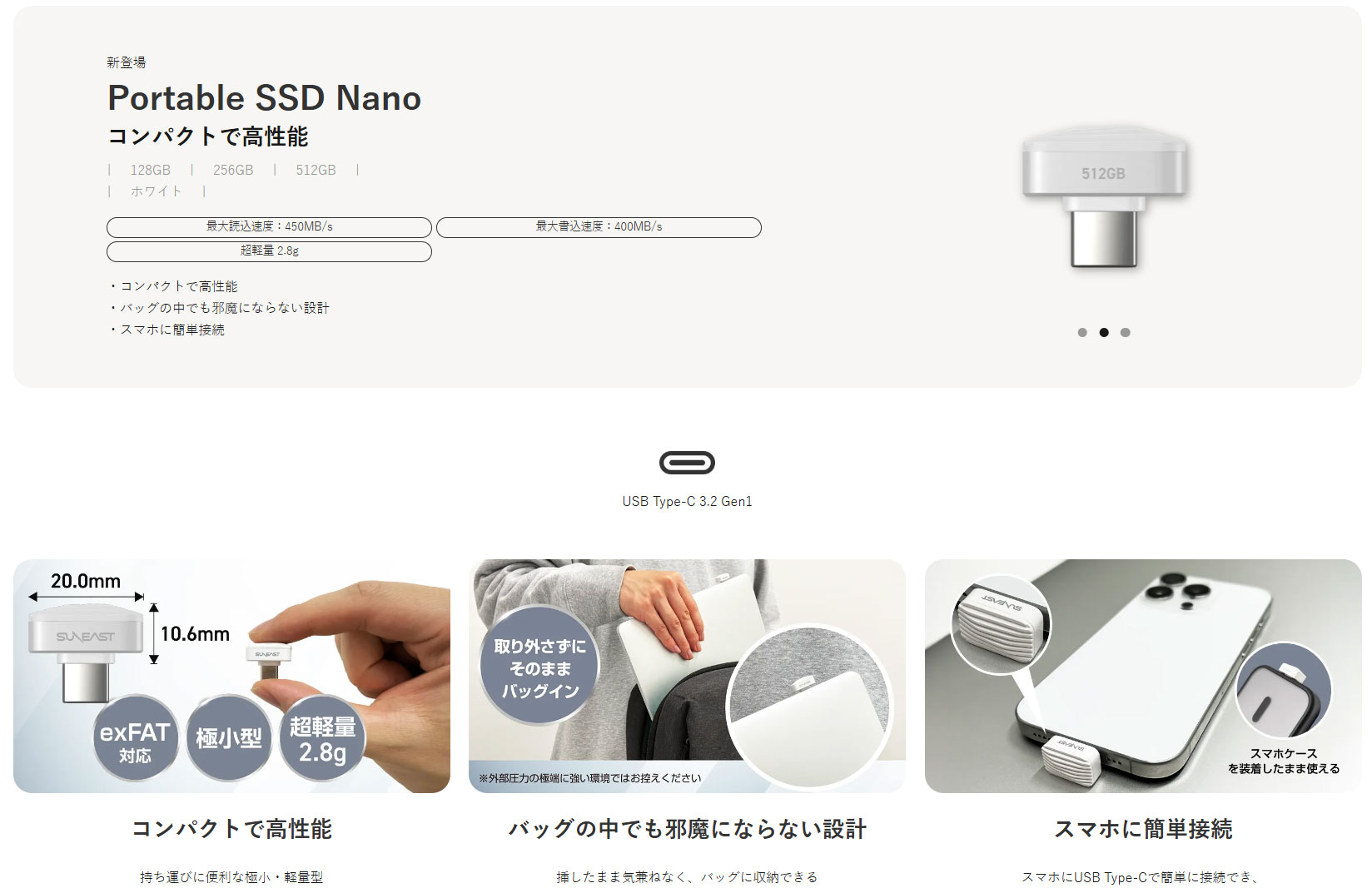
Suneast aims to provide an easy-to-use storage device for smartphones, using a USB Type-C port that is compatible with most modern phones. The SSD can transfer large files like videos from your phone to your laptop for editing, making it a useful tool for video editors or mobile creatives who do not want to carry around cumbersome cables or wait for slow cloud uploads/downloads.
Suneast claims the SSD is compatible with Windows, Mac, Linux, Android, and iOS operating systems, but warns users to initially set it up on a PC or Mac rather than a phone to optimize compatibility.
The device is available in three storage options: 128GB, 256GB, or 512GB. Pricing and availability outside of Japan have yet to be announced, but with the popularity of ultra-compact phone-centric SSDs—especially among video creators—it is safe to assume that it will soon be available to global customers.
FAQ
What is the main takeaway about World's Smallest SSD Launched with Almost Unimaginable Size?
The key is to understand the core idea, compare the available options, and apply the practical guidance that matches your situation.
What should beginners know about World's Smallest SSD Launched with Almost Unimaginable Size?
Start with the essential steps and terminology. Avoid changing advanced settings until you understand how they affect performance, privacy, cost, or compatibility.
How can I use this information in practice?
Follow the relevant section in order, test one change at a time, and confirm the result before moving to the next step or recommendation.
Related Articles
 Smallest Galaxy Ever Discovered: Like a Human but Only the Size of a Grain of Rice8 minutes read
 How to Compress the Smallest File Size with WinRAR2 minutes read
 Display the Actual Size for the Drawing in Corel2 minutes read
 The World's Smallest Computer, 0.04mm Block3 minutes read
 Top 10 Countries with the Smallest Area in the World13 minutes read
 Check the Durability of the Smallest Phone in the World and Unexpected Results3 minutes read
Reader Comments 0
Sign in with email or Google to join the discussion.