Table of Contents
Malware is software or code designed to carry out harmful or unauthorized actions, such as stealing information, disrupting a device, encrypting files, or giving an attacker access. “Virus” is one type of malware, rather than a name for every malicious program.
Malware labels overlap. A Trojan can install a backdoor, a rootkit can hide it, and the compromised device can become part of a botnet. The categories below describe different ways malicious code arrives, spreads, hides, or causes harm; they are not a ranking of the most dangerous threats.
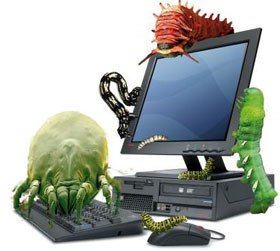
1. Viruses: code that infects a host
A computer virus reproduces by attaching to another file or host, then spreading when that infected material is executed or otherwise activated. Its behavior depends on the host and the infection mechanism.
An email attachment can deliver malware, but an attachment is not automatically a virus. Malicious documents may instead use scripts, macros, or software vulnerabilities to run a different payload. A virus may damage data, steal information, or perform other actions; destruction is not a required feature.
2. Worms: self-propagating malware
A worm can spread between systems without attaching itself to a separate host program in the same way a traditional file-infecting virus does. Some worms exploit network vulnerabilities; others use different propagation mechanisms.
Worms are not inherently “more sophisticated” than all viruses. Their practical risk is that an unpatched or poorly separated network can let an infection spread quickly. Patching, limiting exposed services, and network segmentation help reduce that opportunity.
3. Backdoors: unauthorized access paths
A backdoor provides a way to access a system outside its intended authentication or control process. Malware can install one after exploiting a vulnerability or deceiving a user into running a program.
The degree of control depends on the backdoor and its privileges. Legitimate remote-support software is not automatically malware, although attackers can misuse it. Unexpected remote-access tools or accounts deserve investigation.
4. Trojans: harmful software presented as something useful
A Trojan disguises its malicious purpose behind an apparently legitimate file, app, or function. It may steal credentials, download other malware, or establish remote access. The name describes deception, rather than a requirement to self-replicate.
Be cautious with unexpected installers, cracked software, and fake updates. A convincing icon or familiar-looking filename is not evidence that a file is safe. Do not disable protection just because an installer tells you to.
5. Adware and spyware: unwanted advertising and surveillance
Adware displays or injects advertising. Some advertising-supported software is legitimate, while intrusive or deceptive variants can be unwanted or malicious. Spyware collects information without appropriate authorization; it may monitor activity, capture credentials, or transmit other private data.
Deleting cookies or browser history does not remove an installed malicious program. Review unexpected apps and extensions and use an appropriate security scan. Likewise, free software is not automatically spyware: the developer, distribution source, permissions, and behavior matter.
6. Rootkits: hiding an intrusion
Rootkits use concealment techniques to make malicious activity harder to see. They can hide files, processes, or other evidence, and they may help another threat persist.
- User-mode rootkits interfere with application-level behavior or the information applications receive.
- Kernel-mode rootkits operate with operating-system-level privileges and can undermine the reliability of system tools.
- Firmware rootkits affect firmware rather than only ordinary files on a system drive. Recovery may require device-specific procedures.
System freezes or slow performance do not diagnose a rootkit. Nor is all rootkit damage automatically irreversible. Recovery depends on what was affected and may require specialist investigation or rebuilding from a trusted source. Old rootkit utilities should not be assumed compatible with a current operating system.
7. Malicious scripts and mobile code
“Mobile code” is an older term for code delivered to and executed on another system; it does not simply mean malware on a mobile phone. Scripts can be used legitimately or maliciously. JavaScript itself is not malware.
Legacy discussions often mention Flash and ActiveX, but those technologies should not be treated as normal requirements for modern browsing. Keep browsers and document readers supported and updated, and avoid enabling active content in an unexpected document.
8. Blended threats: several techniques in one attack
A blended threat combines mechanisms such as exploitation, deception, self-propagation, and remote control. The term is useful because an incident may involve several components rather than one easily classified file.
Removing one component may leave another access path in place. Response should consider affected devices, accounts, persistence, and the route of entry, rather than assuming several simultaneous antivirus installations will solve every problem.
9. Malicious bots and botnets
A bot automates actions. Many bots have legitimate uses, but malware can turn a device into a remotely controlled bot. A collection of controlled devices is a botnet.
Attackers may use botnets for spam, credential attacks, or distributed denial-of-service attacks. The owner may notice little obvious activity. Routine rootkit scanning alone is not a complete botnet-prevention strategy.
10. Ransomware: extortion through disrupted access
Ransomware can encrypt files or block access and demand payment. Some incidents also involve stolen data and threats to publish it. Behavior differs between families; there is no universal Safe Mode bypass or guarantee that a scanner will restore encrypted files.
Keep backups that are protected from changes made through an infected system, and test recovery before you need it. A successful malware removal and a successful data recovery are separate outcomes.
Reduce risk and respond to warning signs
- Keep supported operating systems, browsers, and applications updated.
- Install software from trusted sources and review unexpected permissions.
- Use maintained security protection and investigate its alerts.
- Use unique passwords and multifactor authentication for important accounts.
- Keep recoverable backups separate from everyday device access.
If you suspect active malware, stop using the affected device for sensitive sign-ins. For suspected spreading malware or ransomware, disconnect it from the network and contact your organization’s IT team where applicable. Record the warning and follow trusted recovery guidance rather than random pop-up “repair” offers.
See what to do if your computer has a virus for further checks. Organizations can use CISA’s ransomware response guide to plan a coordinated response.


Reader Comments 0
Sign in with email or Google to join the discussion.