Table of Contents
A smart refrigerator adds connected features—usually through Wi-Fi and a phone app—to a conventional refrigerator. Depending on the model, you may get door alerts, remote temperature controls, diagnostics, or a screen for household information. A touchscreen, camera, and automatic-opening door are optional features, not requirements for the “smart” label.
What connected features can do
- Monitoring: receive supported alerts, check settings, or view diagnostic information in an app.
- Food management: some models offer interior cameras, shopping lists, or food-recognition tools. Cameras may not show every shelf or item.
- Household screen: selected models display calendars, notes, recipes, photos, or entertainment.
- Smart-home integration: compatible models may work with other devices through a supported platform.
Features differ by model, country, app version, and account. For example, Samsung’s Family Hub feature guide describes connected food and household functions that require Wi-Fi and a Samsung account. That does not mean every Samsung refrigerator, or every smart refrigerator, includes them.
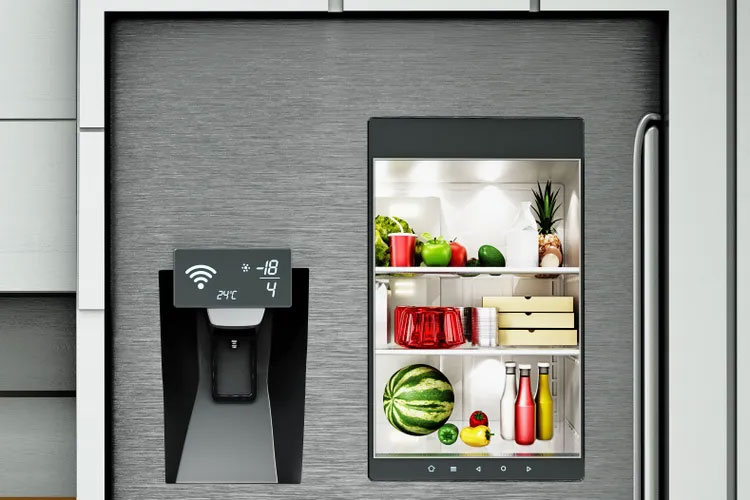
Smart features versus refrigerator hardware
Adjustable-temperature drawers, ice makers, water dispensers, transparent door panels, and assisted-opening mechanisms are hardware choices. They can appear on connected or nonconnected appliances. A clear door panel is not necessarily a transparent touchscreen, and a door-open warning does not imply that the appliance will close its door automatically.
Check the exact product specification and demonstration instead of assuming a feature from the category name.
What to check before buying
- Fit and storage: measure the installation space, ventilation clearance, delivery route, and room needed to open doors and drawers.
- Core performance: compare capacity, energy labels, noise, layout, warranty, and local service availability before considering the screen.
- Useful connectivity: decide which alerts or controls you will actually use and confirm phone and smart-home compatibility.
- Ongoing support: ask how long the manufacturer provides software and security updates, and which functions depend on cloud services.
- Repair costs: check coverage for the screen, cameras, electronics, and other special parts. Do not assume costs match a basic refrigerator.
Connectivity, privacy, and service life
A connected appliance can expose household information through its account, camera, screen, or linked services. Use a unique account password, enable stronger sign-in protection where available, install manufacturer updates, and review what appears on a shared kitchen screen. See practical IoT security steps and securing a home network.
Confirm which functions continue without internet and how the appliance behaves if the app or cloud service is retired. Software updates can improve supported models, but they are not a promise of indefinite compatibility or new features.
A smart refrigerator is worthwhile when its connected functions solve a real household problem at an acceptable total cost. If you mainly need reliable food storage, a well-chosen conventional model may meet that need just as well.
Related Articles
 Cause and remedy when the refrigerator is sweating, condensing steam
 How to clean the refrigerator properly?
 Why does the refrigerator lose heat and is not cold enough?
 [Experience] Which refrigerator is the best and the most durable one?
 Should the refrigerator be unplugged in the winter, when traveling for a long time?
 What to do when the refrigerator vibrates and screams abnormally?
Reader Comments 0
Sign in with email or Google to join the discussion.