Table of Contents
This guide provides a clear overview of minecraft 1.19, including Crafting Turtle Shells, Using the Magic Potion to Breathe Underwater, Water Breathing. Use it to understand the topic, compare the available options, and make a more informed decision.
When the character dives into the water, people will see another bar appear above the hunger gauge. This bar will indicate the character's breathing level, i.e. how long people can stay underwater.
The player can only stay underwater for a limited amount of time because breath runs out pretty quickly. If the character runs out of breath, the character will begin to drown and take damage. So, if you're about to explore watery areas, know these tips for surviving underwater in Minecraft 1.19.
Crafting Turtle Shells
Players often craft armor out of iron, diamonds, and Netherite to keep themselves safe from attacks. However, there is still another type of protection, which gives the character the ability to breathe underwater for a bit longer.
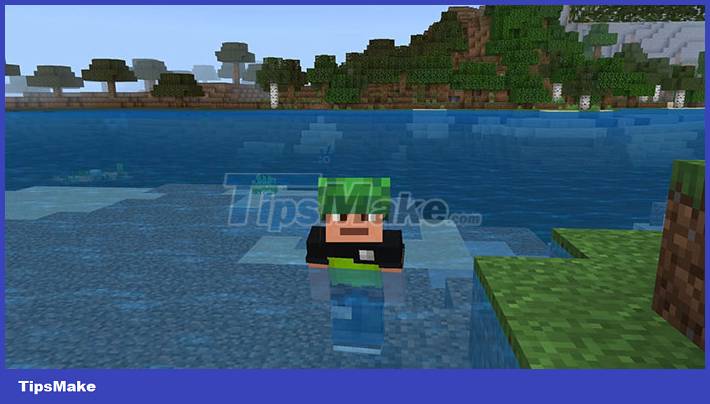
Players can craft turtle shells from scute - items dropped from baby turtles as they mature. The player can then wear these turtle shells for an extra 10 seconds of breathing each time they enter the water. However, after these 10 seconds, the breath will still be out as usual.
Using the Magic Potion to Breathe Underwater, Water Breathing
There are many drugs that help players survive underwater, one of them is Water Breathing. This elixir helps players breathe longer underwater by completely stopping the action of the breathing rod. There is no reduction from the breath bar when the player applies this effect.

This potion can be made by combining pufferfish with the elixir Awkward. Redstone dust can also be added to the base potion to extend the duration from 3-8 minutes.
Using Conduit Block
Conduit is a lesser known block in Minecraft, especially for new players, as crafting it requires a Nautilus shell and a Heart of the Sea. Once crafted, the prismarine blocks must be placed in a certain configuration and the conduits must be in the center.

When the conduits are activated, they can continuously restore the oxygen levels of players within 32-96 blocks. Conduit can also give vision in dark areas in the water, which increases mining speed.
Enchantment with Respiration Breath Charm
Although the turtle shell is a great protective item, providing the effect of breathing underwater, the player still needs another proper support to survive underwater. This is where the Respiration spell comes into play.

This spell can simply increase the player's breathing rate. With this enchantment, the breathing time will be reduced for longer, giving players more time to explore underwater. Respiration can be applied to any helmet, including turtle shells.
Use the Air Pocket
The player can create an air pocket underwater to breathe normally without having to come to the surface multiple times.
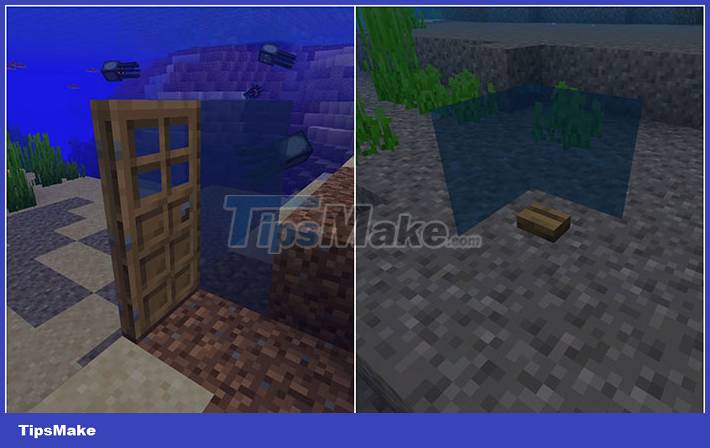
In Java Edition, people simply place a door to create an airbag, then stand and breathe normally. In Bedrock Edition, creating an airbag is a bit more difficult. Gamers need to break a block and quickly place another block like a button to keep the air pocket intact.
Conclusion
Understanding Minecraft 1.19 makes it easier to compare options, avoid common mistakes, and apply the information in this guide more effectively. Review the relevant requirements before making changes or choosing a solution.
FAQ
What is Minecraft 1.19?
However, there is still another type of protection, which gives the character the ability to breathe underwater for a bit longer.
Why is Minecraft 1.19 important?
Understanding Minecraft 1.19 helps you evaluate features, compatibility, performance, and potential limitations before you choose a product or follow a procedure.
What should you consider when using or choosing Minecraft 1.19?
Consider your specific goal, compatibility requirements, available features, cost, security, and the practical recommendations described in this guide.
Related Articles
 Survive Underwater in Minecraft, Breathe Underwater: Step-by-Step Guide6 minutes read
 Strange Story Underneath a Lake in Minecraft: Key Facts5 minutes read
 When Will the Mounts of Mayhem Minecraft Version Be Updated7 minutes read
 Summary of Shortcuts in Minecraft Java Edition5 minutes read
 Minecraft: Top 5 Immutable Potions When Playing Survival Mode4 minutes read
 minutes read
Reader Comments 0
Sign in with email or Google to join the discussion.