Table of Contents
This guide covers asus revealed the high-end zenbook ux301 model ultrabook with practical context and easy-to-follow details. Use it to understand the subject and apply the information confidently.
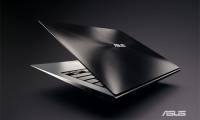
In the video, Asus seems to have revealed the new name for the product is the Zenbook UX301. In terms of configuration, the UX301 is equipped with a 13. 3-inch high-resolution screen of 2560x1440, Intel's latest Core i7 chip Haswell platform, Wi-Fi 802. 11ac standard, SonicMaster audio technology.
It will also be very thin with a thickness of only 15. 5 mm. In addition, this will probably be the first ultrabook with a Gorilla Glass tempered glass 3, which will give it 3 times better scratch resistance than the previous generation Zenbook Prime (Zenbook Prime).
FAQ
What should I check before following these steps?
Confirm device and software compatibility, save important data, and make sure you have the required permissions, files, and account access.
Why might the process not work?
Common causes include outdated software, missing permissions, incompatible hardware, an unstable connection, or completing a step in the wrong order.
Can I undo the changes if necessary?
That depends on the tool or setting. Use built-in restore options when available, keep a backup, and record the original configuration first.
Related Articles
 Asus Announced the Zenbook UX301 and UX302 Duo3 minutes read
 Asus Ultrabook Named Zenbook, Priced from 999 USD4 minutes read
 Zenbook Prime Costs About 27 Million in Vietnam4 minutes read
 Asus Zenbook 15 Laptop Review: Compact, Comfortable Keyboard5 minutes read
 ASUS ZenBook UX425JA Detailed Review: Ultra-thin, Lightweight and14 minutes read
 Asus Zenbook Has Been Upgraded to a Full HD Screen3 minutes read
Reader Comments 0
Sign in with email or Google to join the discussion.