Table of Contents
This guide covers the criteria to pay attention to when buying ultrabook with practical context and easy-to-follow details. Use it to understand the subject and apply the information confidently.
Storage capacity, battery life and connection ports are among the parameters to keep in mind when buying ultrabook.
 Acer Aspire S5.
Capacity and Speed
If buying ultrabook for regular use, users need to consider the drive capacity. Most models are equipped with at least 64 GB SSD drives and can be up to 256 GB. For those who save photos or movies, this capacity is not large enough and they should add the cost of buying an external outlet into the rack.
Some ultrabooks are equipped with flash drives and HDD hard drives, but the flash only supports the system to boot quickly, and the program and the data will be stored in the traditional hard drive, making data exchange speed slow ( on the contrary, they will own the system with large capacity, sometimes up to 1 terabyte). Speed and capacity, which one is more important? If you are among those who enjoy the trend of cloud computing and the ability to store information online, the answer will be speed.
Graphics
Ultrabooks are not ideal for gamers because to achieve a slim and light design with a price not too high, it must sacrifice configuration power. However, some ultrabooks are still equipped with discrete graphics cards, support smooth display of 3D content in apps such as Google Earth, CAD, HD video decoding fast. Battery life will be affected enjoy but a few ultrabooks, such as the Lenovo ThinkPad T430s, can turn on / off the GPU intelligently to save significant battery life.
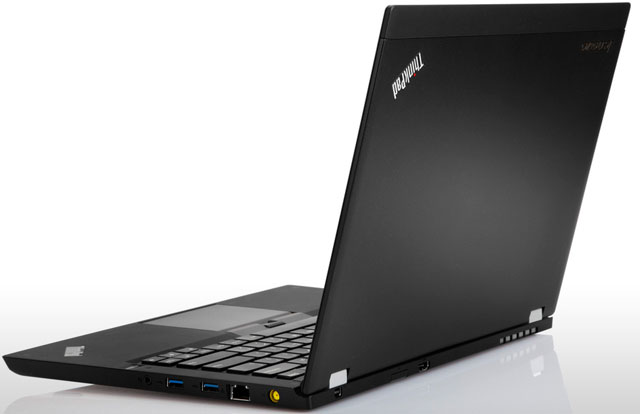 Lenovo ThinkPad T430s.
Price
Costs are always a must not miss every time you buy products. The price of about $ 1, 000 is reasonable, but users will need to consider if they intend to spend over $ 1, 300 for ultrabook.
Connector
To reduce the size of the motor, the manufacturer will remove some ports. Users will need to statistics the number of ports on the machine to see which connections are needed for them. Most are equipped with USB and HDMI, but not many have SD card slots (Asus Light Ultrabook, Toshiba Portege Z830-S8302 and Samsung Series 5 are among the few with this reader). Ethernet ports are also hard to find because it is no longer an important feature for most popular users (Series 5 and Toshiba Portege Z835 are the two systems that still have this connection).
Battery Life
According to Intel standards, ultrabook must have a continuous operation time of at least 5 hours, but many machines can reach 8 hours. Although 5 hours enough satisfaction, ultrabook battery is usually attached to reduce the area, so users are not easy to replace as in normal laptops. Therefore they should choose systems with a battery life of at least 6 hours.
FAQ
What should I check before following these steps?
Confirm device and software compatibility, save important data, and make sure you have the required permissions, files, and account access.
Why might the process not work?
Common causes include outdated software, missing permissions, incompatible hardware, an unstable connection, or completing a step in the wrong order.
Can I undo the changes if necessary?
That depends on the tool or setting. Use built-in restore options when available, keep a backup, and record the original configuration first.
Related Articles
 6 Things to Note When Buying Ultrabook7 minutes read
 Attention When Buying a Laptop8 minutes read
 Important Notes When Choosing to Buy USB8 minutes read
 6 Things to Consider Before Buying a PS59 minutes read
 How the Laptop Is Called Ultrabook5 minutes read
 Set up Query Criteria in Access 20164 minutes read
Reader Comments 0
Sign in with email or Google to join the discussion.