Table of Contents
This guide covers technology trends at computex 2010 with practical context and easy-to-follow details. Use it to understand the subject and apply the information confidently.
Computex Taipei 2010, the electronic trade show, will take place from June 1 to June 5 in Taiwan. This will be the convergence of many original equipment manufacturers such as Compal, Foxconn, Wistron and Quanta for reputable computer firms such as HP, Dell or Apple.
Here are some trends of technologies, Laptopmag products are expected to appear at Computex this year.
" Super portable " laptop with Intel Core i ULV chip.
Earlier this week, Intel officially announced the Ultra Low Voltage (Ultra Low Voltage) processor Core i3 / i5 and i7 announced that laptops based on these chips appears at the beginning of the month. Therefore, the possibility of appearing the first models using this platform will be very great at Computex 2010.
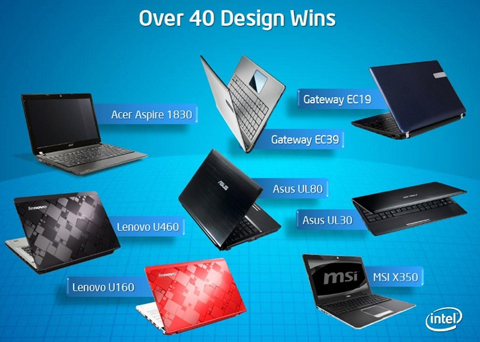 Some of the first laptops were announced using Core i ULV chips.
Netbook with dual core Atom chip.
According to Ubergizmo, there will be at least one device using the Intel Atom dual-core N550 processor that appears at this exhibition.
Device based on Tegra 2 platform
Nividia is one of the largest manufacturers to appear at Computex 2010. It will also be an opportunity for the company to introduce at least one device using the Tegra 2 platform that it "ply" to build for mobile devices. Dynamic last time.
Tablet running Android.
It is likely that the tablet running on Google's platform appears with many improvements in connection and styling to compete with the iPad better.
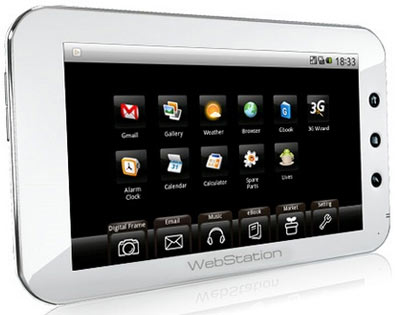 Tablet running Android appears more and more.
Windows 7 tablet.
Although Microsoft 's latest PC operating system is highly rated, it does not seem to be suitable for devices that promote mobility. Typically, rumors of HP canceling the plan to use this platform for its Slate turned to WebOS after acquiring Palm. However, users can still hope and expect manufacturers to customize the look of Windows 7 more appropriately. Recently, according to Engadget, MSI will have such a product in June and most likely it will be introduced in Computex this time.
The appearance of MID.
Mobile Internet Devices (Mobile Internet Devices) have never been appreciated due to being slumped in front of a series of recent tablet models. However, the model like Viliv N5 is quite worthy for users to pay attention and wait for.
In addition to the devices that will almost certainly appear at Computex 2010, there are still some others that are not really outstanding or sinking into oblivion as shown below.
Smartbook.
Just 6 months ago, the smartbook seemed to have had a good start to Lenovo's Smartbook Skylight or HP's Compaq AirLife 100. However, these products keep quiet and do not attract much attention of users currently.
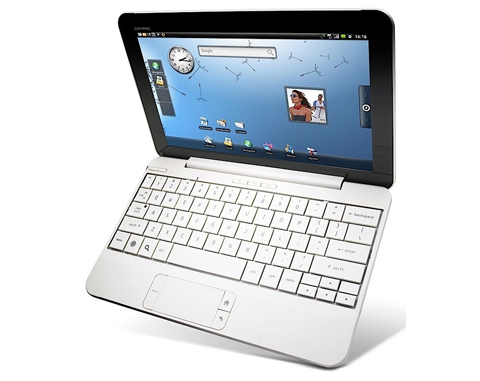 Smartbook has not shown its advantages (Photo: Netbookreviews) .
3D laptop.
3D display technology is a prominent trend in 2010 and Acer has done a great job of introducing this technology-supporting laptop with the G51J 3D model. However, after the impressive presentation phase, this product line is sinking into oblivion.
Smartphone.
Computex is known as an exhibition not for phones and most of the leading phone manufacturers have announced that they will not be here. But the possibility of a few unique patterns can still occur.
Device using USB 3. 0 standard.
Devices using this connection standard have now started to appear but the number and types are still quite few and not really popular.
FAQ
What should I check before following these steps?
Confirm device and software compatibility, save important data, and make sure you have the required permissions, files, and account access.
Why might the process not work?
Common causes include outdated software, missing permissions, incompatible hardware, an unstable connection, or completing a step in the wrong order.
Can I undo the changes if necessary?
That depends on the tool or setting. Use built-in restore options when available, keep a backup, and record the original configuration first.
Related Articles
 7 Technology Trends Will Change the World in the Near Future6 minutes read
 Top 3 Technology Trends in 2018, Which Technology Will Change the Game?11 minutes read
 11 Technology Trends of 2017: Tips and Examples8 minutes read
 If You Want a Successful Career, Find Out About the Five 201812 minutes read
 Technology Trends 2013 in the Eyes of Ceos5 minutes read
 The Latest Products and Technologies at Computex 201815 minutes read
Reader Comments 0
Sign in with email or Google to join the discussion.