Table of Contents
This guide provides a clear overview of handling null values, including what the SQL Value NULL is, When Are SQL NULL Values Useful. Use it to understand the topic, compare the available options, and make a more informed decision.
However, it's important to understand what NULL values are and what they mean to give you an accurate and comprehensive overview of your data.
What Is the SQL Value NULL?
A NULL means no value, not zero or space.
Therefore, traditional comparison operators like =, <, >, and <> cannot be used on it. However, if used, the result will be UNKNOWN.
Treat NULL value as an empty field on the left side while creating a record. You can create a table and insert a new column without adding values. Therefore, that field will be a NULL value. NULL values can also be inserted into columns of any data type.
To illustrate this, you should create a new SQL table using the syntax below:
CREATE TABLE Employee ( FirstName VARCHAR(50), LastName VARCHAR(50), PhoneNum VARCHAR(15), Salary FLOAT ); INSERT INTO Employee (FirstName, LastName, PhoneNum, Salary) VALUES ('Maxwell', 'Ayomide', '812-345-6789', 150000.00), ('David', 'Tosin', NULL, 450000.00), ('Eben', 'Teniola', '912-345-6789', 590000.00), ('Kenneth', 'Olisa', '809-456-8732', NULL), ('Esther', 'Oge', NULL, NULL);
You can also update NULL values in a table using the beginner-friendly SQL command - UPDATE command. To do this, use the syntax below:
UPDATE Employee SET FirstName = 'Esther' WHERE Salary = 200000;To see the results, run:
SELECT * FROM Employee;
When Are SQL NULL Values Useful?
The value NULL can be used in different situations in SQL:
- When data is not available or not known at the time of data entry.
- When the data does not apply to the entity in question. For example, in a survey, a question asking participants to check whether they have children in the survey box may have some NULL values.
What Is the SQL IS NULL Condition?
The SQL IS NULL command is one of the important SQL commands that every programmer needs to know. This command is used to check for NULL values and is best used when you search for NULL values. This command will return all NULL rows in the column specified in your query.
SELECT FirstName, LastName, PhoneNum FROM Employee WHERE PhoneNum IS NULL;This query will return all NULL values in the PhoneNum column.

What Is the SQL IS NOT NULL Condition?
The SQL IS NOT NULL statement is the opposite of SQL IS NULL.
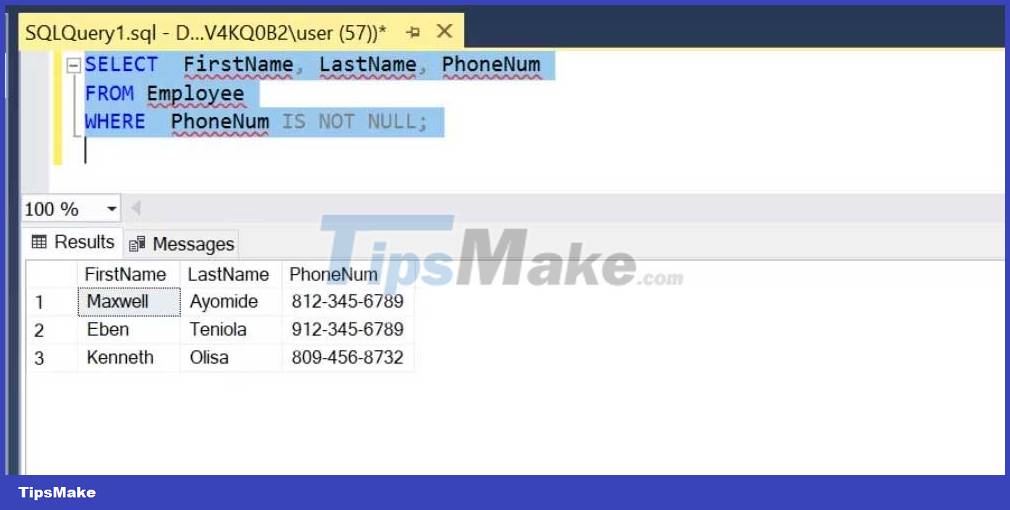
This command checks for non-empty values (NOT NULL values). Therefore, it will always return all rows in a column with a value and include all NULL values in the column specified in your query.
SELECT FirstName, LastName, PhoneNum FROM Employee WHERE PhoneNum IS NOT NULL;This query will return all NOT NULL values in the PhoneNum column.
How to Count SQL NULL Values in a Column
The COUNT() command is used to count. It is a useful command when analyzing data in SQL tables and working with subqueries & clipboard.
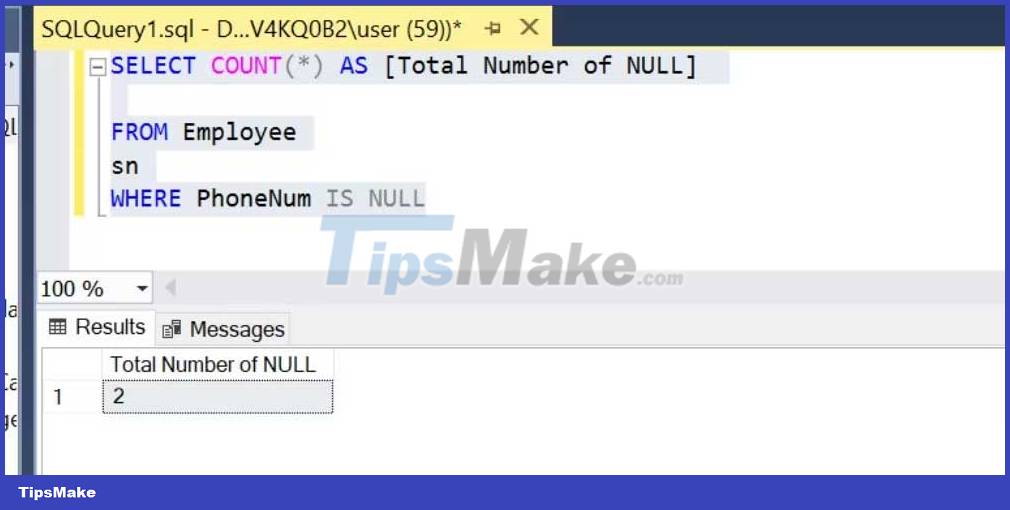
Use this query to count the number of NULL values in the PhoneNum column.
SELECT COUNT(*) AS [Total Number of NULL] FROM Employee WHERE PhoneNum IS NULLYou will get the result:
How to Count NOT NULL Values in a Column
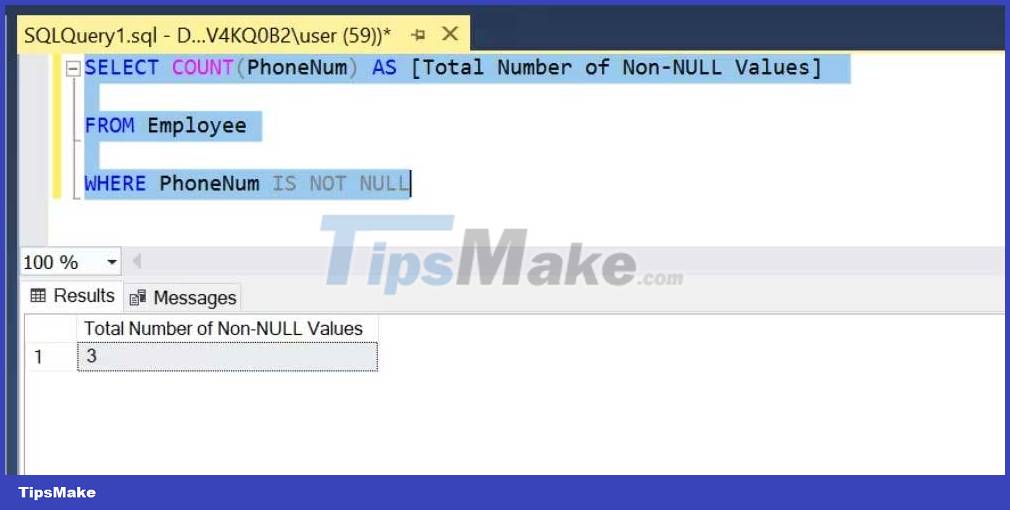
Use the NOT NULL command to count the number of non-NULL values in the PhoneNum column.
SELECT COUNT(PhoneNum) AS [Total Number of Non-NULL Values] FROM Employee WHERE PhoneNum IS NOT NULLResult:
You can also use this query to place results into a table.
SELECT SUM(CASE WHEN PhoneNum is null THEN 1 ELSE 0 END) AS [Number Of Null Values], COUNT(PhoneNum) AS [Number Of Non-Null Values] FROM Employee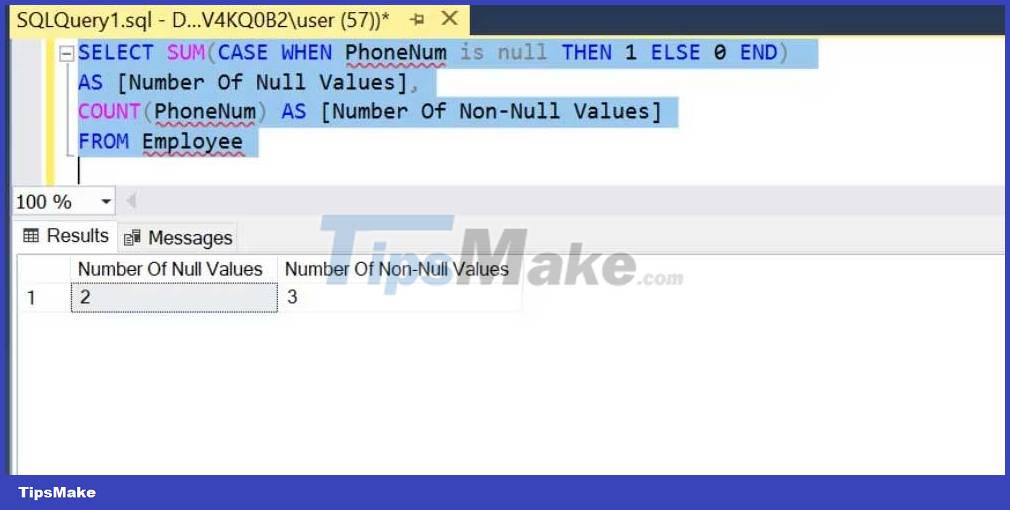
In this query, the CASE and IS NULL statements are used to classify NULL in the PhoneNum column as 1. This value is added and kept in the Number Of Null Values column.
Above is how to count SQL NULL and NOT Null values in a column . Hope the article is useful to you.
Conclusion
Understanding Handling NULL Values makes it easier to compare options, avoid common mistakes, and apply the information in this guide more effectively. Review the relevant requirements before making changes or choosing a solution.
FAQ
What is Handling NULL Values?
This guide provides a clear overview of handling null values, including what the SQL Value NULL is, When Are SQL NULL Values Useful.
Why is Handling NULL Values important?
Understanding Handling NULL Values helps you evaluate features, compatibility, performance, and potential limitations before you choose a product or follow a procedure.
What should you consider when using or choosing Handling NULL Values?
Consider your specific goal, compatibility requirements, available features, cost, security, and the practical recommendations described in this guide.
Related Articles
 How to Check for Null in Java: Clear Instructions5 minutes read
 SQL Server IS NOT NULL: Syntax and Examples3 minutes read
 NULL Value in SQL5 minutes read
 How to Check Null in Java4 minutes read
 Count Function in Excel, Formula, How to Use Count Function in Most Detail4 minutes read
 MS SQL Server: SQL Server IS NULL: Syntax and Examples3 minutes read
Reader Comments 0
Sign in with email or Google to join the discussion.