Table of Contents
This guide covers sony vaio p: netbook or notebook? with practical context and easy-to-follow details. Use it to understand the subject and apply the information confidently.
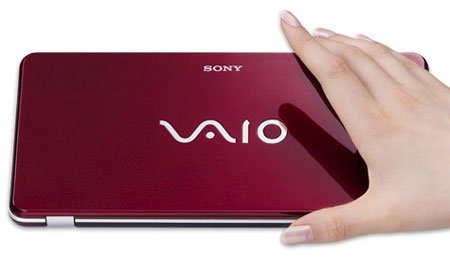 Photo: SonyInsider
The difference between netbooks and UMPC (Ultramobile PC) and MID (Mobile Internet Device) are the following two product lines with only virtual keyboards on the 5-7 inch tap screen. The UMPC works on Windows and the MID runs on Linux.
According to Sony, Vaio P has an impressive keyboard length and high resolution screen (1, 600 x 768 pixels) with backlight support. Akihabara News's technology site also commented that P's keyboard is a "wonder" with a suitable layout for hours. However, this keyboard size is no bigger than the netbooks on the market, and most netbooks today are equipped with backlighting. Vaio P uses Atom Z chip - Intel chip manufactured for MID and UMPC devices. Not to mention, the used P version is clocked at 1. 3 GHz, lower than the 1. 6 GHz processor in the netbook. Sony also explained that the P integrates GPS and works on Windows Vista - a rare feature of netbooks. But recently, LG released X110 with HSDPA positioning and connection technology, and according to the test of Akiharaba, Vaio P took 3. 23 minutes to start the operating system. (Watch video)
 Photo: Akihabara .
All of these points show that the reason why the Vaio P is not a netbook is because it costs up to $ 900, which cannot be called a "cheap mini laptop". Therefore, this product is classified by experts as "high-priced netbook" or Sony's stand-alone device line.
FAQ
What should I check before following these steps?
Confirm device and software compatibility, save important data, and make sure you have the required permissions, files, and account access.
Why might the process not work?
Common causes include outdated software, missing permissions, incompatible hardware, an unstable connection, or completing a step in the wrong order.
Can I undo the changes if necessary?
That depends on the tool or setting. Use built-in restore options when available, keep a backup, and record the original configuration first.
Related Articles
 Admire Vaio W - Sony's First Netbook6 minutes read
 Review the Sony VAIO Y-series Notebooks15 minutes read
 Sony Vaio X for Connoisseurs Playing9 minutes read
 Vaio Signature Laptop for Christmas3 minutes read
 See the Beauty of Vaio W Netbook4 minutes read
 Sony Is About to Add a New Line of Netbooks3 minutes read
Reader Comments 0
Sign in with email or Google to join the discussion.