Table of Contents
This updated guide explores Samsung launches 'world's first' gaming monitor with 500hz refresh rate with practical details, clear explanations, and useful takeaways. In recent years, Samsung has been very active in improving the display field by launching a series of products with many new technologies and highly appreciated performance, such as Odyssey 3D (glasses-free 3D display) or high-end 240Hz 4K OLED display.
Odyssey OLED G6 has a 27-inch panel coded G60SF, equipped with QD-OLED technology with sharp QHD resolution (2560 x 1440 pixels) and super-fast 0.03ms response time.
Along with the high refresh rate, the Odyssey OLED G6 also integrates many superior features that promise to enhance the gaming experience.
- Anti-glare reflective layer
- Anti-burn-in technology protects the OLED panel, especially when playing games for long periods with a static HUD.
- VESA DisplayHDR True Black 500 & Pantone Validation certification ensures color accuracy.
- Supports NVIDIA G-SYNC Compatible and AMD FreeSync Premium Pro for a smooth experience with minimal screen tearing.
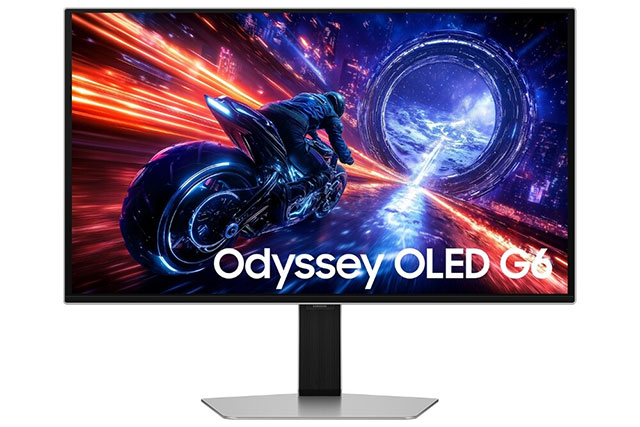
Speaking about the launch of the new monitor line, Mr. Hoon Chung, Vice President of Visual Display Business at Samsung Electronics, shared:
With the Odyssey OLED G6 — the world's first 500Hz OLED gaming monitor — we're taking performance, image quality, and immersion to new heights, bringing the next evolution in display technology to gamers worldwide.
The Odyssey OLED G6 will be launched globally, starting with Singapore, Thailand, Vietnam, and Malaysia first. Samsung plans to expand to other regions later this year.
FAQ
What is the main takeaway about Samsung Launches 'world's First' Gaming Monitor with 500Hz Refresh Rate?
The key is to understand the core idea, compare the available options, and apply the practical guidance that matches your situation.
What should beginners know about Samsung Launches 'world's First' Gaming Monitor with 500Hz Refresh Rate?
Start with the essential steps and terminology. Avoid changing advanced settings until you understand how they affect performance, privacy, cost, or compatibility.
How can I use this information in practice?
Follow the relevant section in order, test one change at a time, and confirm the result before moving to the next step or recommendation.
Related Articles
 How to Turn on 144hz (or Higher) on Dedicated Gaming Screens4 minutes read
 How to Change the Refresh Rate on Windows 113 minutes read
 What Is the Difference Between 60hz, 144hz and 240hz Refresh10 minutes read
 The Fastest and Simplest Ways to Adjust Screen Refresh Rate8 minutes read
 Windows 11: Complete Guide: Frequency Screens3 minutes read
 7 Best Heart Rate Monitor Apps in 20209 minutes read
Reader Comments 0
Sign in with email or Google to join the discussion.