Table of Contents
PyPy Series - Part 1: Introduction to PyPy is easier to approach with a clear overview and reliable steps. This guide organizes the essential information, highlights practical details, and explains what to check along the way.
Key Takeaways
- Review about PyPy.
- Explore so what is PyPy.
- Learn how to install PyPy.
About PyPy
Like languages like C++, Javascript, PHP,. Python also has many different versions (implementations) to serve many purposes such as: CPython (default and most popular version), JPython (version written in Java language), PyPy (version written in Python language),.
Python implementations often aim to use the strengths and features of a certain language X in Python. For instance, IronPython will support users to use.NET libraries,.NET languages in Python or JPython is a version of Python written in Java so that programmers can use both languages during development.
CPython version is the Python version written in C language and is the official and widely used version in the world (the version you download on https://www.python.org). CPython has an inherent weakness of slow performance, the page https://benchmarksgame-team.pages.debian.net/benchmarksgame/ performs solving problems/algorithms that need to be processed, calculated a lot and gives benchmark results between languages such as Swift, JS(Node.js), Dart, PHP, Python,. The results are as follows:

Benchmarksgame-team.pages.debian.net.
We can see in the comparison table that Python (here CPython) is only faster than 2 popular languages, Perl and Ruby, while the fastest languages are C, C++, Rust.
PyPy was developed to serve the tasks that require high performance but still need beautiful, easy-to-understand syntax like Python. This helps you overcome the performance problem on CPython. On its homepage, PyPy states that " the average performance of PyPy is 4.2 times that of CPython ". Therefore, if you want to find a solution to speed up your Python code by 4.2 times "with one command", PyPy might be a good option. In the following part of the article, we will have a basic performance evaluation between these two Python versions.
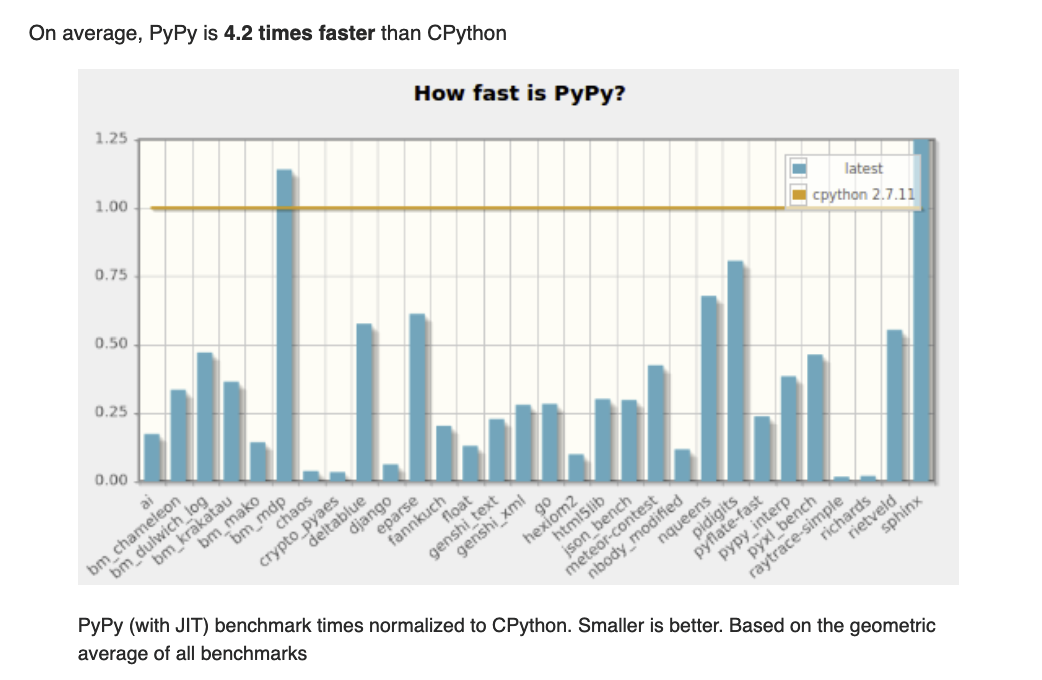
Pypy.org
So What Is PyPy?
According to the definition on the homepage, PyPy calls itself " a fast, compliant alternative implementation of Python ". The word "compliant" here refers to PyPy's compatibility with CPython. That is, a fast, "compliant" version of Python. The word "fast" refers to PyPy's performance, the most important point and also the biggest reason to use PyPy.
Technically, PyPy is written in RPython (Restricted Python) - a small branch of Python. RPython has the same syntax as Python and is modified for higher performance. Therefore, PyPy is known as a version of Python written in Python.
Install PyPy
You can open PyPy's Download page and download the version that matches your operating system. Once downloaded, you just need to unzip it and run the binary file.
For instance here we use zsh on MacOS:
tar xf pypy3.7-v7.3.5.tar.bz2
cd pypy3.7-v7.3.5-osx64/bin
./pypy3
Python 3.7.10 (77787b8f4c49, May 19 2021, 05:28:43) [PyPy 7.3.5 with GCC Apple LLVM 12.0.5 (clang-1205.0.22.9)] on darwin
Type "help", "copyright", "credits" or "license" for more information.
>>>> lst = []
>>>> lst.append(1)
>>>> lst [1]
Alternatively, if you are using MacOS you can use brew to install with one command:
brew install pypy3Learn more about installing PyPy here: https://doc.pypy.org/en/latest/install.html.
Advantages of PyPy Over CPython
Advantage:
- High performance thanks to Just-in-Time (JIT) compiler. This is the biggest advantage and the biggest reason to use PyPy.
- Can write massive concurrency code thanks to Stackless feature.
- More memory optimized than CPython due to improvements in Garbage Collector mechanism.
Disadvantages:
- Poor compatibility with C extensions.
- Performance is really different from CPython in case of large, long running programs (due to the nature of the JIT compiler).
- New features are behind CPython. At the time of writing, the latest PyPy version is 3.7 while CPython is 3.9, soon to be 3.10. This is understandable because PyPy is a reimplementation of Python while CPython is the official version, so if you want to use PyPy, you should only use Python 3.6, 3.7 syntax.
These advantages and disadvantages will be analyzed in detail in the following sections.
Performance Benchmark with CPython
I will use this code to measure performance between CPython and PyPy:
import timeitONE_MILLION = 10 ** 6 t_empty = timeit.Timer( "for i in range({}):n passn".format(ONE_MILLION) ) t = timeit.Timer( "s = 0nfor i in range({}):n s = s + inprint(s)".format(ONE_MILLION) ) took_empty = t_empty.repeat(10, 1) empty_best = min(took_empty) took = t.repeat(10, 1) best = min(took) empty_iterate_freq = ONE_MILLION // empty_best plus_iterate_freq = ONE_MILLION // best print(empty_iterate_freq, plus_iterate_freq)
This code was run on a MacBook Pro 2013 2017 (CPU: 7th Generation Core i5, 7267U, 3.1GHz). Result:
- PyPy 3.7: 1542474318.0 661969327.0.
PyPy 3.7 can loop 1542474318 (over 1.5 billion) times and perform 661969327 (over 666 million) times operations per second.
- CPython 3.7: 43455074.0 16236501.0.
CPython 3.7 can loop 43455074 (43 million) times and perform 16236501 (16 million) operations in 1 second.

Through the above performance test code, we can see that PyPy's performance is approximately 40 times faster than CPython. Why is the code only 2 to 3 lines but the performance is much better when I mentioned above that " PyPy's performance is only really different for large programs that run for a long time "? Please watch the following sections to understand better.
Conclude
As Guido van Rossum said at PyCon US 2015: " If you want your (Python) code to run faster, you can just use PyPy ".
PyPy is the fastest version of Python and can be a viable alternative to CPython in some cases. Just running your code with PyPy instead of CPython can significantly improve your program performance without any additional tweaking. But it also has some drawbacks related to compatibility and technical issues.
In Part 1 of this series, we introduced PyPy, a high-performance version of Python. In the following parts, we will delve deeper into the technical aspects and provide some tips for speeding up a real-world Python application.
Final Thoughts
The most reliable way to handle PyPy series - part 1: introduction to PyPy is to follow the process in order, verify each important setting, and test the result before moving on. Use the guidance above as a practical reference, then adjust the details for your device, software version, or specific goal.
FAQ
What should I know first about PyPy Series - Part 1: Introduction to PyPy?
This series is a series of articles around PyPy.
How do I get the best results with PyPy Series - Part 1: Introduction to PyPy?
Use current software or equipment, follow the steps in order, review the recommended settings, and test one change at a time so you can identify what improves the result.
What should I do if PyPy Series - Part 1: Introduction to PyPy doesn't work as expected?
Check compatibility, permissions, connectivity, and version-specific settings. Restart the relevant device or app, then repeat the process carefully before trying a more advanced fix.
Related Articles
 Security: Pki Tutorial -- Part 2: Design12 minutes read
 Introduction to Network Access Protection (Part 4)7 minutes read
 Server: Introduction to Network Access Protection (Part 2)8 minutes read
 Server: Introduction to Network Access Protection (Part 3)11 minutes read
 Controlling Internet Access: Introduction to Tmg Access Rule15 minutes read
 Controlling Internet Access: Introduction to Tmg Access Rule13 minutes read
Reader Comments 0
Sign in with email or Google to join the discussion.