Table of Contents
This guide covers netbook replaced laptop during crisis with practical context and easy-to-follow details. Use it to understand the subject and apply the information confidently.
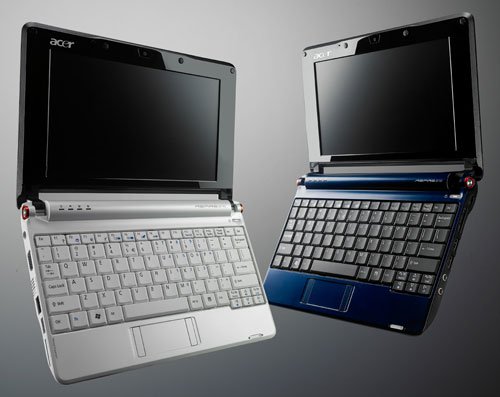 Acer Aspire One 10 inch screen Photo: Digitaltrend .
The downside of netbooks is that the screen and the small keyboard make the user feel uncomfortable at work. But this disadvantage is also very easy to overcome. Each netbook has a standard VGA output port to connect to an external monitor, and many USB ports allow users to attach an external mouse or desktop keyboard. In addition, manufacturers such as USB To Go, Kensington, and Targus also built USB port implants that support connecting via the VGA port. So with USB ports, a netbook can be easily customized for the purpose of use. Another misconception is that the netbook does not have all the features for the business. Most popular netbooks are equipped with 3 USB ports, an Ethernet port, Wi-Fi connection, and that's enough to support each employee's work. The biggest drawback when businesses choose netbooks to be concerned is the lack of integrated optical drives. In addition to new netbooks, the Acer Aspire One and the HP Mini 1000 also supports mobile broadband connectivity with integrated 3G modems. The connections that netbooks have dropped are Serial and FireWire ports, and users can find similar connectivity features with the expansion slot instead.
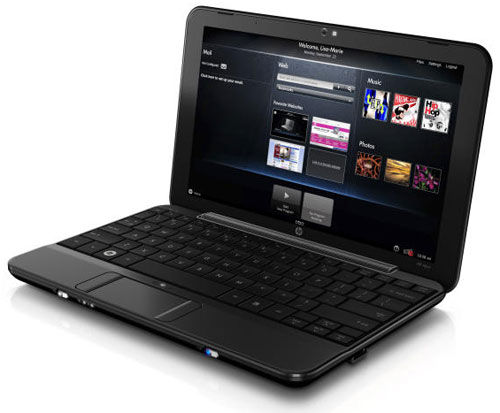 Netbook performance can exceed 4-year-old laptops Photos: Notebookreviews .
Thoughts like netbooks cannot run Microsoft Office office apps, security programs, multiple open web browsers, or iTunes. Underestimated netbook performance. By comparison, the netbook's performance is far superior to a 4-year-old laptop. Moreover, netbook manufacturers always offer the general users the ability to upgrade their own hardware such as upgrading RAM and hard drives. Users can easily remove the case, lift the Mainboard motherboard to mount more RAM or replace a larger capacity hard drive. This task is straightforward, for example, with the Acer Aspire One netbook, simply remove all 50 "screws", to upgrade the netbook to 1 GB of RAM, or increase the hard drive capacity to 250 GB instead. For 160 GB drive. The cost of this upgrade is not a problem because of the relatively cheap price of RAM and HDD.
FAQ
What should I check before following these steps?
Confirm device and software compatibility, save important data, and make sure you have the required permissions, files, and account access.
Why might the process not work?
Common causes include outdated software, missing permissions, incompatible hardware, an unstable connection, or completing a step in the wrong order.
Can I undo the changes if necessary?
That depends on the tool or setting. Use built-in restore options when available, keep a backup, and record the original configuration first.
Related Articles
 Goodbye, Netbook5 minutes read
 How to Turn a Midlife Crisis into a Fresh Start6 minutes read
 10 Middle-aged Crisis Warning Signs Everyone Needs to Know10 minutes read
 LG Launches a Very Light 10-inch Netbook3 minutes read
 Governments Are Injecting Hundreds of Billions of Dollars8 minutes read
 How to Become a Crisis Text Line Crisis Counselor8 minutes read
Reader Comments 0
Sign in with email or Google to join the discussion.