Table of Contents
Understanding Firefox 61 requires more than a headline. The overview below breaks down the key facts, changes, and user impact.
Firefox 61 Overview
New changes and improvements in Firefox 61 include:
- Quantum CSS enhancements help better page rendering time.
- The feature to save a new display list helps to load pages faster.
- WebExtension can run on a separate process on macOS.
- Activate the latest draft of Transport Layer Security (TLS) 1.3.
- Dark theme mode is deployed on the entire interface.
- Allow users to share URLs right on the Page Actions menu on macOS.
- Block access to subresource FTP on HTTP and HTTPS sites to improve security.
- Support update WebExtensions allows to manage and hide tabs.
- The Page Actions menu allows users to easily install the OpenSearch plugin.
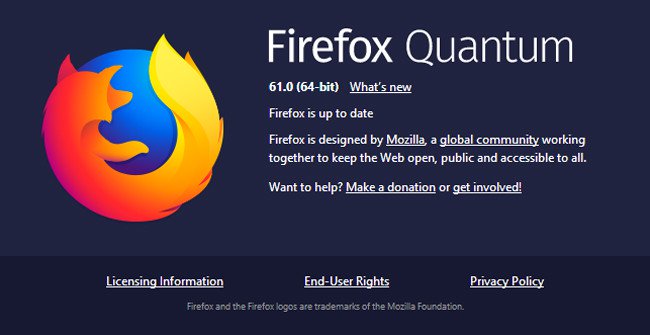
How to update to the latest Firefox:
Step 1: Open the browser -> go to Help -> select About Firefox -> the system will automatically check the browser version of the device.
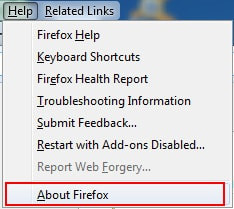
Step 2: If your version is old, Firefox automatically downloads the latest update.

Step 3: Click Restart Firefox to update, the system will update Firefox new version for your device.

Or you can download Firefox 61, the latest version below and proceed with the installation.
- Firefox 61
- 11 Firefox acceleration Quantum less than 10 minutes
- How to split the Firefox window with Side View
- 20 useful sidebar add-ons for Firefox
FAQ
What happened in Mozilla Officially Released Firefox 61, More Stable Operation and?
Understanding Firefox 61 requires more than a headline.
What factors influenced Firefox 61?
The overview below breaks down the key facts, changes, and user impact.
What was the practical impact on users?
Firefox 61 Overview New changes and improvements in Firefox 61 include: Quantum CSS enhancements help better page rendering time.
Related Articles
 Mozilla Firefox - Free, Fast and Private Web Browser: Main Insights15 minutes read
 Firefox 58 and New Features Help Improve Performance5 minutes read
 Mozilla Released Firefox Quantum 59, Enhancing Page Loading Speed2 minutes read
 Mozilla Officially Launched Firefox 253 minutes read
 Firefox 10 Officially Supports the Add-on Better3 minutes read
 5 New Features on Firefox 17 Have Just Been Released5 minutes read
Reader Comments 0
Sign in with email or Google to join the discussion.