Table of Contents
This guide provides a clear overview of msi, including the main concepts, practical steps, and common questions. Use it to understand the topic, compare the available options, and make a more informed decision.
Along with Biostar, Gigabyte, Asus, ASRock, MSI has also officially announced the list of motherboards that support TPM 2.0, along with Windows 11 compatibility.
Notably, MSI also lists each individual motherboard variant that supports Windows 11. According to the manufacturer, all Intel 100-series motherboards and AMD Ryzen motherboards have TPM 2.0 functionality built in. available. Therefore, users will only need to enable "Security Device Support" in the BIOS.
Below is a list of MSI motherboards that support TPM 2.0 (This table shows the MSI motherboards and chipsets that support TPM 2.0).
| Product Line | Chipset* | CPU support |
| 500 Series | Z590/B560/H510 | 10th / 11th Gen |
| 400 Series | Z490/B460/H410 | 10th / 11th Gen |
| 300 Series | Z390 / Z370 / B365 / B360 / H370 / H310 | 8th / 9th Gen |
| 200 Series | Z270 / B250 / H270 | 6th / 7th Gen** |
| 100 Series | Z170/B150/H170/H110 | 6th / 7th Gen** |
| X299 | X299 | X-series 10000/9000/78xx** |
Note: This is NOT a list of motherboards compatible with Windows 11, but simply the BIOS of motherboards that support TPM 2.0.
(*) Visit Intel for more information on TPM 2.0 support status for Intel chipsets.
(**) Intel 6th/7th Gen and X-Series 9000/78xx processors are not included in the list of chipsets compatible with Windows 11.
| Product Line | Chipset |
| 500 Series | X570 / B550 / A520 |
| 400 Series | X470 / B450 |
| 200 Series | X370 / B350 / A320* |
| TR4 Series | TRX40 / X399* |
(*) The Ryzen 1000 series and Ryzen Threadripper 1000 series (Zen1) processors are not included in the Windows 11 compatibility list. Visit Microsoft for more information about Windows 11.
MSI Intel 500 Series motherboards with TPM 2.0 support:

MSI Intel 400 Series motherboards with TPM 2.0 support:
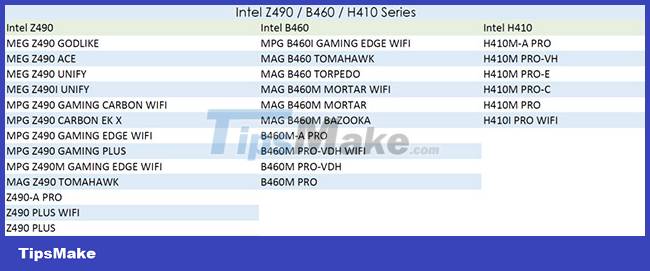
MSI Intel 300 Series motherboards with TPM 2.0 support:
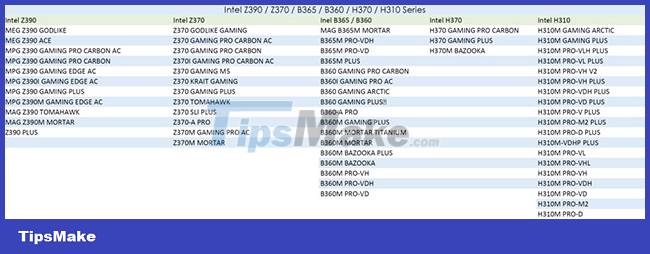
MSI Intel 200 Series motherboards with TPM 2.0 support:
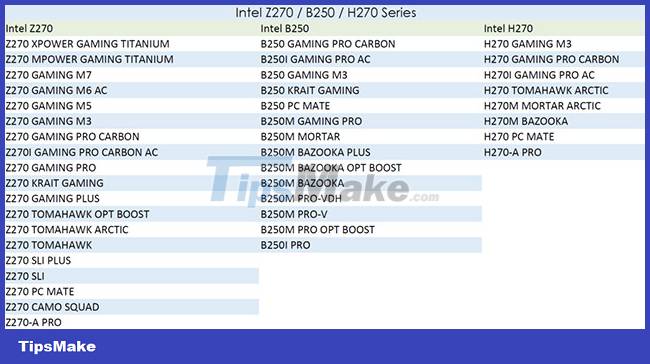
MSI Intel 100 Series motherboards with TPM 2.0 support:
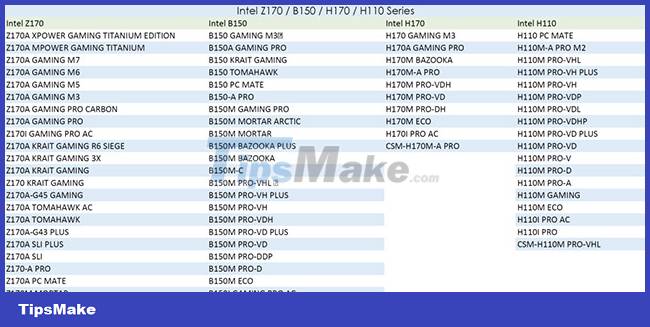
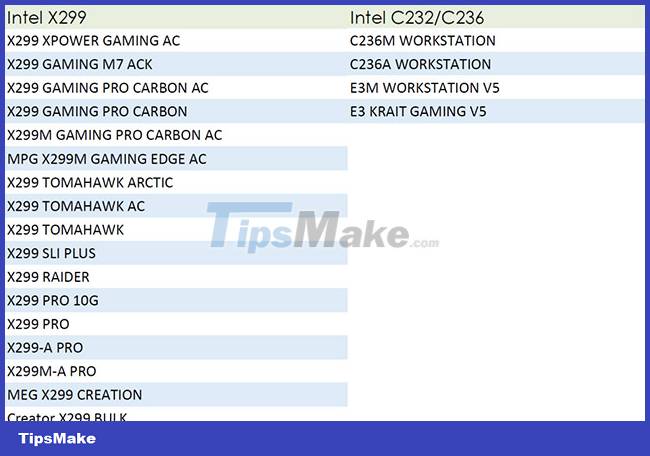
MSI Intel HEDT Series motherboards with TPM 2.0 support:
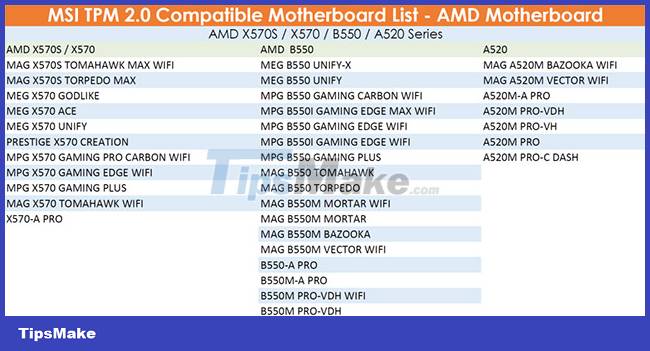
MSI AMD 500 Series motherboards with TPM 2.0 support:
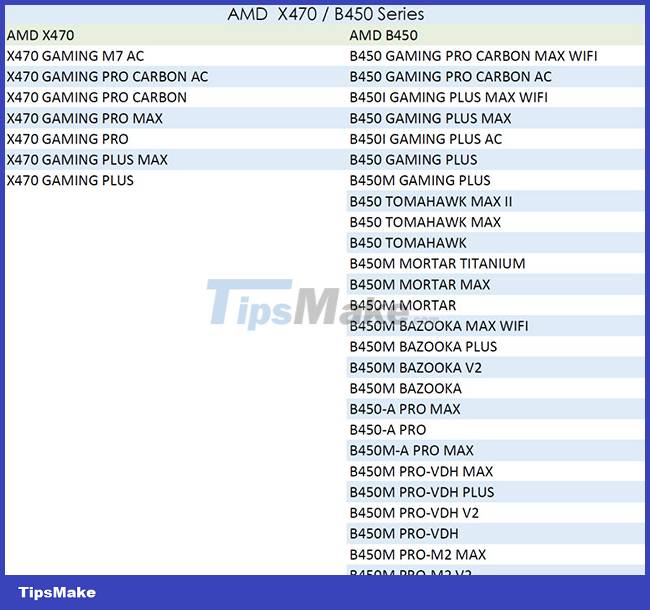
MSI AMD 400 Series motherboards with TPM 2.0 support:
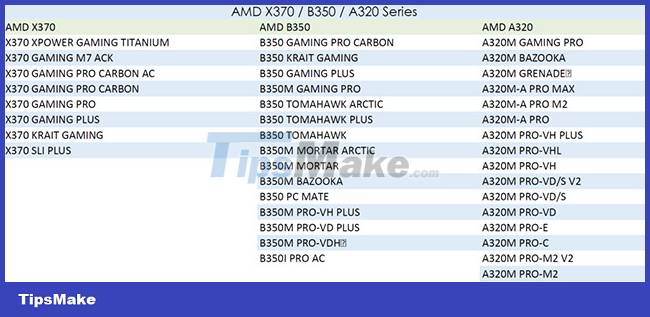
MSI AMD 300 Series motherboards with TPM 2.0 support:
MSI HEDT Series motherboards with TPM 2.0 support:
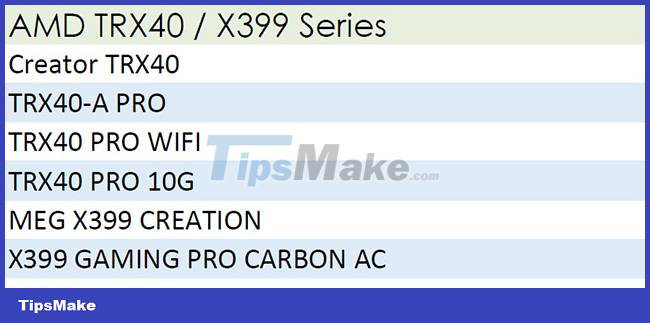
MSI also adds that even older generation motherboards such as Intel 9-series, Intel 8-Series and X99 HEDT platforms have TPM 1.2 functionality through their respective processors (Haswell, Haswell-E). Broadwell, Skylake), are not listed for Windows 11 support. MSI is conducting internal verification, but this also depends on Microsoft enabling support for older generation chipsets or not. are not.
Conclusion
Understanding MSI makes it easier to compare options, avoid common mistakes, and apply the information in this guide more effectively. Review the relevant requirements before making changes or choosing a solution.
FAQ
What is MSI?
Below is a list of MSI motherboards that support TPM 2.0 (This table shows the MSI motherboards and chipsets that support TPM 2.0).
Why is MSI important?
Understanding MSI helps you evaluate features, compatibility, performance, and potential limitations before you choose a product or follow a procedure.
What should you consider when using or choosing MSI?
Consider your specific goal, compatibility requirements, available features, cost, security, and the practical recommendations described in this guide.
Related Articles
 List of MSI Motherboards That Support Windows 1114 minutes read
 5 Top Cheap PCIe 4.0 Motherboards: Expert Selection Guide8 minutes read
 6 Best AMD Motherboards for Gaming9 minutes read
 List of Asus Motherboards That Support Windows 113 minutes read
 Difference Between EATX and ATX Motherboards: Key Facts7 minutes read
 Top 5 Best 2021 B550 Motherboards8 minutes read
Reader Comments 0
Sign in with email or Google to join the discussion.