Table of Contents
This guide covers lenovo introduced the new u series laptop with practical context and easy-to-follow details. Use it to understand the subject and apply the information confidently.
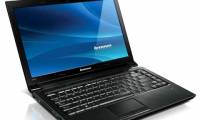
On April 24, Lenovo launched the new U Series laptop with two models of Lenovo U31 and U41 with outstanding performance, impressive entertainment capabilities and stylish fashion design.
In today's digital world, an electronic device is not merely a tool for entertainment and work. It is also a fashion accessory for discerning people who are always on the move. Both new models have a thin and light design: the new U31 13. 3 inch weighs only 1. 5 kg, is 19. 3 mm thin, while the 14-inch U41 weighs 1. 65 kg and is 19. 5 mm thin.
Despite being light and thin, the U Series offers the impressive handling capabilities of a powerful mobile office. The device has the latest Intel 5th-generation processor option and selects NVIDIA's new generation GeForce graphics card. The U Series can meet all those needs thanks to the integration of great entertainment features, such as the Dolby Home Theater speakers for superior surround sound experience with Wi-Fi 802. 11 a / c speeds. Height.
Lenovo U41 ( Including black, silver and red versions ) is now available at computer stores nationwide with a starting price of 10, 999, 000 VND . Meanwhile, the Lenovo U31 ( White and red version ) will be available in the middle of May with a starting price of 10, 999, 000 VND . Both U31 and U41 are covered by a 2-year warranty nationwide.
FAQ
What should I check before following these steps?
Confirm device and software compatibility, save important data, and make sure you have the required permissions, files, and account access.
Why might the process not work?
Common causes include outdated software, missing permissions, incompatible hardware, an unstable connection, or completing a step in the wrong order.
Can I undo the changes if necessary?
That depends on the tool or setting. Use built-in restore options when available, keep a backup, and record the original configuration first.
Related Articles
 Lenovo Introduced G Series Laptops and New IdeaPad Z4 minutes read
 Lenovo Launches Three New Thinkpad T, X and L Series with Many4 minutes read
 Lenovo Launches G-series Laptops at Competitive Prices3 minutes read
 Lenovo Launches a 4G Laptop4 minutes read
 Laptop Series for 2012 from Lenovo4 minutes read
 Lenovo Started Selling IdeaPad V Series3 minutes read
Reader Comments 0
Sign in with email or Google to join the discussion.