Table of Contents
To practise English on IOE, sign in to your student account, open Tự luyện (Self-Practice), and choose an available round for your registered grade. Read each activity's instructions before starting, then check that the round's result has been saved.
Self-practice and an official competition round are different activities. Completing practice does not by itself guarantee registration or eligibility for an official round; follow the current school-year rules and your school's instructions.
1. Sign in with the correct student account
Open the official IOE website and sign in. Check the student profile and grade before practising. If the profile is incorrect, use the platform's current correction process or ask the responsible teacher for help rather than creating duplicate accounts without guidance.
If you need registration background, see the IOE account registration walkthrough, allowing for changes to the current interface.
2. Open Self-Practice
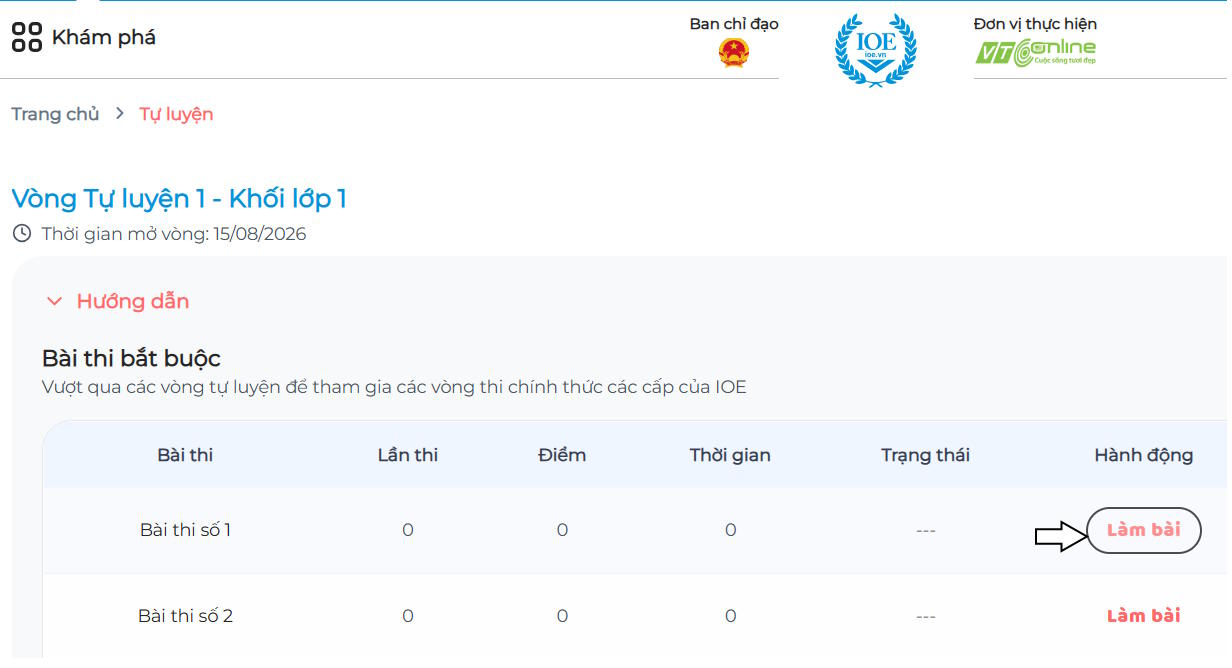
Find Tự luyện. The older screenshot places it under Explore; menu positions can change. Choose the self-practice area rather than an official exam or a different practice service.

3. Choose an available round
Review the grade and available activities, then select the button to begin the intended exercise. Rounds open according to the organizer's schedule, so a missing future round may simply be unavailable yet.
4. Read the activity instructions
Check how answers are entered, whether audio is needed, and any displayed time limit. IOE uses different activity formats, so do not assume every exercise is a multiple-choice question.

Test sound before an audio activity and use a stable connection. Avoid refreshing or closing the page during an attempt unless the platform's instructions tell you to do so.
5. Complete the round and save the result
Finish the required activities and review the round summary. Where offered, Lưu kết quả means “Save result,” and Làm lại means “Try again.” Confirm the recorded status before leaving.
The organizer's current school-year participation guide explains round availability and completion. Use current announcements for deadlines and official-exam conditions.
Use errors to plan the next session
After an attempt, note whether mistakes involved vocabulary, grammar, listening, or rushing. Review that skill before repeating the activity. Repeating answers from memory is less useful than understanding why the answer fits.
If a result does not appear, check the account and round status and record the error message for support. Do not repeatedly start new attempts until you know whether the previous one was saved.






Reader Comments 0
Sign in with email or Google to join the discussion.