Table of Contents
To access IOE mock tests, sign in to the student account, open Thi thử (Practice Test), and choose the grade and test available under that account's service package. Check the remaining attempts and test instructions before starting.
Thi thử is not the same as free exam experience. IOE distinguishes paid/package-based mock tests from Trải nghiệm thi, which follows the organizer's announced conditions and schedule. A free experience announcement does not mean all mock-test packages are free.
Before you begin
- Use the correct student account and check its profile information.
- Confirm which package and grade are active, including validity and remaining attempts.
- Read current service terms before paying or exchanging any credits.
- Test the device, internet connection, and audio before a timed attempt.
For account setup background, see the IOE registration walkthrough. Use the official platform's current instructions when the older screenshots differ.
1. Sign in
Open IOE's official website and log in with the student account that holds the intended package. Do not assume a parent's or another student's login has the same access.

2. Open Practice Test
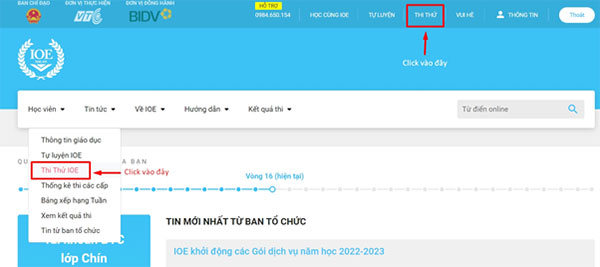
Find Thi thử in the student area. The older interface below places Practice Test at the top of the page or under the Student menu; navigation can change.
3. Select the correct grade or group
Use the displayed grade/group selector and choose the level covered by the active package. The source article's “subject group” wording should not be read as a choice of different school subjects in an English test.
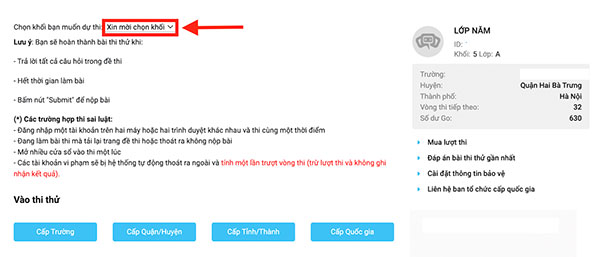
If the expected level is missing, check the package details and account first. Do not buy a second package merely because the wrong grade is selected.
4. Review the test and remaining attempts
The practice page should show the available test choices and the account's allowance. Read the displayed duration, format, and attempt conditions rather than assuming every test always has the same question count or time limit.
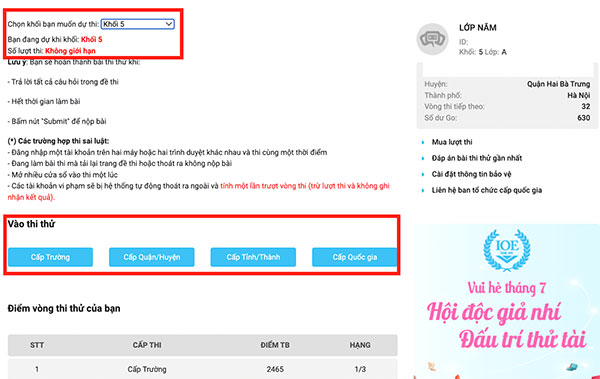
Start the intended test, follow its instructions, and avoid opening duplicate attempts or refreshing during the test unless the platform directs you to do so.
5. Check results and review mistakes
After submission, confirm that the result is recorded. Use any answer-review features available for that test and package. Note the skill behind each error—vocabulary, grammar, listening, or time management—before attempting another test.
A mock-test result is practice feedback, not automatic registration for an official competition. Consult the organizer's school-year participation guidance for the distinction between self-practice, mock tests, experience events, and official rounds.
If access or results are missing
Check the logged-in account, selected grade, package status, and any scheduled platform restrictions. Record the exact error and test details for official support. Avoid sharing passwords or verification codes, and do not repeatedly start a new attempt until the previous attempt's status is clear.






Reader Comments 0
Sign in with email or Google to join the discussion.