Table of Contents
Understanding instructions for calculating inches for tvs is easier when the main points are organized clearly. This guide brings together the essential details and practical considerations.
- What are POLED and AMOLED - Opinion about the difference between these two types of OLED technology
- Is it really economical to unplug the TV?
- How to use 4K TV as a computer screen
When buying a TV next to the price, the brand size is also a problem that many people care about the most. However, many people do not know how to calculate the TV inch properly, because our unit of measurement is centimeters, not inch units. Therefore, The steps below explain how to calculate the standard size to choose the best TV for your needs.
How Instructions for Calculating Inches for Tvs Works

To choose the right size TV you want, the first thing you need to understand is how to change inch to cm. These are considered the two most popular units of measurement around the world, so changing inches to centimeters is a must when needed to calculate the length of objects easily. When you learn how to convert, you will feel easier and more professional when you go to the store to buy a TV.
How is the TV size calculated?
The unit inch TV is not the length, nor the width of the device. That inch is the diagonal of every TV. Based on the inch of the TV, one can calculate the best distance from the screen to the eyes of the viewer to increase the efficiency and safety of use.
For example, a new 49 inch Smart TV, the number of inches is the diagonal connecting the two corners of the TV.
Compared to centimeters, the unit of measurement is much larger.
Example : 1 inch = 2.54 cm.
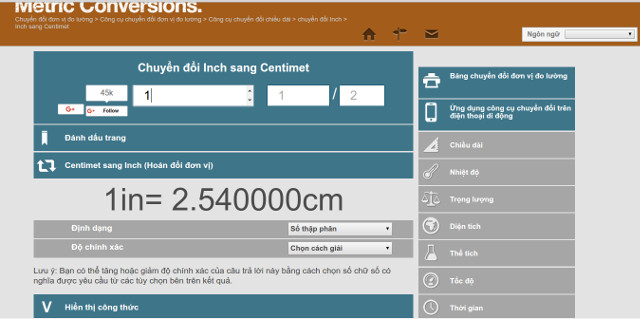
Therefore, when needed to convert a 49-inch TV to a Centimeter number for easy calculation, you must perform the calculation: 49 x 2.54 =?
Today to convert inches to centimeters you do not need to use computers or mental arithmetic takes time, because on the Internet there are many online websites that support you to calculate and convert this unit. To convert inch TV to centimeter you can access Here .
Step 1 :
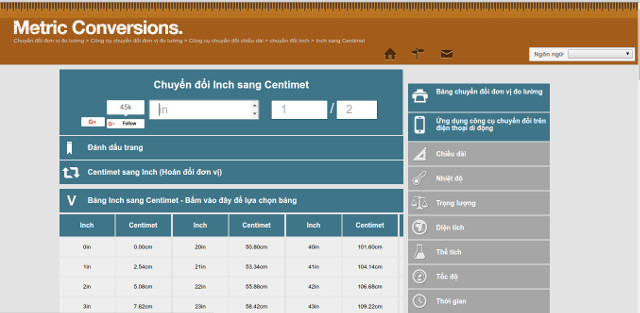
When visiting the website, you enter the number of inch TV you plan to buy.
Step 2 :
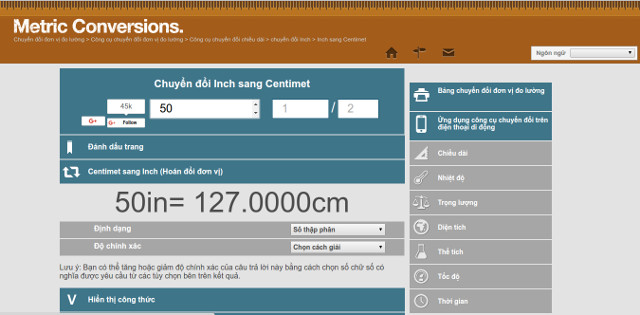
For example, you want to buy a 50-inch large screen Smart TV. Please enter 50 inches and the answer to be given quickly is 127.00cm. That is more than 1 meter.
Similar to the old 21-inch TV series, the number received is 53.34cm.
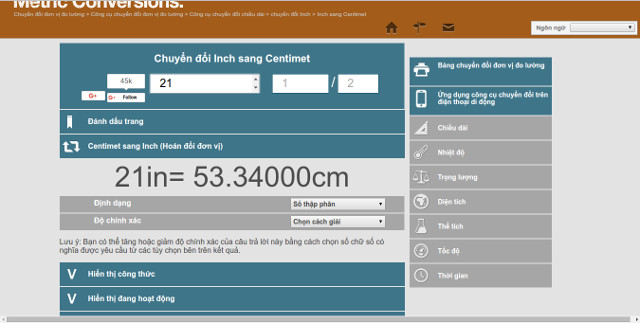
For larger TV models, you can also enter the number here to change the TV inch to cm. This method will help you be able to calculate the area of the TV to make it suitable for the area of your family. Like an area on a small shelf or a living room. For example, the living room is about 1m2 wide, you can choose for yourself a TV about 49 to 50 inches will be suitable for the space as well as see the best quality.
Below is a unit of measurement from inch to centimeter for TV
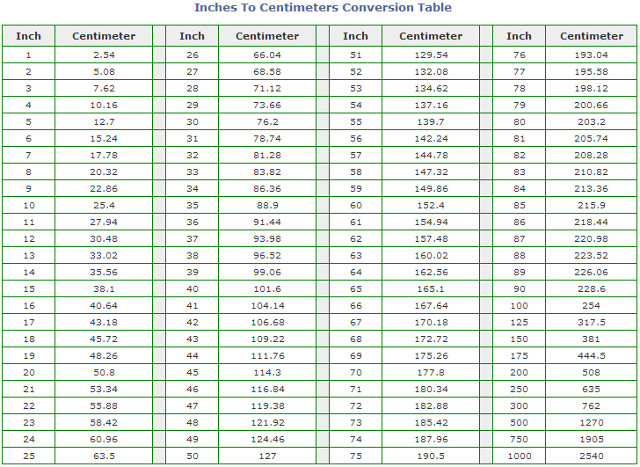
FAQ
What is the main benefit of instructions for calculating inches for tvs?
The main benefit is a clearer understanding of the topic and a practical way to apply the information covered in this guide.
What should I check before using instructions for calculating inches for tvs?
Confirm compatibility, review the required settings, protect important data, and use the latest supported version whenever possible.
What should I do if the result is different?
Repeat the steps carefully, verify permissions and version differences, and consult the product's official support documentation for changes not shown in the article.
Related Articles
 How to Converting Inches to Centimeters in Word2 minutes read
 Instructions on 5 Ways to See How Many Inches the Screen Is in the Most Detail13 minutes read
 Formulas for Calculating the Number of Terms14 minutes read
 How to Calculate TV Inches? Convert Inches to Cm Most Accurately4 minutes read
 Formula to Calculate Sphere Area, Spherical Volume2 minutes read
 Instructions for Calculating Total Lines and Columns in Word 20134 minutes read
Reader Comments 0
Sign in with email or Google to join the discussion.