Table of Contents
This guide provides a practical overview of Instruction for Use of Akito 1-way, 2-way Air Conditioners Is Most Detailed, including its main features, benefits, limitations, and important considerations.
Made of air conditioner Akito
Akito is an air conditioner brand from Malaysia exclusively distributed by Akito Vietnam Joint Stock Company. After 6 years of entering Vietnam market, Akito air conditioners are gradually making a name for themselves in the market, highly appreciated by consumers and partners, distribution channels have been expanded and built and developed. to 200 dealers and warranty stations nationwide.
Akito Vietnam is committed to always putting quality first, providing high quality air-conditioner products, operating stably and permanently, listening and always strengthening technical and technological capacity. To best meet customers' needs.
Instruction for use of Akito air conditioner
Akito air conditioner is a product that is not new to many Vietnamese people, although it is not an 'old brand' like Daikin, Samsung, Pannasonic. but Akito's products still ensure good quality and design. fashion and quite affordable price. In the early summer, many families bought their own air conditioner from Akito brand but did not know how to use it effectively. So, let's find out how to use Akito air conditioners in detail!
Meaning of the buttons on the air conditioner controller Akito
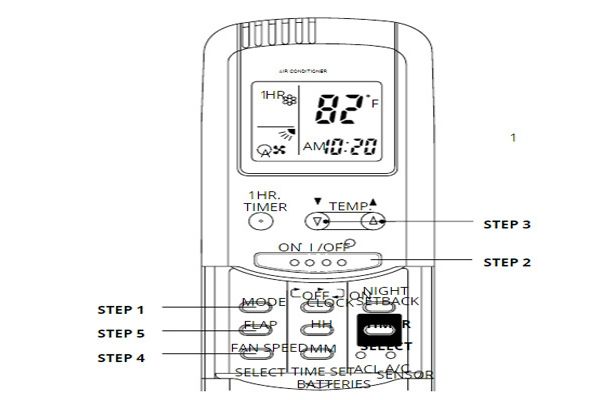
- ON / OFF: Air switch on / off
- TEMP button with cụm / nút button assembly: An increase / decrease button setting parameter. On some models, the term ∧ / ∨ may be replaced by the symbol ∧ / ∨
- MODE: A button to select the operating mode of the air conditioner.
- FLAP: Wind direction change button.
- TIMER: Timer button for air conditioner.
- NIGHT SETBACK: Night mode button.
- FAN SPEED: Fan speed button.
- CLOCK: Button to turn on / off the timer.
- HH: Function key is used to set the timer.
- MM: Function key used to set the timer clock.
How to use Akito air conditioner
With the simplest need to use such as turning on / off air conditioner, changing air flow, wind direction. please follow the manual of Akito air conditioner control below.
- Step 1: Set the MODE button to COOL. To operate the cooling system. If your air conditioner is a 2-way air conditioner, there is an option of WARM to warm up in the winter.
- Step 2: Press the ON / OFF button on the remote to start or stop the machine.
- Step 3: Press the TEMP button to start changing the current temperature setting to the desired temperature by pressing the tổ / ˅ button combination. The adjustable temperature range is a minimum of 15 ° C and a maximum of 31 ° C.
- Step 4: Press the FAN SPEED button and use the ˄ / ˅ button combination to change the wind intensity. Note if the fan speed is set to automatic mode, the fan will automatically increase the appropriate speed, depending on the difference between the actual room temperature and the temperature setting.
- Step 5: Press the FLAP button and use the ˄ / ˅ button combination to change the wind direction as desired.
To turn off the air conditioner, press the ON / OFF button again and the machine will turn off automatically. However, even when turned off, the air conditioner will still consume a small amount of electricity every hour to maintain its operational readiness. Therefore, if you have to be away from home for a long or long time without using it, please disconnect the Aptomat source of Akito air conditioner.
Instruction manual for Akito air conditioner to operate in special mode
In addition to normal mode, as well as many other air conditioning products on the market, Akito air conditioners also have special programs designed to meet the needs of customers. Let's see, how to install these programs via air conditioner control!
How to set the timer on Akito air conditioner
- Step 1: You press the TIMER button on the Akito air conditioner.
- Step 2: After pressing the TIMER button, the timer will blink on the screen to notify ready to enter the timer mode. At this point, you press CLOCK then just repeatedly press HH and MM buttons on the remote control to change the time to the time you turn it off.
- Step 3: Press TIMER again to confirm the time to set.
The timer can turn on / off the air according to the preset time so you do not need to wake up in the middle of the night to turn off the air conditioner or worry whether you have turned off the air conditioner before leaving the house.
How to use Akito air conditioner to set economy mode
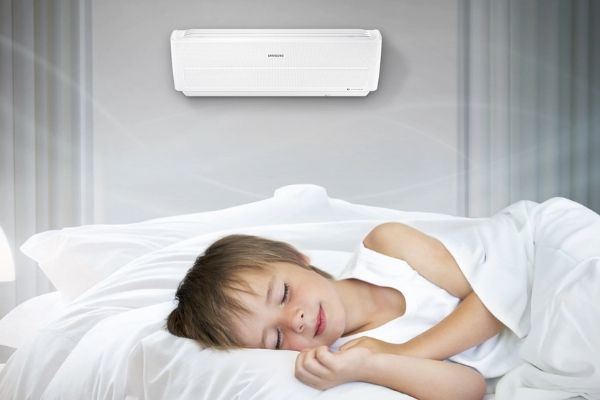
When the device is operating, press the NIGHT SETBACK button, a moon icon will appear on the screen to show that the mode is enabled. To turn off the mode, press the NIGHT SETBACK button again.
There are 2 NIGHT SETBACK modes for you to choose from:
- Cooling mode: The machine automatically increases to 1oC after 60 minutes, and rises to 1oC again after the next 60 minutes. The device will then continue to maintain this temperature to help you save energy and still feel comfortable sleeping.
- Heating mode: For 2-way air conditioners in the warm direction, the machine automatically reduces the temperature to 1oC after 60 minutes, then decreases by 1oC after 60 minutes. The device will then remain at this temperature. This function is suitable for use in winter.
Tips to use Akito air conditioner safely, save electricity
Using air conditioning scientifically helps you save power consumption, improve equipment life and especially not be "unwanted side effects of air conditioning" caused. So how to use Akito air conditioner safely and save electricity like? Check out our tips below!
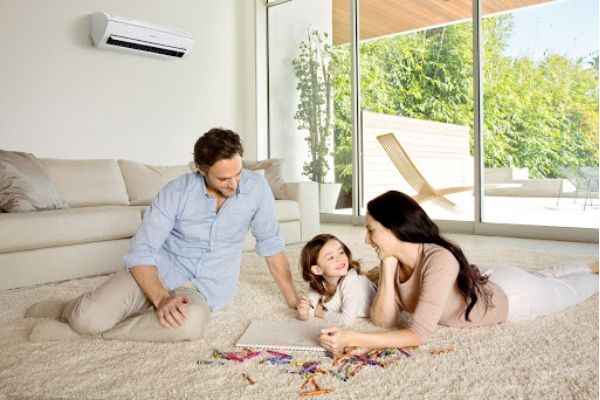
- Only turn the air conditioner back on after at least 10 minutes to avoid gas shock. Absolutely should not turn off the air conditioning continuously causing the system to restart too many times, just consume power and quickly damaged air conditioning.
- If you do not use it for a long time, you should turn off the power to the air conditioner to avoid the phenomenon of unstable power source causing bad effects on electronic circuits as well as avoiding energy loss.
- Do not let the temperature in the air-conditioned room be too different from the outdoor temperature. As recommended by health experts, you should only let the difference between 6 - 10 o C and should not be cold below 20 o C.
- Avoid contact immediately with the air conditioner when the body is sweaty due to movement because it can be chills, dry lips, sore throat, severe can lead to colds, strokes.
- Do not sit in the air-conditioned room for too long, especially with young children should not stay in the air-conditioned room for more than 4 hours continuously. Ideally every 2 to 3 hours should let the baby out, before going out should turn off the air conditioner to the baby's body gradually adapt to changes in temperature. In addition to ensuring children's health, you should clean the room clean, give your child plenty of water to drink, put physiological saline into the baby's eyes and nose, turn on the light fan to let the room open. Avoid letting the air blow directly into the baby's face, especially when sleeping.
- Close the room when using the air conditioner to avoid heat loss, resulting in the air conditioner running continuously, consuming electricity. Should combine to regulate at high temperatures (about 26 - 28 o C) and use fans to cool air circulating in the room. This will help your room cool faster without harming the machine, saving power.
- Regular maintenance and conditioning to help improve longevity as well as limit dust and especially bacteria, mold stay in the air conditioner is harmful to health.
Hopefully, the Akito air conditioner control instruction manual and some tips we have shared can help you use this product more efficiently, safely and economically this summer!
FAQ
What should I know about Instruction for Use of Akito 1-way, 2-way Air Conditioners Is Most Detailed?
Focus on the key features, requirements, limitations, and practical use cases explained in this guide.
How do I get the best results with Instruction for Use of Akito 1-way, 2-way Air Conditioners Is Most Detailed?
Follow the recommended steps, use current software or information, confirm compatibility, and review settings before major changes.
Are there any risks or limitations?
Potential limitations depend on compatibility, data quality, cost, privacy, support, and how the product or method is used.
Related Articles
 Compare Air Conditioners7 minutes read
 What Types of Air Conditioner Are Available Today?3 minutes read
 Learn the Structure, Installation and Use of Air8 minutes read
 What to Consider When Buying Used Air Conditioners10 minutes read
 Portable Air Conditioners: How to Buy the Best One for Your Home9 minutes read
 Learn About Energy Saving Technologies on Air Conditioners4 minutes read
Reader Comments 0
Sign in with email or Google to join the discussion.