Table of Contents
Animal Hospital is a Roblox horror game about working the night shift at a veterinary hospital. You must admit and treat legitimate animal patients, reject anomalies disguised as patients, survive threats inside the building, and keep your Sanity above zero. The safest beginner routine is: inspect first, admit only when the evidence matches, complete treatment promptly, and avoid unnecessary exposure to hazards.
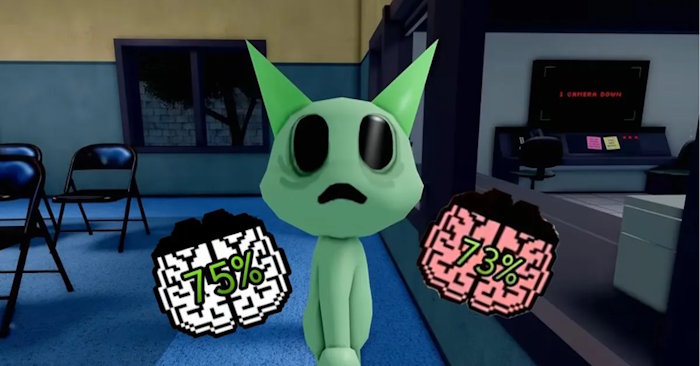
The game can change through updates, so treat exact values and encounter behavior as version-dependent. The workflow below is more important than memorizing one number.
Your goals during a shift
- Screen arrivals: compare each animal’s appearance, camera view, and registration photo.
- Reject anomalies: close the reception shutter before a suspicious arrival is admitted.
- Treat real patients: register them, obtain a sample, identify the required supply, and administer it.
- Protect Sanity: avoid staring at dangerous visuals, escape hostile encounters, and use available recovery methods.
- Prevent patient deaths: monitor the patient list and do not leave admitted animals untreated.
- Finish the shift: completed shifts award currency that can be spent on available classes, items, or upgrades.
First-shift checklist
- Locate reception, the camera controls, treatment rooms, the DNA analyzer, supply shelves, and coffee machine.
- Learn which control lowers and raises the reception shutter.
- Inspect every arrival before completing admission.
- Keep the patient list visible and treat the oldest waiting case first.
- Check your Sanity after a scare, cursed image, or enemy encounter.
- Do not wander into unknown areas while a real patient is deteriorating.
In multiplayer, assign one player to reception and another to treatment until everyone understands the layout. Clear communication prevents two people from doing the same task while a patient is ignored.
How Sanity works
Sanity acts as your survival meter. It can fall when you are frightened, grabbed, exposed to dangerous images, or caught by environmental threats. If it reaches zero, your run ends.
Coffee is the most accessible recovery method for beginners, but availability and the amount restored can depend on the current game version. Some class perks or successful patient treatments may also restore Sanity. Use the meter itself as your guide rather than waiting for a crisis.
Simple Sanity habits
- Top up before investigating a suspicious camera event if coffee is available.
- Look away or close a dangerous view as soon as you have enough evidence.
- Do not repeatedly inspect a cursed photo after deciding to reject the patient.
- Learn the safe response to each environmental enemy instead of trying to fight everything.
- In a team, give recovery resources to the player with the lowest Sanity.
How to screen an arriving patient
Use the same order every time. A consistent check is faster and reduces mistakes:
- Direct inspection: look at the animal at the reception window.
- Camera check: compare its camera appearance with what you saw in person.
- Photo check: take the registration photo and look for mismatched features or distortion.
- Decision: if any stage shows a clear anomaly, lower the shutter to reject it. If all stages are consistent, continue registration.
Do not keep searching for a second sign after finding a decisive one. Extra exposure can cost Sanity and gives other hospital tasks time to pile up.
Common anomaly signs
| Where you notice it | Possible warning signs | Safe response |
|---|---|---|
|
At the reception window |
Extra or sunken eyes, unnatural teeth, a distorted grin, severe twitching, or another feature that clearly does not belong. | Reject the arrival with the shutter as soon as the visual sign is clear. Raise the shutter again only after the threat has left. |
|
On a camera |
A dark or empty body, stretched limbs, changed facial features, direct camera staring, violent shaking, or a shadow that causes the view to zoom. | Stop watching once you have enough evidence. Return to reception and reject the arrival before admitting it. |
|
In the registration photo |
The photo does not match the animal, facial parts have changed, the image is heavily distorted, or a threatening figure appears. | Reject immediately. Do not reopen or stare at the image, because cursed visuals may reduce Sanity. |


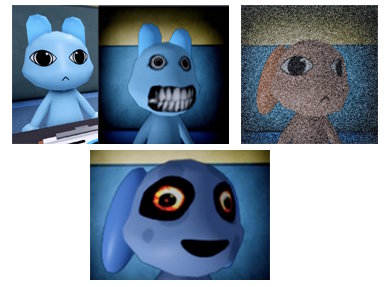
Not every anomaly displays every clue. Some look normal in person and only reveal themselves through a camera or photo, which is why skipping a screening step is risky.
How to admit and treat a normal patient
Once the animal passes inspection, finish the admission process at the reception computer and create the required identification information. After the patient reaches a room:
- Enter the assigned room and collect the requested DNA sample.
- Place the sample in the DNA analyzer and wait for the result.
- Check the patient computer or list for the required treatment item.
- Find that item on the color-coded supply shelves.
- Return to the correct room and apply the treatment.
- Confirm that the patient has recovered or left the active list before moving on.
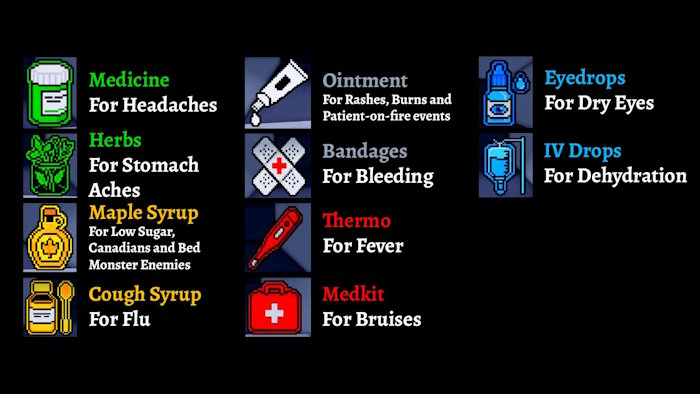
Common treatment supplies
The shelves may include herbs or medicine for headaches and stomachaches, a thermometer for fever, bandages, ointment for burns or rashes, cough syrup, maple syrup for low blood sugar, and drops for dry eyes. Read the treatment request carefully: carrying the wrong item wastes time and leaves the patient at risk.
Memorize shelf colors and locations gradually. During the first shift, accuracy matters more than speed. In later shifts, knowing the route from analyzer to supply shelf to room makes a significant difference.
How to avoid losing patients
- Check the active-patient list after every admission and treatment.
- Finish one treatment before admitting several more animals when playing alone.
- Do not let the reception queue distract you from a patient already waiting in a room.
- In multiplayer, say the room number and needed supply aloud to avoid duplicated work.
- If the shift allows only a limited number of patient deaths, treat that limit as a shared failure counter and prioritize the most urgent case.
Beginner team roles
Reception player
Inspects arrivals, checks photos and cameras, rejects anomalies, and completes admission. This player should announce every legitimate patient and room assignment.
Treatment player
Collects samples, runs the analyzer, obtains supplies, and confirms completion. They should call out when a room is clear.
Support player
Monitors Sanity, watches for environmental threats, carries spare supplies, and fills whichever station is falling behind. With two players, combine support with treatment.
Common beginner mistakes
- Admitting too quickly: a normal first glance does not replace the camera and photo checks.
- Watching dangerous footage too long: decide and close the view as soon as the clue is confirmed.
- Ignoring the patient list: real animals can be lost while everyone focuses on a scare.
- Taking the wrong medicine: verify the request before leaving the supply area.
- Hoarding recovery: coffee is more useful before Sanity reaches a critical level.
- No team communication: announce admissions, room numbers, treatments, and threats.
A reliable shift routine
Use this loop until it becomes automatic: inspect arrival → compare camera → check photo → reject or admit → treat active patient → check Sanity → return to reception. Once you can perform that sequence without skipping steps, start learning individual enemy counters and class-specific strategies.
Related Articles
 Animal Hospital Roblox Class Tier List (July 2026)9 minutes read
 Animal Hospital Roblox Emergency Guide: Every Event10 minutes read
 How to obtain and use the key in Animal Hospital2 minutes read
 Is It Possible to Play Animal Crossing: New Horizons Online for Free Explained6 minutes read
 Tips to Play Zoo 2 Animal Park for Newbies5 minutes read
 How to Play Balatro Game for Beginners5 minutes read
Reader Comments 0
Sign in with email or Google to join the discussion.