Table of Contents
This guide explains how to play Among Us 100 People, with clear steps, practical tips, and important checks before you begin.

In fact, Among Us 100's gameplay is not officially supported by Innersloth, so the battles can be a bit chaotic and unbalanced at all, but that's still very interesting isn't it. Here is how to play Among Us 100 people on the computer for you to read.
Download 100 Player Among Us Player Version
Among Us's 100-player mod has been introduced on popular YouTube channels like MrBeast and Socksfor1. You can download them from the link below.
Usually you'll have to join a popular Discord server to access the mod, but some fans have figured out how to download and install their own mod.
- Note: How to play Among Us 100 can only be done on PC , so iOS and Android players cannot use this method.
Download Mod Among Us 100 People here
How To Install And Play Among Us Version 100 People
Step 1: Open Steam and find Among Us in your Library list.
Step 2: Right- click on the game and select Manage => select Browse Local Files .
Step 3: Extract version 100 Among Us players you have downloaded by WINRAR or some other decompression support tool.
Step 4: Copy and Paste all the content in the file that appears after extracting into the game folder Among Us on your computer.
Step 5: Start playing Among Us version 100 people as usual.
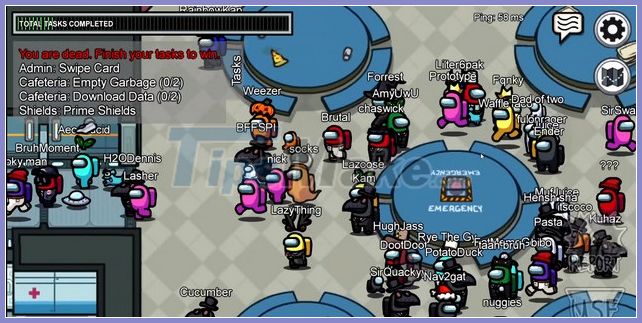
If you follow these steps correctly, you will be able to host a match Among Us 100 players of your own. You will know if you got everything right if you see the red Socksfor1 text under Ping while in the lobby.
Wish you happy gaming.
FAQ
What should I know about Play Among Us 100 People?
Focus on the key features, requirements, limitations, and practical use cases explained in this guide.
How do I get the best results with Play Among Us 100 People?
Follow the recommended steps, use current software or information, confirm compatibility, and review settings before major changes.
Are there any risks or limitations?
Potential limitations depend on compatibility, data quality, cost, privacy, support, and how the product or method is used.
Related Articles
 TOP Fun Games to Play with Friends Like Play Together9 minutes read
 How to Play Games on Houseparty: Step-by-Step Guide7 minutes read
 Space Mark Play Together6 minutes read
 Play YouTube in Background: Complete Guide5 minutes read
 The Polish Government Opened Its Own Minecraft Server to Let3 minutes read
 7 Reasons to Switch from PC Gaming to Console Gaming8 minutes read
Reader Comments 0
Sign in with email or Google to join the discussion.