Table of Contents
This article examines Chatbot EVNHANOI CSKH and explains the main developments, practical implications, and context readers should understand.
The search of electricity bills or any information can be done via chatbot on Facebook Messenger taking care of automated customers EVNHANOI CCKH 1.0 of Hanoi Electricity.
Chatbot EVNHANOI CCKH 1.0 will automatically answer any questions of users regarding all information about electricity bills used, or some other information such as calendar recording index, power supply suspension schedule, registration level New electricity. The power search operations on Messenger are very simple and will be guided by us in the article below.
- Learn interesting English idioms right on Facebook Messenger
- How to see who uses the most messaging on Facebook
- Only with Messenger tips, you'll know where the phone owner is
How to Look up Electricity Money on Chatbot Messenger
Step 1:
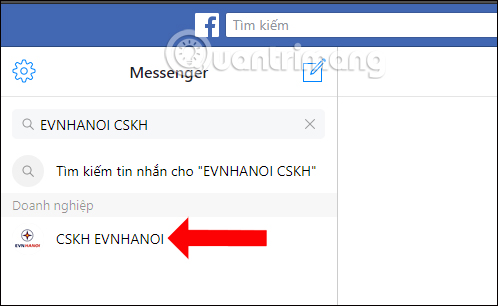
You access the Facebook Messenger web version, then enter the keyword EVNHANOI CSKH into the search bar. Click on the found results to link with the automated answering service of EVNHANOI CSKH.
Step 2:
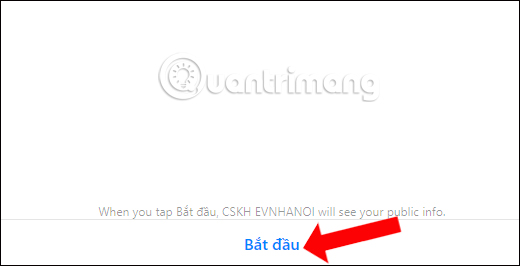
In the chat interface with EVNHANOI CSKH press Start to receive support.
Step 3:
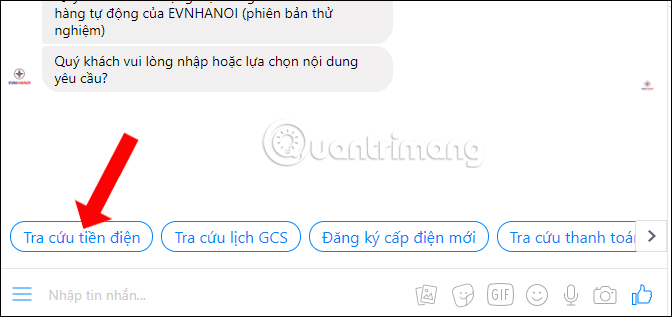
There are 3 lookup options available, including Power lookup, Index lookup, Electricity registration. Click on each item to receive advice, or users can enter questions to get answers.
Click Look up electricity bill to see electricity bill.
Step 4:
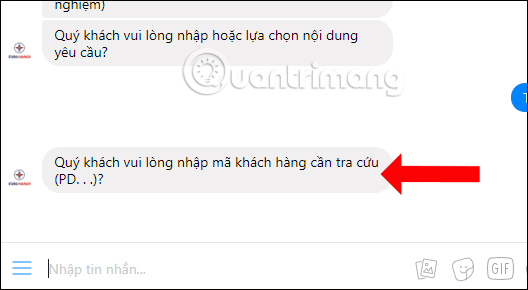
To continue you will need to enter your customer code for each electricity bill. Customer code will be printed on the monthly electricity bill, or sent via text message. Password is the customer code.
Step 5:
Next, click the 3 dash icon and select some additional functions such as New power registration.
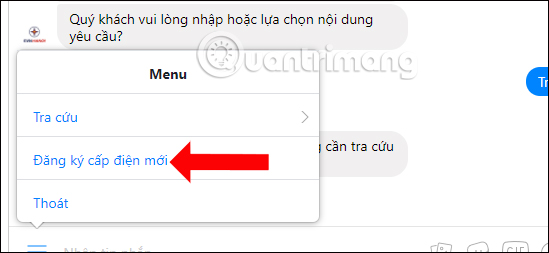
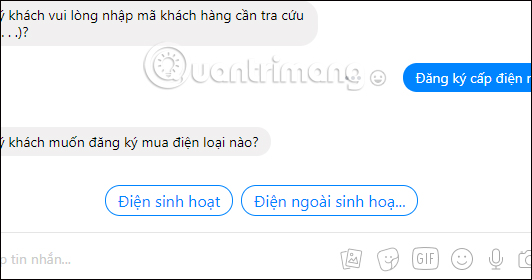
There will be 2 options: Active electricity registration or Active electricity registration. You choose according to your electricity registration needs and follow the instructions.
Step 6:
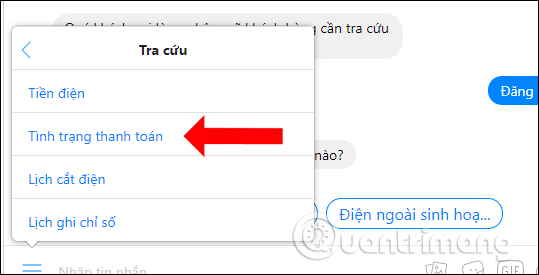
Clicking on Search will add a list of functions including Electricity, Payment status, Power cut schedule, Calendar record. Each item will provide details for the user.
Chatbot EVNHANOI CSKH on Facebook Messenger helps users get the most detailed information about used electricity information. Besides, we will have many other services to use on chatbot EVNHANOI CSKH, such as registering power supply with 2 different types or re-checking previous bills,.
- Transform color chat window Facebook Messenger
- How to "hunt" messages hidden in Facebok Messenger
- How to call group videos on Facebook Messenger
I wish you all success!
FAQ
How does Chatbot EVNHANOI CSKH work?
This article examines Chatbot EVNHANOI CSKH and explains the main developments, practical implications, and context readers should understand.
What should you prepare before using this method?
The search of electricity bills or any information can be done via chatbot on Facebook Messenger taking care of automated customers EVNHANOI CCKH 1.0 of Hanoi Electricity.
What should you do if the process does not work as expected?
Chatbot EVNHANOI CCKH 1.0 will automatically answer any questions of users regarding all information about electricity bills used, or some other information such as calendar recording index, power supply suspension schedule, registration level New electricity.
Related Articles
 How to Save Electricity Bills for Your Family Is Simple6 minutes read
 Fixed a Bug with Facebook Messenger Being Escaped on iOS2 minutes read
 All About How to Use Facebook Messenger Lite4 minutes read
 GIFUR Emoji Set for Facebook Messenger: Emoji Facebook Messenger5 minutes read
 It's Very Simple to See Who Has Blocked You on Facebook9 minutes read
 Instructions for Looking up Electricity Money on the Phone5 minutes read
Reader Comments 0
Sign in with email or Google to join the discussion.