Table of Contents
This guide covers dell studio 14z is thin and light with practical context and easy-to-follow details. Use it to understand the subject and apply the information confidently.
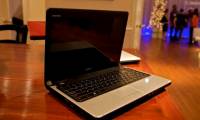
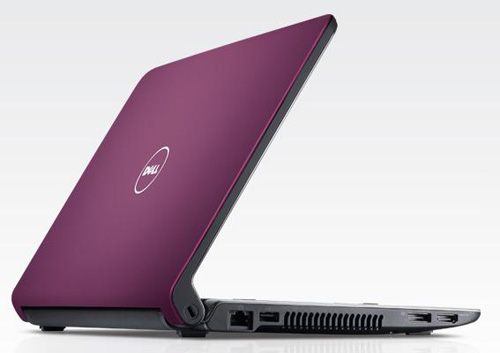 Dell Studio 14z is only about 2 cm thick Photo: Blogcdn .
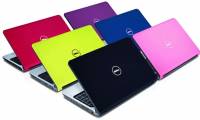
Studio 14z inherits Studio 15's "elder" design, but is slimmer and lighter because it doesn't use an optical drive to reduce the cost of targeting the average user. If there is a need, users can purchase DVD burners themselves, even Blu-ray disc players. The case is made of magnesium alloy with a plastic material to enhance durability and reduce weight. The device will look "healthier" if the rest area is made of magnesium alloy instead of plastic. Dell Studio 14z is thin and quite light, about 2 cm thick and weighs about 2. 2 kg. But with the 8-cell battery on the back of the neck, the device will be thicker and heavier when moving. The outer coat is very thick and covered with rubber, which enhances the bearing capacity and screen protection. Currently Studio 14z is sold with 6 colors black, blue, pink, green, plum and magenta. These are the colors available in the basic monochrome design, but Dell said that by the beginning of September, there will be more than 120 different shell decorations. The most advanced high-end HD 14z studio has bright, brilliant colors, high contrast and wide viewing angles. HD HD LED backlight, 16: 9 aspect ratio with 1, 600 x 900 pixel resolution, watching movies very much. It uses up to 4 speakers, 2 small speakers located just above the keyboard and 2 larger speakers on the front of the machine. The top speaker system is responsible for handling high frequencies while the lower speaker will handle mid-range and bass tones. Although the sound quality is not equal to 2. 1 speaker systems with its own subwoofer, but with the professional layout and separation of features, it is clear that Studio 14z's "loudspeaker" is better than many 14-inch laptops. Other. Standard size keyboard, with flat, rough surface keys, with LED backlight option for those wishing to use the machine in a dark room or late at night. But it seems that the bounce of the key is a bit too high, if you accidentally type it hard, the key will "turn on like a spring". The multi-tap touchpad is quite large compared to the 14-inch laptop size, which is very responsive and smooth. Two separate mouse buttons are smooth without bouncing too much like a keyboard.
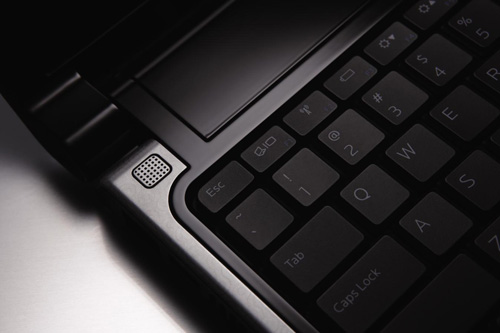 The keyboard is very bouncing Photo: Byonpc .
Dell Studio 14z besides removing optical drive also sacrifices some basic connections. It has 2 USB ports, an integrated USB / eSATA port, FireWire port and ExpressCard / 34 expansion card slot. There are enough HDMI and DisplayPort outputs, but there is no traditional VGA port and a popular MMC / SD card reader. If connecting to large TV-HD monitors without any difficulty, it is difficult to publish via Projector (most projectors) because most projectors still use the universal VGA port.
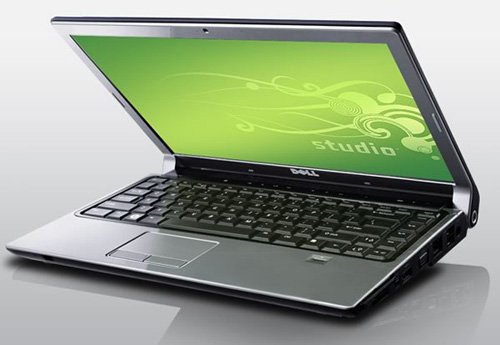 Dell Studio 14z is configured quite well Photo: Gizmag .
Dell Studio 14z is equipped with a strong configuration with Intel Core 2 Duo P8600 2. 4 GHz processor, 3 GB DDR3 RAM, NVIDIA GeForce 9400M graphics card and 320 GB HDD to meet the learning needs as well as multimedia entertainment. In fact, the 14z Studio has the same configuration as Apple MacBook Pro 13 inches but the test results and reviews show that the performance of Dell is better than the MacBook Pro 13, while the resale price is cheaper. Studio 14z version in this test is only about 18 million, while the most basic configuration is only about 12 million. NVIDIA GeForce 9400M card also supports watching HD movies or playing games better than Intel's integrated graphics solution. With the Portal game, Studio 14z produces beautiful images at a speed of 39-45 frames per second, at a resolution of 1, 280 x 800 pixels. Its storage capacity can be extended with a 500 GB capacity hard drive option, which can hold up to 125, 000 high-quality songs, 142, 000 digital photos, and about 133 DVD movie discs. But choosing 320 GB drive is the most reasonable because of the overall balance between storage capacity and finances. Not as advertised by Dell, the 8-cell battery is quite "strong". Setting the screen brightness to 70%, running Windows Vista operating system in "Balanced" mode, it maintains a continuous uptime of 4 hours 58 minutes.
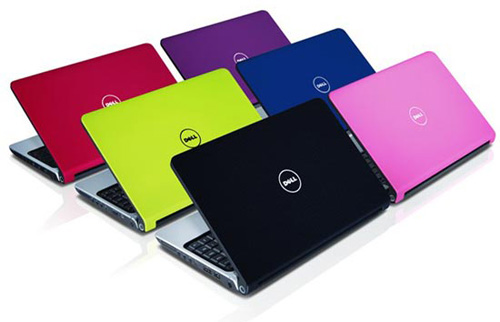 This is Dell's most colorful model Photo: Mensite .
FAQ
What should I check before following these steps?
Confirm device and software compatibility, save important data, and make sure you have the required permissions, files, and account access.
Why might the process not work?
Common causes include outdated software, missing permissions, incompatible hardware, an unstable connection, or completing a step in the wrong order.
Can I undo the changes if necessary?
That depends on the tool or setting. Use built-in restore options when available, keep a backup, and record the original configuration first.
Related Articles
 Dell Is About to Release Studio XPS 15 and 17 Inches3 minutes read
 Dell Inspiron Z Thin Light Low Price3 minutes read
 Dell's New Fashion Laptop3 minutes read
 See Dell XPS 14z 'Supermodel' in Vietnam4 minutes read
 Acer Blamed Dell and HP 'Sabotaging' Ultra-thin Laptops5 minutes read
 Dell 9. 9 Mm Thin Dell Adamo Showing Off3 minutes read
Reader Comments 0
Sign in with email or Google to join the discussion.