Table of Contents
This guide covers dell mini 10, 'half-hearted' choice with practical context and easy-to-follow details. Use it to understand the subject and apply the information confidently.
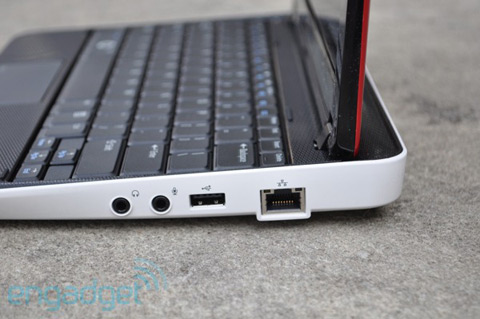 Mini 10 has no HDMI port Photo: Engadget .
Because the design is larger than its line of products, the Dell Mini 10 has quite a bit of connectivity, including: 3 USB ports, VGA output, Ethernet, SD card slot, headphone jack and microphone. Unfortunately, there is no HDMI port because according to the manufacturer, Pineview chipset does not support this type of connection regardless of whether the Mini 10 can showing HD video. The keyboard has a chiclet-style design that spills out to the sides of the body for a comfortable typing experience. However, the big problem of the Mini 10 is in the touchpad section, it's hard to use this mouse board smoothly because it's too small and near the keyboard. Two mouse buttons are also difficult to press and manipulate. If users want to use the device effectively, they will have to buy an external mouse instead of this "useless" touchpad.
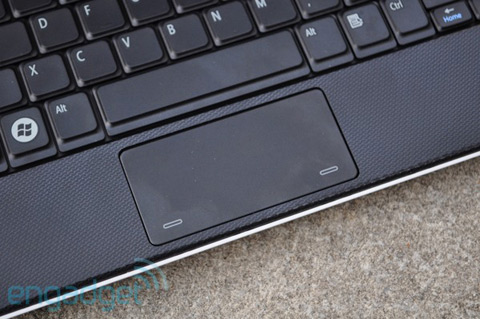 The touchpad is almost useless Photo: Engadget .
The screen of the Dell Mini 10 has a resolution of 1, 366 x 768 pixels higher and more detailed than the normal netbook screens (1024 x 600 pixels). In testing outdoor 1080p resolution movies, the camera still produces sharp images but suffers a slight shadow if the viewing angle is misaligned. The Dell Mini 10 has an Intel Atom N450 1. 6 HGz processor, 1GB of RAM, a 250 GB hard drive and comes pre-installed with Windows 7 Starter Edition operating system. This is the equivalent of many netbooks using other Pine Trail platforms, but it feels a bit slow when using some programs (it takes 8 seconds to open Firefox instead of 4 seconds of the Aspire One 532h). When used, the device also emits quite a lot of heat when used with running programs like Microsoft Works and browsing the web with Firefox.
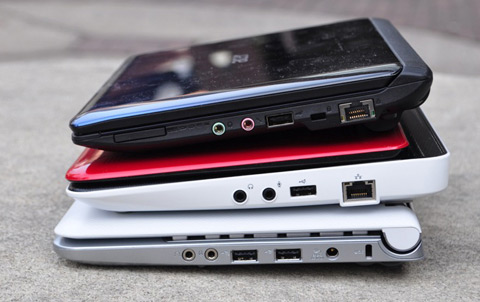 The Dell Mini 10 is larger in size than netbooks Other common Photo: Engadget .
In testing, watching an HD clip on YouTube with Adobe Flash 10. 1, the browser has a long suspension. The reason that is represented by Broadcom said that Crystal HD technology is only supported in the version of Adobe Flash 10. 1 Beta 3 which appears in the coming time. Users will also have to manually update drivers from Broadcom when this version of Adobe is released. When playing some 1080p videos with Windows Media Player 11 available on the device, the video is still sometimes jerky and still quite confusing. Meanwhile, because Broadcom only supports HD standard video playback on Windows Media Player, it will be difficult for users to open the video with another program. In addition, Broadcom's Crystal HD technology and the Pine Trail platform even made the Dell Mini 10 with scores rated by PCMark05, 3DMark06 lower than netbooks using the usual Pine Trail platform.
Model / ScorePCMark053DMark06 Dell Battery Life Mini 10 (Pine Trail, Broadcom Crystal HD) 12641325: 58HP Mini 311 (Ion) 201614643: 53Toshiba Mini NB305 (Pine Trail) 12721566: 30Acer Aspire One 523h (Pine Trail) 13101546: 31ASUS Eee PC 1005PE (Pine Trail) 14311578: 10
With a 56 Wh 6-cell battery, the Mini 10 works for 5 hours and 58 minutes continuously with video playback and screen brightness at 65%. If using normal web surfing, the device runs for about 7 uoi hours continuously. The Dell Mini 10 is very hard to be the perfect choice when considering each factor. If talking about thinness, even overall performance, this netbook is not as attractive as the Toshiba NB305. And although its battery life is quite large, it can't be compared to the Eee PC 1005PE. When discussing the possibility of HD presentation, Mini 10 is not a perfect solution when it only supports Windows Media Player and cannot be viewed well on the web with Flash. In this case, perhaps the HP Mini 311 for $ 399, the ASUS Eee PC 1201N for $ 499 is the more valuable option, at least until Broadcom announced the driver suitable for the new Adobe Flash version.
FAQ
What should I check before following these steps?
Confirm device and software compatibility, save important data, and make sure you have the required permissions, files, and account access.
Why might the process not work?
Common causes include outdated software, missing permissions, incompatible hardware, an unstable connection, or completing a step in the wrong order.
Can I undo the changes if necessary?
That depends on the tool or setting. Use built-in restore options when available, keep a backup, and record the original configuration first.
Related Articles
 10 Best American Laptops Like 20095 minutes read
 Dell 'Wiped Out' Inspiron Mini Netbook3 minutes read
 The Dell Mini 10 Is Brilliant3 minutes read
 Next-generation Dell Mini 'Shows Up'3 minutes read
 Dell Mini 11 Is the First Netbook to Run Vista4 minutes read
 Dell Unveiled the Inspiron Mini 9 Netbook3 minutes read
Reader Comments 0
Sign in with email or Google to join the discussion.