Table of Contents
Basic Java Exercises, with Sample Decoding is easier to understand when the core ideas are paired with practical examples. The sections below explain the topic clearly, highlight useful steps, and point out details that can prevent common errors.
To serve your Java learning needs, TipsMake.com has synthesized some Java exercises from many sources, including sample code (for some articles). Hopefully it can be helpful to learn your Java programming language.
Basic Java exercises have a solution
Lesson 1 . Write a program to find the greatest common divisor, the smallest common multiple of two natural numbers a and b. See the article Lesson 1
Lesson 2. Write a program to convert a natural number of the base 10 system into numbers at any b-base system (1 Lesson 3 . Write a program that calculates the sum of the digits of any integer. For instance,: Number 8545604 has a total of 8 digits: 8 + 5 + 4 + 5 + 6 + 0 + 4 = 32. See Solution 3 Lesson 4 . Write a program that analyzes an integer into prime factors. Example: Number 28 is broken down into 2 x 2 x 7. See Lesson 4 Lesson 5 . Write a program that lists all primes smaller than n given. See Lesson 5 Lesson 6 . Write a program that lists the first n prime numbers. See Lesson 6 Lesson 7 . The Fibonacci number sequence is defined as follows: F0 = 1, F1 = 1; Fn = Fn-1 + Fn-2 with n> = 2. Write a program to find the Nth Fibonacci number. See Problem 7 Lesson 8. A number is called a reverse reversal number if we read from left to right or right to left number we still get the same number. Please list all six-digit malicious reversal numbers (Example: 558855). See Lesson 8 Lesson 9. Write a program that lists all binary strings of length n. See the lesson Lesson 9 Lesson 10. Write a program that lists all k subsets of 1, 2,., n (k≤n). See Lesson 10 Lesson 11. Write a program that lists all permutations of 1, 2,., n. See Lesson 11 Lesson 12. Calculate the value of the polynomial P (x) = a n x n + a n-1 x n-1 +. + a 1 x + a 0 according to the calculation of Horner: P (x) = (( ((a n x + a n- 1) x + a n-2. + a 1 ) x + a 0 See Lesson 12 Lesson 13 . Enter data for 2 real numbers a 0, a 1,., a m-1 and b 0, b 1,., b n-1. Suppose both of these sequences have been sorted in ascending order. Take advantage of the alignment of the two ranges and create the range c 0, c 1,., c m + n-1 is the combination of the two ranges, so that the sequence c i also has an ascending order. See Lesson 13 Lesson 14 . Enter the data for the real number sequence a 0, a 1,., a n-1. Please list the elements that appear in the sequence exactly once. See Lesson 14 Lesson 15 . Enter the data for the real number sequence a 0, a 1,., a n-1. Please list the elements that appear in the sequence exactly 2 times. See Lesson 15 Lesson 16. Enter the data for the real number sequence a 0, a 1,., a n-1. Print to the screen the number of occurrences of the elements. See Lesson 16 Lesson 17. Enter the number n and the sequence of real numbers a 0, a 1,., a n-1. Do not change the elements and do not use any other real number array (you can use the integer array if necessary). See Lesson 17 Lesson 18. Enter a string of characters. Count the number of words of that string. For instance,, "School" has 2 words. See Lesson 18 Lesson 19. Write a program that lists all 5-digit primes so that the sum of the digits in each prime number is equal to the given S. See Lesson 19 Lesson 20. Enter a natural number n. Please list the number of Fibonacci smaller than n is the prime number. See Lesson 20 Lesson 21. Write a program to enter a positive integer n and perform the following functions: See Lesson 21 Lesson 22. Write a program to enter a positive integer n and perform the following functions: See Lesson 22 Lesson 23. Write a program to enter a positive integer n and perform the following functions: See Lesson 23 Lesson 24. Write a program to enter into matrix A with n lines, m columns, elements that are integers greater than 0 and less than 100 entered from the keyboard. Perform the following functions: See Lesson 24 Exercise 25. Write a program that lists integers of 5 to 7 digits satisfying: See lesson 25 Lesson 26. Write a program that lists 7-digit integers that satisfy: See lesson 26 Lesson 27. Write an input program into array A with n elements, elements that are integers greater than 0 and less than 100 entered from the keyboard. Perform the following functions: See lesson 27 Lesson 28. Write a program to enter into matrix A with n lines, m columns, elements that are integers greater than 0 and less than 100 entered from the keyboard. Perform the following functions: See lesson 28 Lesson 29. Write a program to enter the coefficients of the polynomial P of degree n (0 See lesson 29 Lesson 30. Write an input program into array A with n elements, elements that are integers greater than 0 and less than 100 entered from the keyboard. Perform the following functions: Lesson 31. Write a program to perform standardization of a string entered from the keyboard (remove extra spaces, convert the first character of each word to uppercase, other characters to lowercase) See the article 31 Lesson 32. Write a program to execute a string and find the longest word in that string. Where does that word appear? (Note. If there are multiple words of the same length, select the first word found). See solution 32 Lesson 33. Write a program that implements a structured string: they. buffer. name; convert that string to represent by name structure . they. buffer. See Lesson 33 Lesson 34. Write a program that lists all the elements of the set: Lesson 35. Write a program that lists all the elements of the volume Lesson 36. Write a program that lists all the elements of the set Lesson 37. Let two sets A consisting of n elements, B include m elements (n, m≤255), each of its elements is a string of characters. Example A = {'Lan', 'Hang', 'Ming', 'Shui'}, B = {'Meaning', 'Chinese', 'Ming', 'Shui', 'German'}. Write a program to do the following: Lesson 38. Give two polynomials Lesson 39. Give two square matrices A level n. Write a program to do the following: Lesson 40. Give a character buffer with n lines. Write a program to do the following: Lesson 41. Write a program to do the following: 1. List the elements of the volume Inside 2. List the elements of the set: Inside Inside 4. Calculate the minimum value of the objective function Lesson 42. The binary matrix is a matrix whose elements are either 0 or equal to 1. Let A = [a ij ], B = [b ij ] be binary matrices of levels m × n (i = 1, 2,., m. J = 1, 2,., n). We define logical combinations, assignments and logic and exponentiation for A and B as follows: Write a program to do the following: Lesson 1: Lesson 2: Lesson 03: Lesson 04: Lesson 05: Lesson 06: Lesson 07: Lesson 08: Lesson 09: Lesson 10: Start with the core concepts and examples in this guide. They provide the context needed to understand the topic accurately and apply the information with fewer mistakes. Understanding this topic helps readers make better technical decisions, recognize common problems, and choose safer or more efficient solutions. Work through each section in order, test unfamiliar steps in a safe environment, and keep a backup of important files or settings before making significant changes.
The basic Java solution does not solve



 .
. .
. .
. . Write a program to do the following:

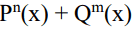

 and residual polynomial
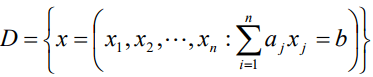
 b is positive integers,

 b is positive integers,


 ; Inside
  is the set of permutations of
  .
.
 is a binary matrix level m × n with the element in position (i, j) is c ij = (a i1 Ùb 1j) Ú (a i2 ∨ b 2j ) ∨. ∨ ((a ik ∨ b kj ).
 (r times).

Java exercise solution
  return (key);9  return (key);8
  return (key);7
  return (key);6
  return (key);5
  return (key);4
  return (key);3
  return (key);2
  return (key);1
  return (key);0
  }9
  }8

  }7
  }6
  }5
  }4
  }3
  }2
  }1
  }0
  public static void inArray(int[] a, int begin , int end){
 System.out.println();9
  public static void inArray(int[] a, int begin , int end){
 System.out.println();8
  public static void inArray(int[] a, int begin , int end){
 System.out.println();7
  public static void inArray(int[] a, int begin , int end){
 System.out.println();6
  public static void inArray(int[] a, int begin , int end){
 System.out.println();5
  public static void inArray(int[] a, int begin , int end){
 System.out.println();4
  public static void inArray(int[] a, int begin , int end){
 System.out.println();3
  public static void inArray(int[] a, int begin , int end){
 System.out.println();2
  public static void inArray(int[] a, int begin , int end){
 System.out.println();1
  public static void inArray(int[] a, int begin , int end){
 System.out.println();0
  int i;9
  int i;8
  int i;7
  int i;6
  int i;5
  int i;4
  int i;3

  int i;2
  int i;1
  int i;0
  for(i=begin ; i System.out.print(" "+a[i]);9
  for(i=begin ; i System.out.print(" "+a[i]);8
  for(i=begin ; i System.out.print(" "+a[i]);7
  for(i=begin ; i System.out.print(" "+a[i]);6
  for(i=begin ; i System.out.print(" "+a[i]);5
  for(i=begin ; i System.out.print(" "+a[i]);4
  for(i=begin ; i System.out.print(" "+a[i]);3
  for(i=begin ; i System.out.print(" "+a[i]);2
  for(i=begin ; i System.out.print(" "+a[i]);1
  for(i=begin ; i System.out.print(" "+a[i]);0
  }9
  }8
  }7
  }6
  }5
  }4
  }3
  }2
  }1
  }0
  System.out.println9
  System.out.println8
  System.out.println7
  System.out.println6
  System.out.println5
  System.out.println4
  System.out.println3
  System.out.println2
  System.out.println1
  System.out.println0
  System.out.println1
  System.out.println0
 }4
 }3
 }2
 }1

 }0
 2
 1
 0
 9
 8
 7
 6
 5
 4
 3
 2
 1
 0
 9
 8
 7
 6
 5
 4
 3
 2
 1
 0
 9
 8
 7
 6
 5
 4
 3
 2
 1
 0
 9
 8
 7
 6
 5
 4
 3
 2
 1
 0
  @media (min-width:1024px) { #adsposttop { margin: 0 20px 10px 0; width: 336px; min-height: 360px; float: left } #adsposttop2 { height: 90px; } } @media (max-width:480px) { #adsposttop { float: none; min-height: 360px; } } 9
  @media (min-width:1024px) { #adsposttop { margin: 0 20px 10px 0; width: 336px; min-height: 360px; float: left } #adsposttop2 { height: 90px; } } @media (max-width:480px) { #adsposttop { float: none; min-height: 360px; } } 8
  @media (min-width:1024px) { #adsposttop { margin: 0 20px 10px 0; width: 336px; min-height: 360px; float: left } #adsposttop2 { height: 90px; } } @media (max-width:480px) { #adsposttop { float: none; min-height: 360px; } } 7
  @media (min-width:1024px) { #adsposttop { margin: 0 20px 10px 0; width: 336px; min-height: 360px; float: left } #adsposttop2 { height: 90px; } } @media (max-width:480px) { #adsposttop { float: none; min-height: 360px; } } 6
  @media (min-width:1024px) { #adsposttop { margin: 0 20px 10px 0; width: 336px; min-height: 360px; float: left } #adsposttop2 { height: 90px; } } @media (max-width:480px) { #adsposttop { float: none; min-height: 360px; } } 5  @media (min-width:1024px) { #adsposttop { margin: 0 20px 10px 0; width: 336px; min-height: 360px; float: left } #adsposttop2 { height: 90px; } } @media (max-width:480px) { #adsposttop { float: none; min-height: 360px; } } 5  @media (min-width:1024px) { #adsposttop { margin: 0 20px 10px 0; width: 336px; min-height: 360px; float: left } #adsposttop2 { height: 90px; } } @media (max-width:480px) { #adsposttop { float: none; min-height: 360px; } } 4  @media (min-width:1024px) { #adsposttop { margin: 0 20px 10px 0; width: 336px; min-height: 360px; float: left } #adsposttop2 { height: 90px; } } @media (max-width:480px) { #adsposttop { float: none; min-height: 360px; } } 4
  @media (min-width:1024px) { #adsposttop { margin: 0 20px 10px 0; width: 336px; min-height: 360px; float: left } #adsposttop2 { height: 90px; } } @media (max-width:480px) { #adsposttop { float: none; min-height: 360px; } } 3
  @media (min-width:1024px) { #adsposttop { margin: 0 20px 10px 0; width: 336px; min-height: 360px; float: left } #adsposttop2 { height: 90px; } } @media (max-width:480px) { #adsposttop { float: none; min-height: 360px; } } 2
  @media (min-width:1024px) { #adsposttop { margin: 0 20px 10px 0; width: 336px; min-height: 360px; float: left } #adsposttop2 { height: 90px; } } @media (max-width:480px) { #adsposttop { float: none; min-height: 360px; } } 1
  @media (min-width:1024px) { #adsposttop { margin: 0 20px 10px 0; width: 336px; min-height: 360px; float: left } #adsposttop2 { height: 90px; } } @media (max-width:480px) { #adsposttop { float: none; min-height: 360px; } } 0
  QTM Responsive Post 9
  QTM Responsive Post 8
  QTM Responsive Post 7
  QTM Responsive Post 6
  QTM Responsive Post 5
  QTM Responsive Post 4
  QTM Responsive Post 3
  QTM Responsive Post 2
  QTM Responsive Post 1
  QTM Responsive Post 0
  Tipsmake Links - Dapung1 9
  Tipsmake Links - Dapung1 8
  Tipsmake Links - Dapung1 7
  Tipsmake Links - Dapung1 6
  Tipsmake Links - Dapung1 5
  Tipsmake Links - Dapung1 4
  Tipsmake Links - Dapung1 3
  Tipsmake Links - Dapung1 2
  Tipsmake Links - Dapung1 1
  Tipsmake Links - Dapung1 0
 package bai07;
 import java.util.Scanner;
 public class Main {

 public static int nhap(){
  Scanner input= new Scanner(System.in);
 boolean check= false;
  int n=0;
 while(!check){
  System.out.print(" ");
 try{
  n= input.nextInt();
 check= true;
  }catch(Exception e){
  System.out.println("Ban phai nhap so! hay nhap lai.");
 input.nextLine();
  }
  }
  return (n);
  }
  public static void main(String[] args) {
 System.out.print("Nhap n");
  int n= nhap();
  int[] f= new int[n+1];
 f[0]= 1; f[1]= 1;
  for(int i=2;i<=n;i++){
  f[i]= f[i-1]+f[i-2];
  }
  System.out.println("So Fibonanci thu "+n+" la: f["+n+"]= "+f[n]);
  }
 }
 package bai08;
 public class Main {
  public static boolean testSoThuanNghich(int n){
 StringBuilder xau= new StringBuilder();
 String str= ""+n;
  xau.append(str);
  String check= ""+xau.reverse();
 if(str.equals(check)) return true;
 else return false;
  }
  public static void main(String[] args) {
 int n,count=0;
  for(n=100000 ; n<= 999999 ; n++){
  if(testSoThuanNghich(n)){
 System.out.println(n);count++;
  }
  }
  System.out.println("Co "+count+" so thuan nghich co 6 chu so");
  }
 }
 package bai09;
 import java.util.Scanner;
 public class Main {

 public static int nhap(){
  Scanner input= new Scanner(System.in);
 boolean check= false;
  int n=0;
 while(!check){
  System.out.print(" ");
 try{
  n= input.nextInt();
 check= true;
  }catch(Exception e){
  System.out.println("Ban phai nhap so! hay nhap lai.");
 input.nextLine();
  }
  }
  return (n);
  }
  public static void main(String[] args) {
 System.out.println("Nhap n");
  int n= nhap();
  int[] array= new int[n];
 int tich;
  do{
  tich= 1;
  //In ra mang va tinh tich cac phan tu trong mang
 System.out.println("");
  for(int j=0 ; j
  System.out.print(" " +array[j]);
 tich*= array[j];
  }
  int i=n-1;
 do{
  if(array[i]==0){
  array[i]=1;
  for(int j=n-1 ; j>i ;j--){
  array[j]= 0;
  }
  break;
  }
  else i--;
  }while(i>=0);
  }while(tich!=1);
  }
}FAQ
What should readers know about Basic Java Exercises, with Sample Decoding?
Why is Basic Java Exercises, with Sample Decoding important?
How should beginners use this guide?
Related Articles
 C ++ Exercises Have Solutions (Sample Code)17 minutes read
 Summary of JavaScript Exercises with Sample Code15 minutes read
 Basic Java Syntax: A Practical Guide10 minutes read
 C ++ Exercises Have Solutions (Sample Code) for Variables, Data3 minutes read
 EQuiz - Multiple Choice Quiz About JAVA4 minutes read
 What Is Java? Why Choose Java?11 minutes read
Reader Comments 0
Sign in with email or Google to join the discussion.