Table of Contents
Explore 8 reasons typora became the favorite markdown editor and learn what each option does well. The article focuses on practical details that can help you make a more informed decision.
Anyone who loves writing understands the importance of a good editing application. Nothing kills creativity faster than a complex, difficult-to-use editing software.
How 8 Reasons Typora Became the Favorite Markdown Editor Works
Markdown editors are increasingly popular, serving as an alternative to traditional word processing software. After trying many Markdown editors and word processing software, many decided to choose Typora.
You can try Typora and see why it was voted one of the best markdown editors!
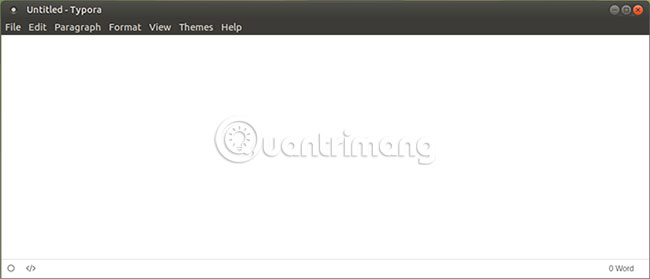
The point helps Typora shine is its simplicity. When opening the app for the first time, Typora will welcome you with a blank screen. There are no pop-ups, no redundant toolbars, only two buttons and word count tools. What you enter is converted into Markdown in real time.
Everything, from basic format to spell check, is included in this editor. There is a sidebar to manage and outline the directory.
All formatting buttons are in the system menu (you can disable in Windows to prioritize Typora's hidden menu) or in the context menu that appears when right-clicking.
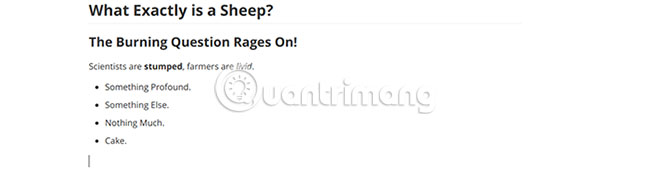
Although some people may not care much about the appearance of the app, it is hard to deny that Typora has an excellent appearance. See what you enter is formatted automatically for clarity and readability. The aesthetically pleasing text will be a significant motivating factor for excitement and concentration when writing.
If you're a night mode, you'll be glad to know that the night mode is one of Typora's 5 standard themes. Although each standard theme has its own beauty, there are many other options that make your document look better.

Of course, Markdown's appearance depends on each person's personal preferences. Typora supports themes created by the community. Many themes are introduced in Typora Theme Gallery ( Link: http://theme. typora. io/ ).
Like HTML in web pages, Typora's Markdown is designed with CSS. This means you can modify an existing theme or even write your own theme. Typora even provides instructions for users to create their own themes.
Typora is available for Windows, Mac and Linux. This software works the same on different platforms and can make a big difference to productivity. If you have a synced folder in the cloud to back up documents, switching between devices is easy and users experience remains unchanged.
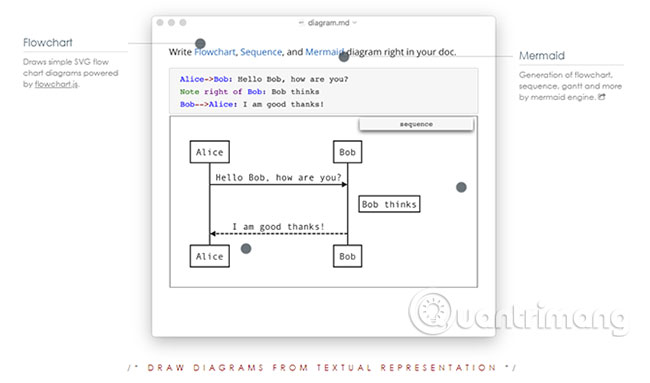
Typora is perfect for creating blog posts and web content, but that's not all that Typora can do. If you need a simple way to write presentations for work, Typora also supports creating tables and diagrams from text.
If you are using Typora for writing essays or scientific research, this tool also supports integration for mathematical formats, instant annotations can be read by hovering and a list of tasks to do.
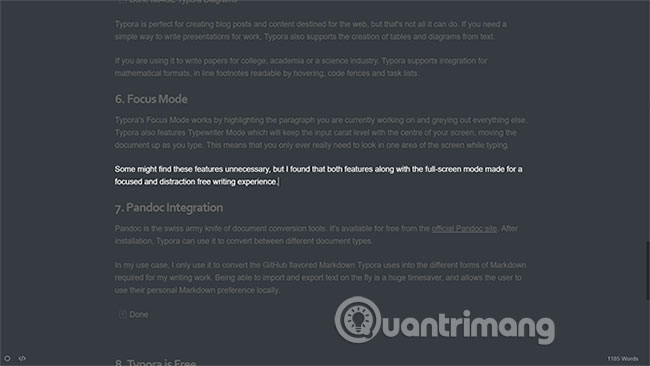
Typora's Focus Mode Works by highlighting the text you're working on and making everything else around gray. Typora also has a Typewriter Mode, Set the start cursor in the middle of the screen, and then move the document you type upwards. That means you only need to look at an area of the screen while entering content.
Some users may find these features unnecessary, but on the contrary, many find that both Focus Mode, Typewriter Mode, and full-screen mode support greatly for a centralized and avoidable writing experience. neglected.
Pandoc is a versatile utility for document conversion tools. Pandoc is available for free from Pandoc's official website. After installation, Typora can use Pandoc to switch between different types of documents.
Pandoc's ability to import and export text quickly will save many time and allow users to save local personal Markdown options.
Typora is in beta, which means it is still free. Download Typora for all 3 operating systems here.
It is not predictable how much Typora will cost when it is officially launched, but the beta will help you visualize some part of this tool and decide whether to buy it or not.
If you're a writer, you'll probably spend many time sitting in front of a computer screen. Typora can make your writing experience more interesting. No program is suitable for everyone, but many users have tried different software and found that Typora is quite stable.
Markdown is not just a piece of software, so please refer to the article: What is Markdown and why should you learn it today? to know how to use this tool effectively.
Good luck!
FAQ
How were the 8 reasons typora became the favorite markdown editor options selected?
The options are compared by usefulness, ease of use, core features, and their fit for the situations described in the article.
Which option is best for beginners?
Choose the option with the simplest setup, clear documentation, and the features you actually need. A more advanced option is not always the better starting point.
What should I check before choosing?
Check compatibility, current availability, pricing or licensing, privacy requirements, and whether the product still receives updates and support.
Related Articles
 6 Best Free Online Markdown Editors and Converters10 minutes read
 7 Best Markdown Editors for Android and iPhone7 minutes read
 3 Reasons Typora Is the First Offline Writing App That Feels Better Than Google Docs7 minutes read
 5 Best Markdown Editors for Linux: Explained5 minutes read
 Cu Phap Markdown Co Ban: Basic Markdown Syntax13 minutes read
 What Is Markdown and Why Should You Learn It Today?11 minutes read
Reader Comments 0
Sign in with email or Google to join the discussion.