When you hold a new iPhone in your hand, its battery life seems fantastic. Even with heavy use, you can still use it for a few days before really needing to charge. This is especially true for newer iPhone models, as battery life continues to improve with each new version.
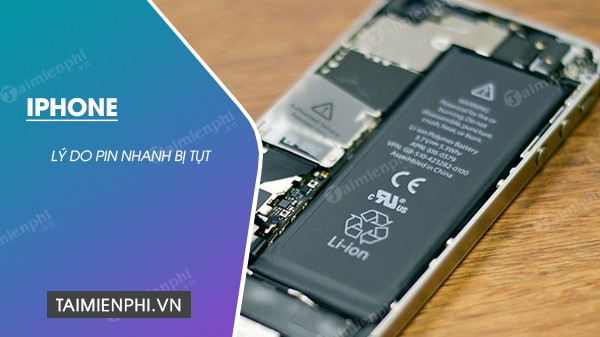
Reasons why iPhone battery drains quickly.
But as time goes on, you've probably started noticing that you need to charge your phone battery more often. While this could be due to battery degradation, it's more likely that new apps and various settings are draining the battery faster. This article will point out 5 reasons why your iPhone battery is draining quickly and how to address them to help extend average battery life a little longer.
Reason 1: Your auto-lock time is too long.
When you don't interact with your iPhone for a while, the screen will automatically turn off. This can happen as quickly as 30 seconds, but it may also never happen.
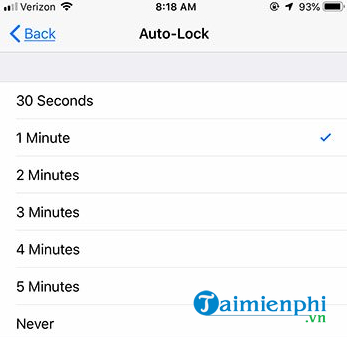
Your iPhone screen is the biggest culprit when it comes to poor battery life, so taking steps to minimize screen time when you're not using your iPhone is essential. You can adjust your iPhone's Auto Lock settings with the following steps:
- Open the Settings app .
- Select Display & Brightness.
- Tap Auto-Lock.
- Choose your desired option from 30 seconds, 1 minute, to 5 minutes.
Reason 2: The screen is too bright.
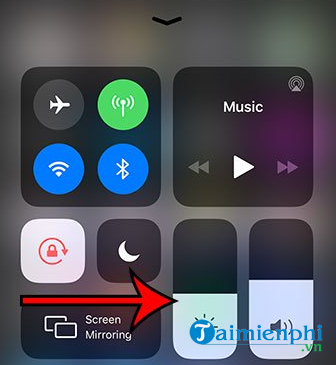
Another screen-related setting that can drain battery is brightness. The brighter the screen, the more battery power is used. You can reduce screen brightness by swiping up from the bottom of the screen to open the Control Center . Then, drag the brightness slider downwards to decrease the brightness.
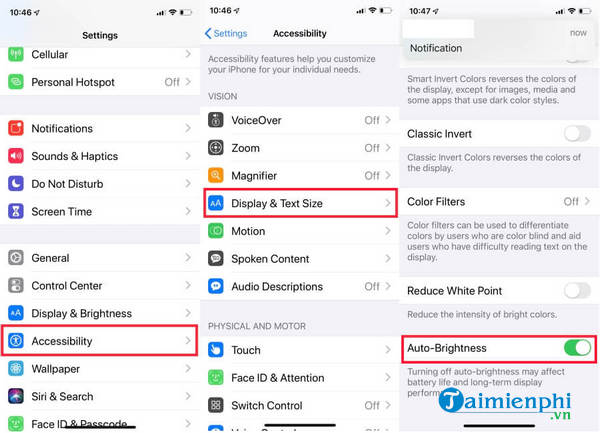
You should also adjust the auto brightness setting. This setting will cause the screen brightness to automatically adjust depending on the brightness of the room you are in. You can enable Auto Brightness as follows:
- Open Settings > Accessibility .
- Select Display & Text Size.
- Scroll down the page and turn on Auto-Brightness.
Reason 3: Too many widgets
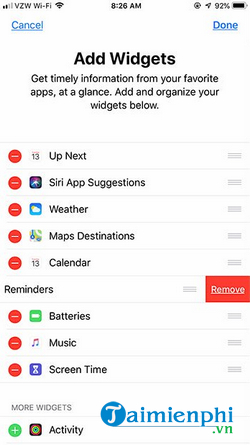
Surprisingly, you can access many different menus and settings simply by tapping the Home screen or swiping the screen in different directions. One of these main menus is the Widget screen, which you can open by swiping from left to right on the Home screen. Here, you can see several small rectangles that provide information about various apps on your iPhone, such as Weather or Calendar.
But you probably don't really need these widgets, and they can drain your battery quickly. If you scroll to the bottom of the menu and tap the Edit button, you'll see a screen like the one below. By tapping the red circle to the left of each widget, you'll see a Remove button to delete widgets you don't use.
Reason 4: You receive too many notifications.
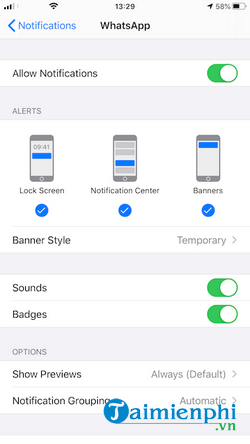
Some notifications you receive on your iPhone are for things you actually need. That could be a message notification or an Amazon update. But there are notifications that you probably don't need and may never even see. Each time one of these notifications pops up, it lights up your phone screen and wastes battery power, leading to faster battery drain . By adjusting or disabling notifications for unnecessary apps, you can minimize the number of times the screen turns on, thus preserving battery life.
- Open Settings > Notifications.
- Select the app and you can turn off Allow Notifications or turn on Allow Notifications but adjust the notification settings.
Reason 5: Too many apps want to know your location.
Many apps on the iPhone need to know your location to function correctly. While some of these apps improve by always tracking your location, many of them don't need that functionality.
When multiple apps are configured to track your location all the time, it drains your battery. Fortunately, you can change how each app tracks your location, even configuring an app to only track your location when you're actively using it. You can adjust that setting using the following steps:
- Open Settings > Privacy.
- Select Location Services and tap an app.
- Choose While Using the App or Never to prevent the app from tracking your location.

So, you now know exactly why your iPhone battery is draining quickly and how to fix it. Of course, the cause could also be the operating system, and if so, you can revert to a previous version or wait for a new update. Additionally, you can refer to this guide on how to fix an iPhone that won't charge if you're experiencing this issue.
Related Articles
 Why iPhone Battery Drains Overnight and How to Fix It6 minutes read
 Chrome Is the Reason Why Your iPhone Battery Drains So Quickly8 minutes read
 This Application May Be the Culprit Causing the Rapid3 minutes read
 iOS 26 Tips to Solve the Problem of iPhone Battery Draining: Key Takeaways6 minutes read
 Why Laptop Battery Drains Quickly and 8 Effective Ways to Fix It!7 minutes read
 Handle Rapid Battery Drain on iPhone5 minutes read
Reader Comments 0
Sign in with email or Google to join the discussion.