Table of Contents
PAI on Mi Band 5 is easier to understand when the core ideas are explained in practical terms. This guide covers what it means, how it works, why it matters, and the main details you should know.
Key Takeaways
- Understand what is PAI index on mi band.
- Explore how is the PAI score calculated.
- Understand what is the function of PAI and what is it actually used for.
What Is PAI Index on Mi Band?
Xiaomi has defined the tool as a personal index of physiological activity based on various data collected by the device such as heart rate, daily activity intensity, and other personal data provided by the user. All this data is converted into a 'PAI value' by a special algorithm developed by the brand, which is obtained when performing an activity of a certain physical intensity with the bracelet synchronized with the mobile device.
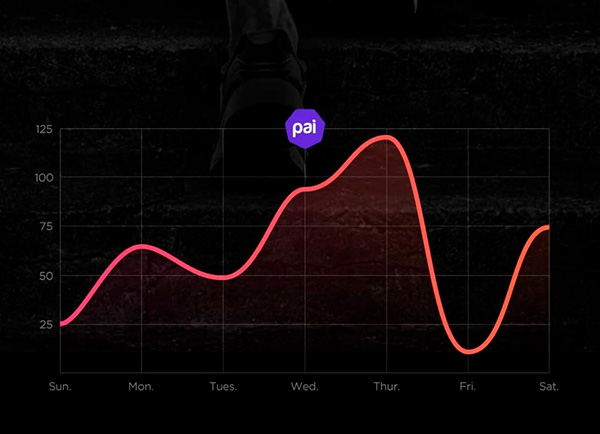
It will help prevent the risk of death from cardiovascular diseases and increase life expectancy if we maintain this PAI value above 100.
How Is the PAI Score Calculated?
The system displays points based on data collected from the last 7 days of activity. At the end of those 7 days, the goal is to never drop below 100 points. You must activate the heart rate monitor and raise it by exercising, which forces the body to pump more blood. This helps you get these results. The higher and longer your heart rate is, the more PAI points you earn.
In terms of these points, the more difficult the activity, the more points you get, in addition to using heart rate, you also have other values such as age and gender. After 7 days, they expire and you should start again, encouraging you to keep up with regular activity. This is why some days you may see your points decrease.
According to Xiaomi, the easiest way to get a higher score is to run or cycle, although working out, climbing stairs, and playing with kids can also add to your score. You can earn up to 75 PAI points per day, so hitting the weekly goal of 100 points shouldn't be too difficult.
What Is the Function of PAI and What Is It Actually Used for?
Xiaomi's new generation of Mi Band 5 smart bracelets has up to 50% higher measurement accuracy than other devices or previous generations of watches.
Not only has PAI been improved, it also has a calorie counter, distance traveled, step count or sleep tracking as well as a heart rate monitor.
In fact, the PAI value represents the level of physical activity. It tells you your lifestyle in terms of physical activity, habits, training and then evaluates it with the help of data. The bracelet will do the same to notify you when the setting is turned on if you move or play a little sport.
The entire physical activity system, i.e. PAI, works on the principle of various algorithms, which also evaluate your physical activity based on an average healthy lifestyle. The smart band then tells you how you are doing or what needs to be improved.
The PAI index is also a combination of your heart rate, height, weight, gender or even your age. The monitoring takes place throughout the week, at the end of which all the collected data will form an overall report, which then gives a conclusion about all the activities and can be compared with the previous period (one week).
The PAI value will range from 0 to 125. The ideal result for a week of physical activity should be equal to or greater than 100. In this case, everything is fine and your health will not have many problems, such as cardiovascular diseases.
You don't have to do much to reach 100 or higher. All you have to do is add a few steps each day, walk to the store or the post office, or just cycle a few times. In that case, you can get closer to 80, which is just a hair's breadth away from 100.
How to Use PAI on Mi Band
1. Open the Mi Fit app on your phone. This helps you calculate PAI score.
2. Open Heart rate detection.
3. Enable Automatic heart rate detection.
4. On your Mi Band device, open the PAI menu.
5. Now start practicing.
6. To get points you must do heart rate increasing activities.
7. The more active you are, the more points you get.
8. On the PAI menu, see the score achieved today.
9. The information will be divided into 3 categories: low, medium and high.
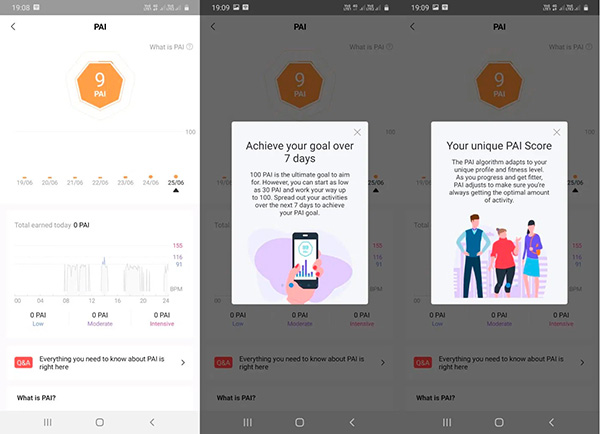
You can use the Mi Fit app to track your workout history. This helps you see all the data. The Mi Band 5 and Mi Band 6 have many other sports modes that are suitable for you to stay healthy. It is advisable not to overdo it just to reach your target score. However, if you have a habit of challenging yourself, you can use it to motivate and motivate.
Final Thoughts
The most reliable way to handle PAI on mi band 5 is to follow the process in order, verify each important setting, and test the result before moving on. Use the guidance above as a practical reference, then adjust the details for your device, software version, or specific goal.
FAQ
What is PAI on Mi Band 5?
Since the Mi Band 5, Xiaomi has added a PAI body index measurement feature.
Why is PAI on Mi Band 5 important?
Understanding PAI on mi band 5 helps you evaluate its purpose, requirements, limitations, and practical impact before you use it or make a related decision.
Who should understand PAI on Mi Band 5?
It is useful for beginners who need a clear overview and for experienced users who want to confirm terminology, requirements, or best practices.
Related Articles
 How to Install Mi Band 45 minutes read
 Review Xiaomi Mi Band 4: the Best Health Monitoring Bracelet7 minutes read
 Quick Guide to Setting up the Xiaomi Mi Band 54 minutes read
 What Is a Dual-band and Tri-band Router?12 minutes read
![[Compare] Mi Band 2 and Mi Band 3 -- Better Design, More Features](/data/thumbs_200x120/[compare]-mi-band-2-and-mi-band-3-better-design-more-features_thumbs_200x120_dyAZ4qnua.jpg) [Compare] Mi Band 2 and Mi Band 3 -- Better Design, More Features7 minutes read
[Compare] Mi Band 2 and Mi Band 3 -- Better Design, More Features7 minutes read Huawei Launched Band 4 Pro, Integrated Nfc, Gps, Spo2 Blood3 minutes read
Reader Comments 0
Sign in with email or Google to join the discussion.