Table of Contents
This guide covers the MacBook pro retina has a screen error with practical context and easy-to-follow details. Use it to understand the subject and apply the information confidently.
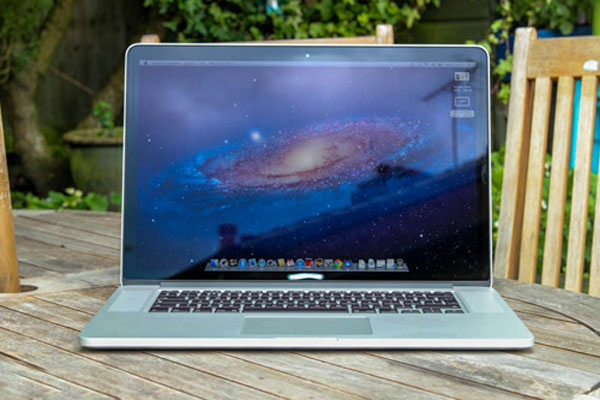 Some MacBook Pro Retina models that have just been reflected by users are screen errors (Photo: Pocket-lint).
Some members on the Apple Support Communities product support page have complained about the bug on the MacBook Pro Retina screen. Specifically, when these people put the device into "Sleep " mode for a short time and returned to use, the login screen of the MacBook Pro Retina appears blurry images. Users must leave the screen bright after a while, this shadow is gone.
According to Cnet , some users have reflected this issue to employees at Apple Store and are informed that they will be replaced. Some people predict that this is just a small batch of errors because there are not so many MacBook Pro Retina machines having this problem. Currently, it is unclear whether other devices' IPS screens have a shadowy appearance on the MacBook Pro Retina IPS screen.
MacBook Pro Retina was introduced in early June this year. This product uses a screen with IPS panels and a resolution of 2, 880 x 1, 800 pixels on a size of 15. 4 inches for a pixel density of 220ppi, higher than HDTV. As a result, the MacBook Pro Retina's screen can help users browse the web, read text, and view "smooth " quality images like on regular paper.
FAQ
What should I check before following these steps?
Confirm device and software compatibility, save important data, and make sure you have the required permissions, files, and account access.
Why might the process not work?
Common causes include outdated software, missing permissions, incompatible hardware, an unstable connection, or completing a step in the wrong order.
Can I undo the changes if necessary?
That depends on the tool or setting. Use built-in restore options when available, keep a backup, and record the original configuration first.
Related Articles
 Apple Will Release Ultra-thin MacBook Air Retina This Year3 minutes read
 LG Provides a Screen for the MacBook Pro Retina3 minutes read
 Apple Unveiled the MacBook Pro Retina Screen3 minutes read
 Why Doesn't MacBook Air Use Retina Display?5 minutes read
 MacBook Air Retina Screen Will Not Be Released This Week3 minutes read
 Apple May Have a 12-inch MacBook Retina Next Year3 minutes read
Reader Comments 0
Sign in with email or Google to join the discussion.