Article on the subject of "case command syntax"
-

CASE statement in SQL Server
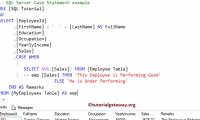
this article will show you in detail how to use the case statement handling function in sql server with specific syntax and examples to better visualize and capture functions.
-
CASE function in SQL Server (part 1)
in sql server, the case function verifies the value based on the list of given conditions, then returns one or more results. in this article we will illustrate a number of different uses of this function in different situations.
-
CASE statement in SQL Server
this article will show you in detail how to use the case statement handling function in sql server with specific syntax and examples to better visualize and capture functions.
-
CASE function in SQL Server (part 1)
in sql server, the case function verifies the value based on the list of given conditions, then returns one or more results. in this article we will illustrate a number of different uses of this function in different situations.
-
Reg command copy in Windows
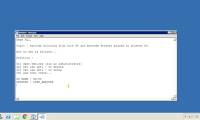
to copy an entry to the location specified on the local pc or the remote computer we will use the reg copy command. to learn more about how to use the reg copy command, you can track the syntax, explain the command parameters and the example tipsmake.com has compiled below.
-
How to use the Net Use command in Windows
the `net use` command is a command prompt command used to connect to, remove, and configure connections to shared resources, such as mapped drives and network printers.
-
Del command in Windows
the del command deletes one or more files. this command is the same as the eraser command.
-
Set command in Windows
the set command helps show, set or remove cmd.exe environment variables.
-
Cmd command in Windows
the cmd command starts a new version of the command interpreter, cmd.exe. if used without parameters, cmd will display copyright information and the version of the operating system.
-
Fc command in Windows
the fc command compares two files or a collection of files and displays the differences between them.
-
Bitsadmin getmodificationtime and bitsadmin getnoprogresstimeout command
the bitadmin getmodificationtime command retrieves the last time the task was modified or the data was successfully transferred. the bitsadmin getnoprogresstimeout command retrieves the duration, in seconds, but the service will try to transfer the file after a temporary error occurs.
-
Command at in Windows
the at command schedules commands and programs to run on a computer at a specified time with a specific date. you can only use the command at when schedule service is running.
-
The echo command in Windows
the echo command displays the message or turns on / off the command repeat feature. if used without parameters, the echo command will display the current echo setting.
-
Switch Case command in JavaScript
you can use multiple if ... else ... if statements as in the previous chapter to make a multiple choice branch. however, it is always not the best solution, especially when all branches depend on the value of a single variable.
-
The command reg add in Windows
the reg add command adds new subkeys or entries to the registry.
-
Doskey command in Windows
the doskey command calls doskey.exe (which reminds of previously entered command lines), modifies the command line and creates macros.
-
Rem command in Windows
the rem command helps write comments (comments) in a batch file or config.sys.
-
Basic SQL syntax
sql has a set of rules and instructions called syntax (syntax). this article will quickly list for you the basic sql syntax.
-
Auditpol command in Windows
the auditpol command displays information and performs functions to manipulate audit policies.
-
Exit command in Windows
the exit command exits the cmd.exe program (command interpreter) or the current batch script. to learn how to use this command, please see the example below.
-
The chkntfs command in Windows
the chkntfs command displays or modifies the automatic disk check when the computer starts. if used without options, the chkntfs command will display the file system of the specified drive.
-
The certutil command in Windows
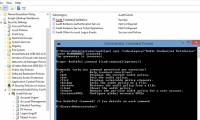
when the certutil command is run by a ca without additional parameters, it displays the current ca configuration. when the certutil command is run on an unassigned ca, the default command to run is certutil -ump.
 Home
Home Tech info
 Technology
 Science
 Life
Life Application
 Electric
 Program
 Mobile
 System