Table of Contents
This guide covers review fenda f560x Bluetooth speaker with practical context and easy-to-follow details. Use it to understand the subject and apply the information confidently.
During Tet holidays or on special occasions, each family cannot lack a loudspeaker to listen to music, contributing to a joyful atmosphere. However, traditional computer speakers seem to be too boring for technology lovers. Today, TipsMake introduces to you the Fenda F560X Bluetooth speaker with LED color change. Let's see what this product stands out for!
Evaluate the Fenda F560X Bluetooth Speaker
Review of Design
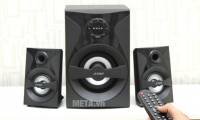
Fenda F560X Bluetooth speaker possesses impressive design. Still with familiar cube cubes, modern, but subwoofer is equipped with LED strip full of personality. This is also the highlight of this set of products.
You can change the LED color or LED light intensity with the convenient remote control. This design will make the music party more vibrant and colorful.
See also : How to make computer speakers from plastic cups
Evaluate Sound Quality
According to TipsMake, the sound quality of Fenda F560X is quite OK. 20Hz - 20, 000Hz frequency band for true sound, depicting all levels, satisfying you to enjoy all kinds of music: from lyrical music, pop, young music, rock.
In addition, you can also adjust the pitch of the sound with a treble and bass knob behind the speaker. This speaker is really good to listen to Remix music!
You can refer to music test video with Fenda F560X speaker below!
Evaluate Connectivity
Diversified connectivity - This is also an advantage not to be missed when mentioning Fenda F560X. In addition to wireless Bluetooth connectivity to the phone, you also have more entertainment and music options with F560X such as: USB music listening, FM connection, 3. 5mm jack jack connection with electrical devices laptop death, smartphone.
See also : How to connect phones and tablets with music speakers via Bluetooth
With a reference price of only VND 1, 150, 000 at META. Vn, TipsMake judged that this is a set of speakers worth your own.
Utility with Remote Control
In addition to the control panel right above the subwoofer body, the Fenda F560X is also equipped with a handy remote control to control various functions. With this control, you can easily customize functions and connections, remote LED effects without having to stand up.
Some Actual Images of Fenda F560X Fenda Computer Speakers
Control panel with integrated LED display
Design luxury black cubes
Easy-to-use control buttons
The function on the remote control
Photos of Fenda F560X computer speakers
3. 5mm jack with electronic devices connected
Sound adjustment buttons and connection terminals
Adjustable bass / treble knob
USB slot
Fenda F560X satellite speakers
Buy F560X Fenda Computer Speakers Where Good Prices, Reputation?
Through the price survey and assessment of the quality of users on the market of TipsMake, you can refer to some reputable addresses after purchasing Fenda F560X computer speakers or any line of music speakers!
Hanoi: No. 56, Pho Duy Tan, Dich Vong Hau, Cau Giay Hotline: 024 35. 68. 69. 69
Ho Chi Minh City: 716 - 718 Dien Bien Phu, Ward 10, District 10 Hotline: 028. 38. 33. 33. 66
Hopefully with this review, you will have more choices to listen to music. Look forward to the next review of TipsMake! Thanks for your interest and follow up!
See also : 3 5. 1 computer speaker models for sound quality
FAQ
What should I check before following these steps?
Confirm device and software compatibility, save important data, and make sure you have the required permissions, files, and account access.
Why might the process not work?
Common causes include outdated software, missing permissions, incompatible hardware, an unstable connection, or completing a step in the wrong order.
Can I undo the changes if necessary?
That depends on the tool or setting. Use built-in restore options when available, keep a backup, and record the original configuration first.
Related Articles
 Review Fenda Bluetooth Speaker6 minutes read
 Evaluate Fenda T-400X 2.1 Wireless Bluetooth Speaker Connection5 minutes read
 Review Speaker Karaoke Microtek MTK - 04 __ Great Bluetooth Speakers6 minutes read
 Review the Soundmax M2 Bluetooth Speaker5 minutes read
 Buy the Best Bluetooth Speaker Company Today?13 minutes read
 Review Sony Srs-xb10 Bluetooth Speakers6 minutes read
Reader Comments 0
Sign in with email or Google to join the discussion.