Table of Contents
This guide covers PC-z1 - miniature netbook with practical context and easy-to-follow details. Use it to understand the subject and apply the information confidently.
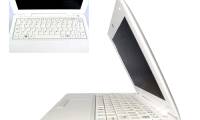
 NetWalker PC-Z1 Photo: Engadget .
Sharp plans to introduce a super-compact model called NetWalker PC-Z1 this month. In fact, NetWalker PC-Z1 is a mobile Internet device (MID) - designed as a netbook, with a 5-inch screen. NetWalker PC-Z1 is equipped with Freescale i. MX515 800 MHz processor on ARM Cortex-A8 platform, 512 MB RAM memory, and 4 GB Flash storage drive. The 5-inch screen of the device uses backlight technology - LED backlit has a resolution of 1024 x 600 pixels, just enough space for surfing the web or basic office apps. But only 4 GB of Flash storage is not enough for the needs of users who want to own an ultra-portable entertainment device. NetWalker PC-Z1 also has a QWERTY keyboard, Wi-Fi 802. 11b / g connection, expandable microSDHC card slot supporting up to 16 GB capacity, 2 USB 2. 0 ports, and a mini USB port. Extremely light machine, only 410 grams and compact with a size corresponding to 161 x 109 x 20-25 mm. Battery life is advertised up to 10 hours. The device runs Linux Ubuntu 9. 04, and in the "fast mode" mode, users can access the apps immediately after 3 seconds of startup. NetWalker PC-Z1 will be sold in Japan first, scheduled for September 25 for about US $ 480, equivalent to VND 8. 6 million. See more pictures of NetWalker PC-Z1.
FAQ
What should I check before following these steps?
Confirm device and software compatibility, save important data, and make sure you have the required permissions, files, and account access.
Why might the process not work?
Common causes include outdated software, missing permissions, incompatible hardware, an unstable connection, or completing a step in the wrong order.
Can I undo the changes if necessary?
That depends on the tool or setting. Use built-in restore options when available, keep a backup, and record the original configuration first.
Related Articles
 How to Create a Dollhouse with ChatGPT, Create a Miniature 3D Model with ChatGPT9 minutes read
 Invite to Download Combat Strike Pro, the Miniature Version of3 minutes read
 LG Launches a Very Light 10-inch Netbook3 minutes read
 Intel Developed a Hybrid Netbook3 minutes read
 Netbook Loses Its Identity5 minutes read
 Thin Netbook 5 Mm3 minutes read
Reader Comments 0
Sign in with email or Google to join the discussion.