Table of Contents
This guide covers MacBook pro retina 2013 is very difficult to fix when hardware failure with practical context and easy-to-follow details. Use it to understand the subject and apply the information confidently.
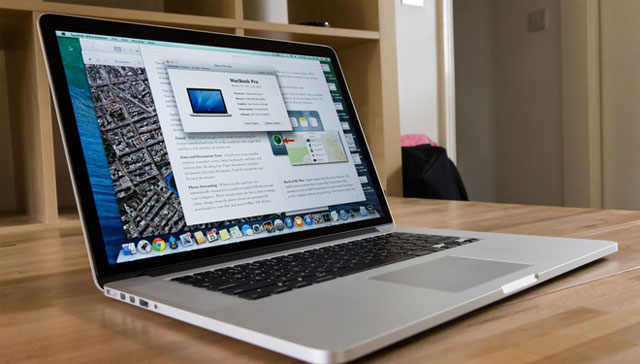
15-inch Apple MacBook Pro Retina laptop gets the iFixIt "endoscope" component and evaluates the problem of repair when there is a problem - (iFixIt Photo)
IFixIt Has explored details of the internal components of the 2013 MacBook Pro Retina series Released by Apple on October 22.
Having a screen size of 15 inches but only 0. 7 inches thin, the 2013 MacBook Pro Retina similar to the 2012 15 inch MacBook Pro Retina, is not easy to fix, or it is very difficult to correct when there is a problem IFixIt Gives the lowest score on the score column of 1-10 in terms of ease of damage (1-10, the most difficult to fix).
The exclusive Apple screw is used in components, the board makes it difficult to disassemble when there is no dedicated tool. Furthermore, the RAM memory is soldered to the board (Elpida DRAM type) and there is only one radiator inside the unit with a single heat sink.
 Remove the board to review components of the MacBook Pro Retina 2013 - (Photo: iFixIt)
New in 2013 MacBook Pro Retina is Intel Core 4-generation chip (Intel Haswell), and Iris Pro graphics chip. Intel Haswell chip increases battery life by two hours and keeps battery space in the camera body like the previous generation. In addition, this new product line also integrates Intel Thunderbolt 2 port (Intel DSL5520 Thunderbolt 2 Controller).
Comparing the Configuration of the 2013 MacBook Pro Retina and the
 You can choose a higher profile and the corresponding price increase - (Photo: TechCrunch)
|
MacBook Pro Retina 2013 |
MacBook Pro Retina 2012 |
|
|
Screen / Shell |
13, 3 inch / 15 inch Aluminum cover No tap |
13, 3 inch / 15 inch Aluminum cover No tap |
|
Resolution |
2560 x 1600 (Retina) |
|
|
Operating system |
OS X Mavericks (10. 9) |
OS X Mountain Lion (10. 8) |
|
Storage capacity |
128 GB SSD |
|
|
Processor chip |
Dual-core, Intel Core i5 2, 4GHz (Haswell), 3MB L3 cache |
Dual-core, Intel Core i5 2, 5GHz (Sandy Bridge), 3MB L3 cache |
|
Graphics |
Intel Iris Graphics |
Intel HD Graphics 4000 |
|
RAM memory |
4GB DDR3L onboard |
8GB DDR3L onboard |
|
Connect |
Thunderbolt 2, Wi-Fi 802. 11ac, Bluetooth 4. 0, USB 3. 0 |
Wi-Fi 802. 11n, Bluetooth 4. 0, Thunderbolt, HDMI, USB 3. 0, USB 2. 0, SDXC memory card slot |
|
Battery / Time of use |
9 hours |
6 hours |
|
Weight |
1, 56kg |
1, 61kg |
|
Prices start from 1. 999 USD |
Starting from 2. 199 USD |
The configuration has increased significantly when choosing the 15-inch 2013 MacBook Pro Retina, specifically Intel Core i7, 8-16 GB RAM, NVIDIA GeForce GT 650M discrete graphics card, and storage capacity of 256GB and 512GB. Prices start from $ 2, 199-2, 799.
FAQ
What should I check before following these steps?
Confirm device and software compatibility, save important data, and make sure you have the required permissions, files, and account access.
Why might the process not work?
Common causes include outdated software, missing permissions, incompatible hardware, an unstable connection, or completing a step in the wrong order.
Can I undo the changes if necessary?
That depends on the tool or setting. Use built-in restore options when available, keep a backup, and record the original configuration first.
Related Articles
 Apple Reduced the Price of MacBook Pro Retina and MacBook Air, Upgraded3 minutes read
 MacBook Air 12 'Retina Has Started to Be Mass-produced?3 minutes read
 Apple Stopped Supporting Hardware Repair / Replacement for MacBook Pro 20123 minutes read
 Mac Computers Hardly Have Breakthrough Changes at WWDC 20136 minutes read
 Apple Will Release Ultra-thin MacBook Air Retina This Year3 minutes read
 MacBook Pro Retina Offers Discounts That Are Still Heavily Stocked3 minutes read
Reader Comments 0
Sign in with email or Google to join the discussion.