Table of Contents
This updated overview organizes the essential information about List of Samsung Smartphones Eligible for Android Updates Within, including practical uses, key features, setup considerations, and common questions.
What This Guide Covers
- 7 years of Android updates
- 4 years of Android updates
- 3 years of Android updates
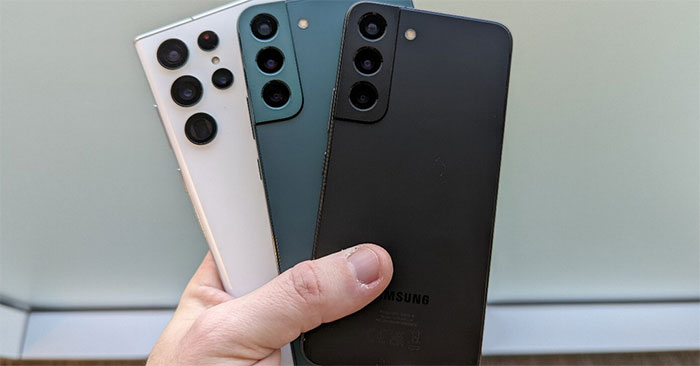
Recent flagship devices like the Galaxy S23 and Galaxy Z Fold 5 are expected to receive five years of security updates.
Samsung has extended its 4-year update policy to a variety of devices, including flagship models, mid-range smartphones, foldable smartphones and tablets.
Samsung expands its update policy to ensure more users benefit from extended software support, enhancing device longevity and user satisfaction.
Below is a detailed list of devices eligible for these extended updates.
7 years of Android updates
- Galaxy S24 Series
- Galaxy Z Fold 6
- Galaxy Z Flip 6
The Galaxy S24 series along with Samsung's latest folding screen smartphones will receive Android updates for 7 years, that is until 2031.
4 years of Android updates
- Galaxy S23, S23 Plus, S23 Ultra, S23 FE
- Galaxy S22, S22 Plus, S22 Ultra
- Galaxy S21, S21 Plus, S21 Ultra
- Galaxy Z Fold 5
- Galaxy Z Flip 5
- Galaxy Z Fold 4
- Galaxy Z Flip 4
- Galaxy Z Fold 3
- Galaxy Z Flip 3
- Galaxy A55 5G
- Galaxy A54 5G
- Galaxy A53 5G
- Galaxy A73
- Galaxy A35 5G
- Galaxy A34
- Galaxy A33
- Galaxy A24
- Galaxy F54 5G
- Galaxy A15 5G
- Galaxy Tab S9 series (including FE and FE Plus)
- Galaxy Tab S8, S8 Plus, S8 Ultra
- Galaxy Watch 4, 5, 6 series
- Galaxy Watch 7, Watch Ultra
3 years of Android updates
- Galaxy S20 Plus 5G/4G
- Galaxy S20 5G/4G
- Galaxy S20 FE 4G/5G
- Galaxy S10 4G/5G
- Galaxy S10 Plus
- Galaxy S10e
- Galaxy S10 Lite
- Galaxy Note 20 Ultra 5G/4G
- Galaxy Note 20 5G/4G
- Galaxy Note 10 Plus 5G/4G
- Galaxy Note 10 5G/4G
- Galaxy Note 10 Lite
- Galaxy A71 4G/5G
- Galaxy A72
- Galaxy A51 4G/5G
- Galaxy A52 4G/5G
- Galaxy A90 5G
- Galaxy Z Fold 2 5G/4G
- Galaxy Z Flip 5G/4G
- Galaxy Fold 5G/4G
- Galaxy Tab S7 Plus 5G/4G
- Galaxy Tab S7 5G/4G
- Galaxy Tab S7 FE
- Galaxy Tab S6 5G/4G
- Galaxy Tab S6 Lite
Samsung's provision of three years of updates for older flagship models and select mid-range smartphones and tablets ensures that even older devices remain relevant and safe for a reasonable period of time.
Final Thoughts
Use the instructions and checks above in order, verify the result after each major step, and keep a backup whenever the process changes important files or system settings.
FAQ
What is Samsung used for?
Recent flagship devices like the Galaxy S23 and Galaxy Z Fold 5 are expected to receive five years of security updates.
Who should consider Samsung?
It is most useful for readers who need the features, workflow, or problem-solving approach described in this guide.
What should I check before using it?
Review compatibility, current software requirements, privacy or security settings, costs, and any limitations that could affect your workflow.
Related Articles
 List of Samsung Galaxy Devices That Will Receive the Android 15 Update Explained5 minutes read
 Ranking the World's 10 Most Powerful Android Smartphones Today5 minutes read
 Samsung Galaxy, Updated, One UI 7, Android 154 minutes read
 Ranking the 10 Most Quirky Android Phones in History8 minutes read
 List of Xiaomi Smartphones to Android 8 Oreo and Android 9 Pie3 minutes read
 List of CSC Product Codes and Specific Product Areas of Samsung Galaxy10 minutes read
Reader Comments 0
Sign in with email or Google to join the discussion.