Table of Contents
This guide provides a practical overview of karaoke software on quality computers with clear explanations and useful details. It focuses on the information users are most likely to need.
To own a karaoke room at home, karaoke software on the computer is a great assistant for us. Possessing professional karaoke features, these software will help you satisfy your singing passion.
How Karaoke Software on Quality Computers Works
The preparation is very simple, you just need a laptop or computer with karaoke software Installed , then Install the Microphone on your computer . the app brings users a rich song, so you can choose and show your voice. The following article of the Network Administrator will introduce you to the quality karaoke software on the computer, completely free to use.
- How to create lyrics of karaoke songs on Windows
- Top 5 great Karaoke applications for Andoird
- Simple way to create Karaoke songs
- Download Karafun Player software
Used by many people, Karafun Player still ranks high on top of karaoke shows. The tool possesses many rich features, huge song repositories with many different genres, such as young music, foreign music, lyric music, revolutionary music,. help users choose songs freely. I love, or choose new types of songs.
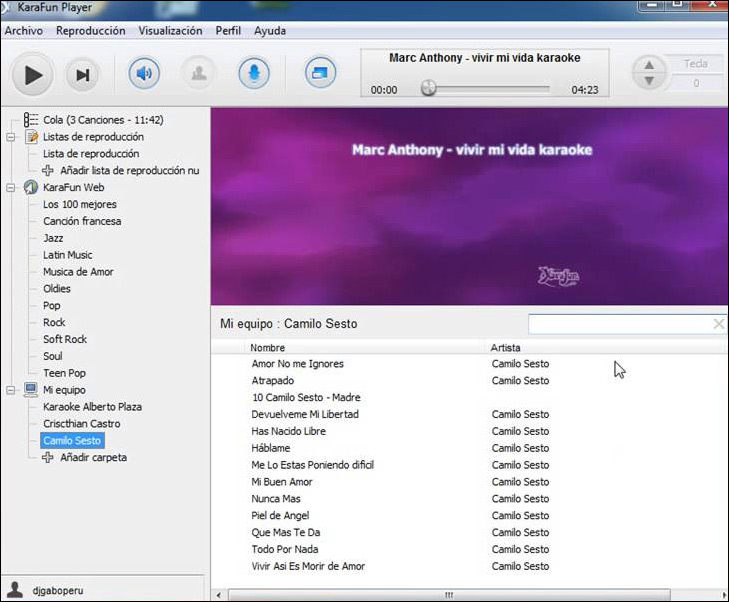
Each song will be provided with detailed information such as images, sounds, artist and musician names that are displayed on the interface for easy management.
In addition, Karafun Player will help to record vocals, karaoke songs to listen to again through the support feature to record songs. the app supports file formats like AVI, WMV, MID, MP3, OGG, KAR.
How to use Karafun Player karaoke on your computer will be written in detail in How to sing Karaoke on your computer?.
- Download Winlive Free software
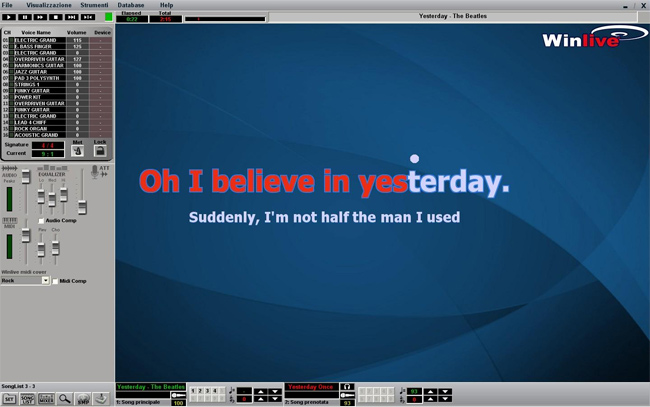
Winlive Free is also karaoke software with many easy-to-use features, handling multiple audio files and displaying lyrics on the screen to sing karaoke.
The program supports files including MIDI, Kar, MP3 and CD + G. The lyrics will display with a large font size on the screen interface, convenient for tracking. Karaoke interface using Winlive Free is relatively simple, the control buttons, play / play music, pause, switch to the previous song or the next song is placed on the same interface, with an easy-to-see position.
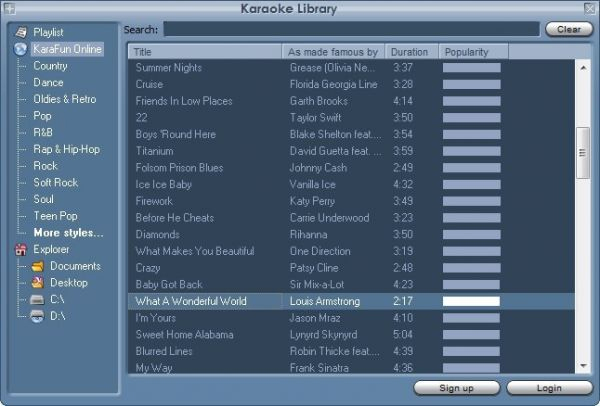
After searching for songs that want to sing karaoke, users can store their favorite songs in the app, then categorize them in different genres, different styles, depending on users.
In particular, Winlive Free provides a mixer for you to take control of the song, such as selecting musical instruments, adjusting high frequency tones,.

- Download Walaoke software
Walaoke is also karaoke software on the computer like the above programs. But, Walaoke can help you create your own karaoke versions with extremely simple implementation. Songs will be sorted by title or by different topics and genres. The program will support AVI, MKV, DAT, VOB, MPG, FLV, WMV, or MP3 + CDG, MP3 + LRC and MP3 + XML files.

- Download Vietnam Karaoke
One of Vietnam Karaoke's special features is to automatically update the source of karaoke songs on the network when the computer is connected. Thus, selecting songs will be faster, with the latest songs. The visual effects of karaoke were also emphasized by VietNam Karaoke. Live wallpaper with changing scenery creates a lively when singing karaoke on the computer.
In addition, VietNam Karaoke also created Echo mechanism to have more echo and sound effects when singing, creating an attraction when singing karaoke.

Above are some karaoke software on quality computers, used completely free. In addition, there are many karaoke applications on smartphones, so you can sing karaoke right on your phone.
Hope this article is useful to you!
FAQ
What is the main benefit of karaoke software on quality computers?
The main benefit is a clearer understanding of the topic and a practical way to apply the information covered in this guide.
What should I check before using karaoke software on quality computers?
Confirm compatibility, review the required settings, protect important data, and use the latest supported version whenever possible.
What should I do if the result is different?
Repeat the steps carefully, verify permissions and version differences, and consult the product's official support documentation for changes not shown in the article.
Related Articles
 Simple Way to Create Karaoke Songs3 minutes read
 Top 3 Models of Karaoke Speakers Are the Youngest Favorite Today6 minutes read
 Instructions for Using Karafun Player to Sing Karaoke on Your4 minutes readEnhance Music Style with Temeisheng Q8 Mobile Speaker5 minutes read
 What Is the Hot SoundMax M-1 Speaker That Young People Are Crazy About?7 minutes read
 Karaoke Sets: What Equipment Is Needed to Sing Karaoke?9 minutes read
Reader Comments 0
Sign in with email or Google to join the discussion.