Table of Contents
The sections below explain instructions for registering cgv cinemas account in a clear and practical way. Review the key details, examples, and considerations before applying the information.
With CGV cinema system in Vietnam, users can follow the most attractive cinema through CGV Cinemas application to help viewers to keep track of CGV's blockbusters on the phone. mine. In addition, users can book movie tickets and search for the nearest CGV theater.
In order to perform the above things, users need to have an account when using CGV Cinemas, currently there are two ways for users to register for CGV Cinemas accounts. The steps below explain how to register a CGV Cinemas account.
- Download CGV Cinemas for iOS
- Download CGV Cinemas for Android
Instructions for registering CGV Cinemas account
1. Register your own CGV Cinemas account
Step 1: On the main screen of CGV Cinemas application, please click the list icon in the upper right corner. Then click Login.

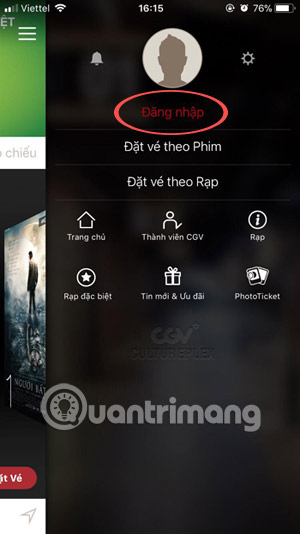
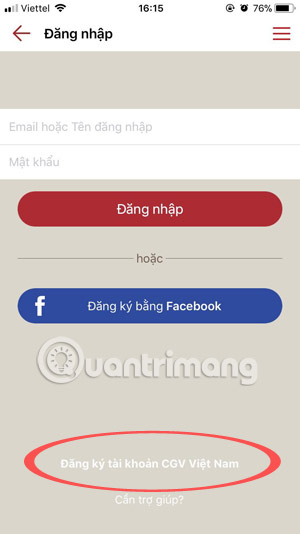
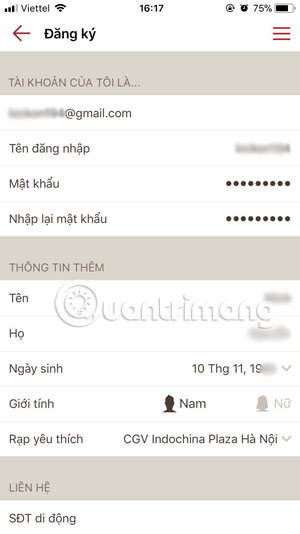
Step 2: In the login interface, click Register Vietnam CGV account. Write down all information such as Email address name, username, password. Under the More Information Section, write your Full Name, select your date of birth, gender, and your favorite CGV cinema.
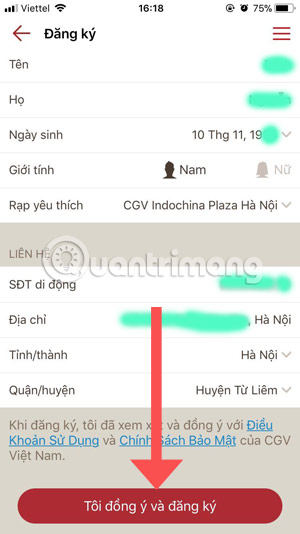
Step 3: Finally, contact, including Phone number, address, update information, please click I agree. Next, there will be an email sent by CGV Cinemas to your email address, go to your email to check and activate by clicking on the CGV Cinemas link sent to you. That's it.
2. Register CGV Cinemas account with Facebook account
Step 1: In the CGV Cinemas login screen, select Register with Facebook and click Continue. After enabling CGV to use Facebook to sign in, click Next to Sign in with the Facebook application In the next step.
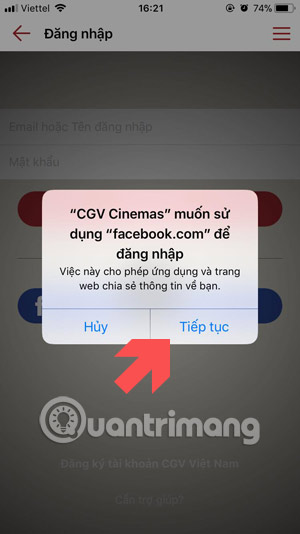
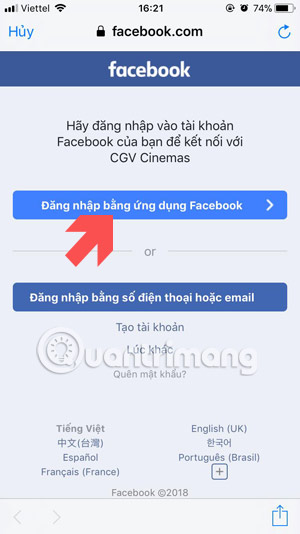
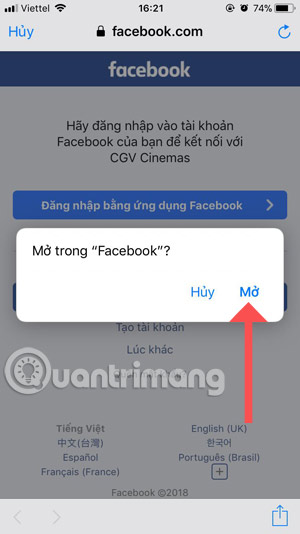
Step 2: Notice to open in the Facebook app appears, click Open To continue. Then the table filled in information appears, if your Facebook account is registered with SDT, you will be filled in the phone number in the information table, if your Facebook account is email, it is the same.

Then you just need to fill out the information and click I agree and register Is okay.
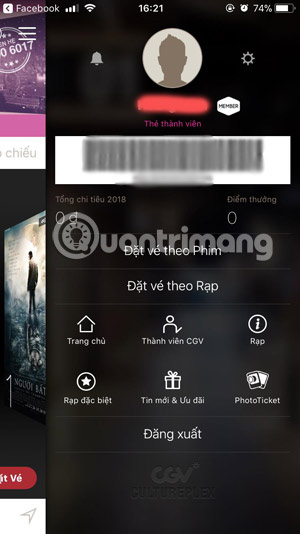
The above is a two-way guide to register a CGV Cinemas account, once you have a CGV Cinemas account, then you can use CGV Cinemas's services already.
- Free video watching software on computers
- How to watch movies online, get link Fshare on Goophim
- How to download movies on BanhTV
FAQ
What is the main benefit of instructions for registering cgv cinemas account?
The main benefit is a clearer understanding of the topic and a practical way to apply the information covered in this guide.
What should I check before using instructions for registering cgv cinemas account?
Confirm compatibility, review the required settings, protect important data, and use the latest supported version whenever possible.
What should I do if the result is different?
Repeat the steps carefully, verify permissions and version differences, and consult the product's official support documentation for changes not shown in the article.
Related Articles
 How to Registering a Skype Account: Step-by-Step Guide4 minutes read
 How to Book Movie Tickets on the Phone with CGV Cinemas7 minutes read
 9 Secrets That Movie Theater Staff Never Reveal to You7 minutes read
 Instructions for Registering and Installing Dropbox4 minutes read
 Instructions for Registering a Flickr Account3 minutes read
 Create Minecraft Account: How to Registering a Minecraft Account3 minutes read
Reader Comments 0
Sign in with email or Google to join the discussion.