Table of Contents
This updated guide examines How to Get Free Minecraft Earth Skin and organizes the essential facts, background, and practical takeaways in clear American English.
Minecraft Earth is expected to be released on Android 7 and iOS 10 and above and will support ARkit and ARcode. If you play Minecraft Earth on older devices that do not support augmented reality framework, you will not be able to play Minecraft Earth.
In addition, Microsoft allows players to register at Minecraft Earth website. After signing up for Minecraft Earth's free skins, you will get free skins for Minecraft Earth Bedrock.
To get the free skins of Minecraft Earth, you need a free Xbox Live account and both Android 7 or iOS 10 or higher devices. Please follow the instructions below to receive Minecraft Earth skins.
- How to fix Crash cannot access Minecraft
- Instructions to download Minecraft for free on iPhone
- Instructions for creating your own Minecraft mods to play games in your style
How to get Minecraft Earth skins for free
Step 1: Visit the link below, then click Sign Up Now to login your Hotmail, Outlook account.
Link to receive Minecraft Earth


Step 2: When logging in to your hotmail account or outlook, you may receive some update information or log in with fingerprint security. You can click Next or No, thank you to continue receiving Minecraft Earth skins.


Step 2: Next, you will be redirected to the registration page to receive the skin. Here you enter the Microsoft Xbox Live email address, select the country, enter the code zip code, select iOS 10 or Android OS 7. Finally write your Google ID or Apple ID account.


Then check I want to know about Minecraft's own information, tips and incentives. Privacy policy and select Sign Me Up . Next if you see the notice Success!You're signed up successfully. Now wait for Minecraft Earth information to be sent to your mailbox

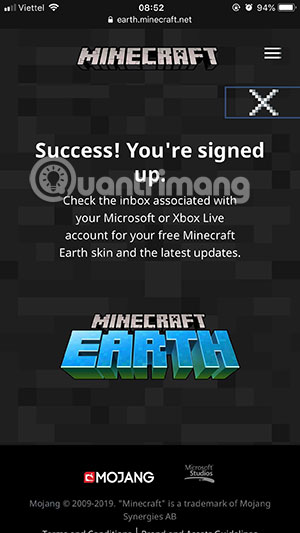
The time of Minecraft Earth sending information about your mailbox may be a bit long, when a confirmation letter from Minecraft Earth is sent to your registered email address, it means you have successfully registered to receive skins in MInecraft Earth already. there.
With Minecraft, in addition to PC and Mobile versions, you can play Minecraft on the internet version. In Minecraft Web version, Minecraft will let you go back to Minecraft version 2009, to play Minecraft on the internet, please see the instructions in the article How to play Minecraft for free on the internet.
FAQ
What is How to Get Free Minecraft Earth Skin about?
It provides a structured overview of minecraft earth, explains the main context, and highlights practical takeaways for readers.
Why does this topic matter?
Understanding the main concepts helps readers evaluate the issue, avoid common mistakes, and make better-informed decisions.
How should readers use this information?
Use the guidance as a practical starting point, confirm details that may have changed, and follow current product, safety, or security recommendations.
Related Articles
 How to Mod Minecraft PC Skin Easily3 minutes read
 Top Most Beautiful Minecraft Skin, Hot Minecraft Skin6 minutes read
 How to Download Minecraft Earth Without Fake IP4 minutes read
 How to Change Skin in Minecraft: Complete Guide7 minutes read
 How to Change Skins in Minecraft PE: Practical Guide4 minutes read
 Instructions to Get the Frankenstein Free Fire Skin for Free4 minutes read
Reader Comments 0
Sign in with email or Google to join the discussion.