Table of Contents
This guide provides a clear, practical overview of fake voice 7.0 - fake voice 7.0 download and installation, with useful context, important details, and straightforward takeaways for everyday readers.
Download Fake Voice 7.0 here
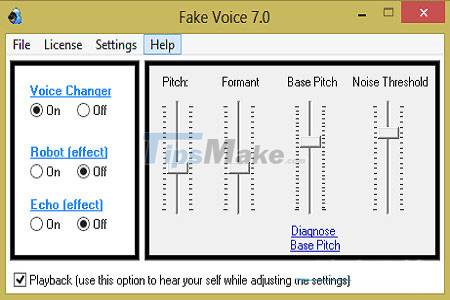
Let's say if you are female and want your voice to sound like a man, here is the tool that helps you do just that. You can apply a robotic effect to make an alien-like sound, or an echo effect to make it sound like you are speaking from the bottom of a well or tunnel.
Just integrate Fake Voice with your IM and make chats with your friends. Whether you want to have fun with your friends or you want to improve the quality of your voice for recording, this tool gives you full control over your voice.
Fake Voice 7.0 is a software program developed by Web Solution Mart. The main executable file is named fv.exe. The setup package usually installs about 14 files and is usually more than 4.5MB in size. The program installs a standalone sound driver on your sound card. You can then select it through the Windows volume control to enjoy the changes.
Features of Fake Voice
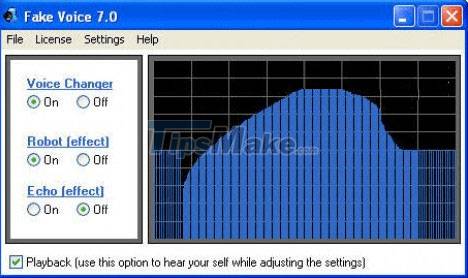
Fake Voice allows you to change your real voice when chatting through chat applications. The tool supports many popular chat applications Yahoo, MSN, Skype, etc. Fake Voice provides hundreds of different sound effects for you to freely choose depending on your needs.
In addition, you can optionally change the sound parameters as desired. Fake Voice is compact, easy to use and consumes little system resources. However, this tool is only compatible with the Windows operating system.
Advantages
- Change voice sound
- Enables real-time voice play as you make adjustments
- Adjust various tonal properties
- Uses very little system resources
Defect
- May produce some distortion in the voice
- The voice sounds like a robot when the gender is changed
- The application interface is a bit old
- Not allowed to write
Key Takeaways
Use the information above as a practical reference for fake voice 7.0 - fake voice 7.0 download and installation. Review each step carefully, confirm any requirements, and choose the option that best fits your situation.
FAQ
What does this guide explain about Fake Voice 7.0 - Fake Voice 7.0 Download and Installation?
It explains the main concepts, practical considerations, and useful steps related to fake voice 7.0 - fake voice 7.0 download and installation without requiring advanced knowledge.
Who can benefit from learning about Fake Voice 7.0 - Fake Voice 7.0 Download and Installation?
This information is useful for readers who want a clear overview, practical guidance, and reliable steps related to fake voice 7.0 - fake voice 7.0 download and installation.
What should I check before applying this information?
Review the requirements, confirm that your device, software, or situation matches the instructions, and back up important data before making major changes.
Related Articles
 How to Use Fake Voice to Change Voice: Step-by-Step Guide3 minutes read
 Using a Fake Voice Created by AI, the Crook Pretends to Be the3 minutes read
 Tips to Avoid Fake Download Button7 minutes read
 5 Real-Time Voice Changing Software for Discord, Skype, Steam6 minutes read
 AI Can Fake Anyone's Voice in Just a Few Minutes3 minutes read
 4 Ways to Fix IDM Error Fake Serial Number6 minutes read
Reader Comments 0
Sign in with email or Google to join the discussion.