Table of Contents
This updated guide explores don't charge your iPhone to 100%, here's why with practical details, clear explanations, and useful takeaways. In the smartphone era, the battery is the "lifeblood" of the device. Although phone manufacturers, including mid-range and low-cost models, have optimized battery life very well, even enough to last all day, battery life is another problem.
So, why is 100% charging harmful? Accordingly, when the battery is fully charged, it will fall into a "stressed" state, which in the long run will reduce its lifespan and cause the battery to deteriorate faster.

Many people often have the habit of charging their iPhone to 100%.
iPhone has a solution, but it is not enough
Apple has recognized this problem and equipped the iPhone with an optimized battery charging feature called "Optimized Battery Charging". This feature will "learn" your charging habits, delaying the full 100% charge until closer to the time you usually unplug it (like in the morning). But recently, the company continued to launch another weapon to support the safe battery charging process, called "Charge Limit".
How to enable Charge Limit feature
This feature lets you set a maximum charge level (e.g. 80%, 85%, 90%.) that prevents your iPhone from charging to 100%. This feature is currently only available from iPhone 15 and later, to enable it you open:
open Settings > select Battery > select Charging. Here, you can choose the desired charging limit from 80-100%. According to Apple, limiting charging, even to 95%, can bring long-term benefits to the iPhone battery.
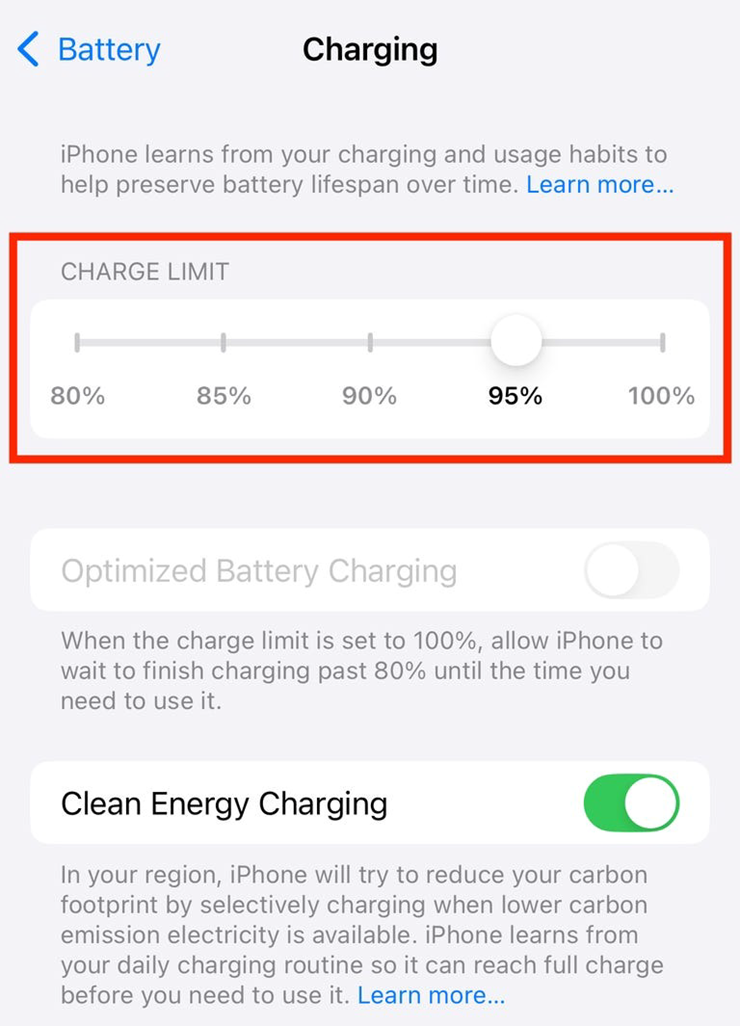
Still, there are many factors that affect battery life, and 100% charging is not the only culprit. Therefore, phone manufacturers, including Apple, have integrated many technologies to protect the battery.
Still, changing your charging habits and avoiding frequent 100% charging is a simple and effective way to extend your iPhone's battery life.
FAQ
What is the main takeaway about Don't Charge Your iPhone to 100%, Here's Why?
The key is to understand the core idea, compare the available options, and apply the practical guidance that matches your situation.
What should beginners know about Don't Charge Your iPhone to 100%, Here's Why?
Start with the essential steps and terminology. Avoid changing advanced settings until you understand how they affect performance, privacy, cost, or compatibility.
How can I use this information in practice?
Follow the relevant section in order, test one change at a time, and confirm the result before moving to the next step or recommendation.
Related Articles
 How to Fast Charge Iphone 113 minutes read
 How to Charge iPhone Without Using a Charger: Clear Instructions12 minutes read
 How to Charge iPhone on a New MacBook Pro4 minutes read
 Quick Charging Tips Twice for iPhone 6, iPhone 76 minutes read
 What to Do When the iPhone Can Not Charge the Battery?4 minutes read
 Chop the iPhone Battery: Complete Guide and Key Details6 minutes read
Reader Comments 0
Sign in with email or Google to join the discussion.