Table of Contents
This guide provides a clear overview of cats & soup, including Avoid Auto-Selling Items, Upgrade the Kitchen Area to Increase the Price of Food. Use it to understand the topic, compare the available options, and make a more informed decision.
Cats & Soup is an idle game. Players will have to support cute cats to make hearty dishes for customers. It sounds simple, but in fact, Cats & Soup has a lot of work that requires players to perform. In the following Cats & Soup tips, let's find out the things and tasks that gamers need to do in this relaxing game.
Avoid Auto-Selling Items
Ready-to-sell items are displayed at the bottom of the screen. If you do not press to sell to the customer, the items will continue to accumulate at the bottom until there is no space left to sell more.

When 8 items are collected at the bottom of the screen, the first item on the left side will automatically be sold at a huge discount.
The player will only earn 50% of the original price of that product. To avoid such huge losses, quickly tap on the items to sell them at the right price.
Upgrade the Kitchen Area to Increase the Price of Food
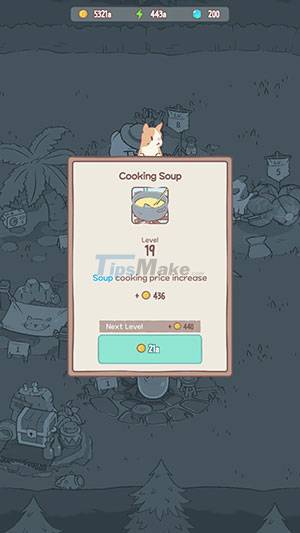
Upgrading the main kitchen area in the middle will increase the price of all the soups. To upgrade the cooking place, tap it then tap the level number and be taken to the level up screen. Gamers need to have enough gold to level up.
Upgraded Cutting Areas
The best way to increase the price of soup is basically to upgrade all the slicing stations like the ones where the carrots and cabbage are cut.
Tap the carrot or cabbage slicer and then tap their level number. Everyone will need a lot of gold to upgrade the slicing tools. However, the price for all the soups will go up a lot, so it's totally worth it.
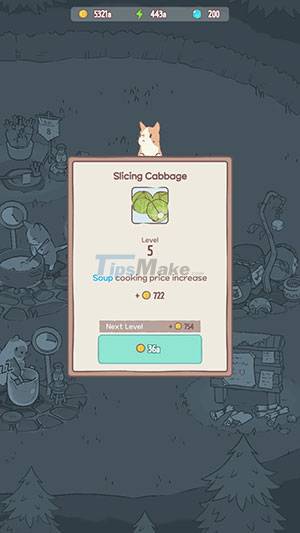
As people progress, people will unlock advanced gadgets, such as peelers and juicers. Upgrade all tools to increase the selling price of the finished dish
Use Recipe Points to Increase the Price of Soup
Players will earn recipe points from rest areas. Tap the hammer icon in the lower right corner of the screen to open the build menu. Head to the Rest and then book a rest facility for the cats. After a hard day chopping vegetables, these adorable cats deserve a break and play.
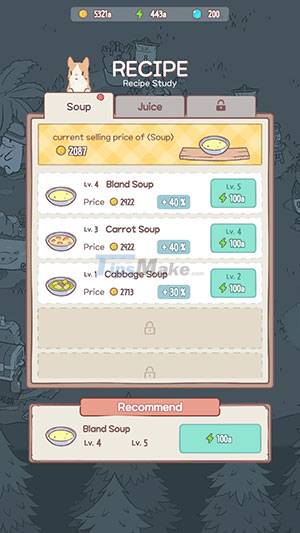
Make a Bower or Trampoline for your cats so they can enjoy some shade, listen to music, and have fun after a tiring day at work. When they leave their resting place, the player will receive recipe points (green lightning bolt icon). Tap that icon to collect recipe points (they will also be collected automatically).
Now tap on the red bound pamphlet next to the hammer icon. A new menu will appear on the screen. Here, gamers can use recipe points to increase the price of soups, such as carrot soup, cabbage. according to a certain ratio.
Conclusion
Understanding Cats & Soup makes it easier to compare options, avoid common mistakes, and apply the information in this guide more effectively. Review the relevant requirements before making changes or choosing a solution.
FAQ
What is Cats & Soup?
Avoid Auto-Selling Items Ready-to-sell items are displayed at the bottom of the screen.
Why is Cats & Soup important?
Understanding Cats & Soup helps you evaluate features, compatibility, performance, and potential limitations before you choose a product or follow a procedure.
What should you consider when using or choosing Cats & Soup?
Consider your specific goal, compatibility requirements, available features, cost, security, and the practical recommendations described in this guide.
Related Articles
 Cats && Soup: Fluffy Town6 minutes read
 TOP Light Game, Relaxing Game on Phone4 minutes read
 Soup for Cooling, Cool Soup, Delicious Soup for Summer6 minutes read
 Infographic - the Grrr Benefit of Cats!3 minutes read
 Top 10 Most Beautiful Cats in the World5 minutes read
 Eat Rice Soup - Bad Habits That Many People Are Suffering5 minutes read
Reader Comments 0
Sign in with email or Google to join the discussion.