Table of Contents
Hawaiian Airlines led the median download ranking in Ookla’s first-quarter 2025 in-flight Wi-Fi analysis, followed by Qatar Airways and Spirit Airlines. Qatar Airways led the upload and latency comparisons. These results reflect a historical sample of tests. The aircraft and route matter more when you are booking a specific trip.
What Ookla measured
The reported median download speeds were about 162 Mbps for Hawaiian Airlines, 121 Mbps for Qatar Airways and 85 Mbps for Spirit Airlines. Ookla highlighted Starlink deployments at Hawaiian and Qatar when discussing the results. See the in-flight Wi-Fi report for its comparisons.
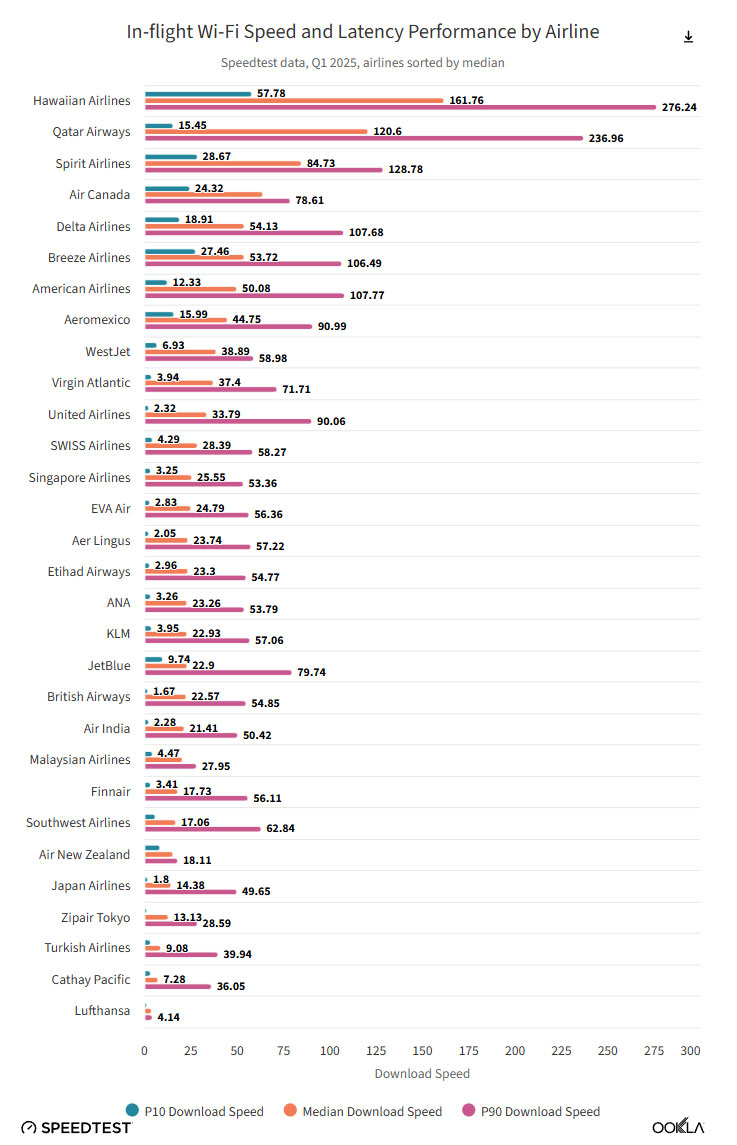
Download speed matters for loading pages or streaming. Upload speed matters when sending files. Latency is the time it takes data to travel to a server and back. It affects how responsive interactive applications feel, even if downloads are fast.
Check Wi-Fi on the flight you plan to take
- Look up the airline’s onboard Wi-Fi page and check the aircraft type and route for your flight. Aircraft assignments can change.
- Check whether access is free, paid or limited to messaging. If you need to use a specific app, check the carrier’s rules as well as its coverage.
- Download important documents and entertainment before boarding. Once the crew permits it, turn Wi-Fi back on while keeping airplane mode enabled as directed.
For general precautions on shared networks, see how to use public Wi-Fi carefully.
Related Articles
 Vietnam Airlines provides wifi services on board
 In response to the Covid-19 epidemic situation, airlines had to use the 'ghost flight' method to maintain operations.
 5 secrets that airlines limit disclosure
 iPhone miraculously 'survived' after falling from a height of 16,000 feet from an Alaska Airlines plane
 The plane had to make an emergency landing because of a laptop
 Bloomberg: The Covid-19 epidemic could cause most airlines to go bankrupt until May
Reader Comments 0
Sign in with email or Google to join the discussion.