Table of Contents
If you are new to an AI chatbot, begin with a real task rather than a list of clever prompt tricks. Tell the assistant what you want to accomplish, what information it may use, and what a useful answer should look like.
A starter prompt can also ask the chatbot to help you choose a suitable first task—but it should not decide what private information is safe to share or make an important decision for you.

The starter prompt
I'm new to using AI. Help me choose one small, low-risk task that would be useful today.

About me or my goal: [brief non-sensitive context]
Tasks I often do: [two or three examples]
What I do not want to share or automate: [boundaries]

Suggest three options. For each, explain:
- what I would give you;
- what you would produce;
- what I must check myself.
Ask one question before starting the option I choose.
This works in general-purpose assistants such as ChatGPT, Claude, Gemini, and Perplexity, although their tools and account features differ. The prompt is useful because it asks for a workflow, not a sales pitch or a vague list of everything AI might do.
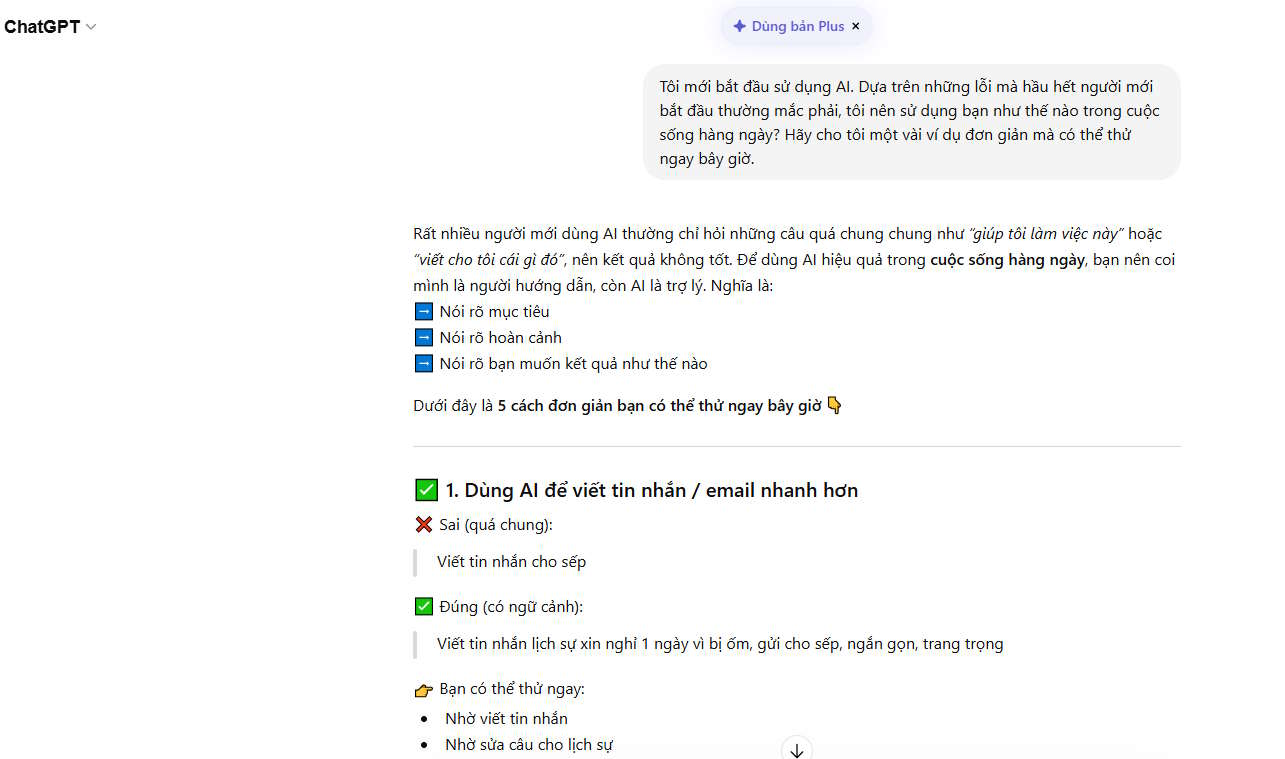
How to turn an option into a good prompt
Use four parts:
- Task: state the action you want.
- Context: provide only the background needed to do it.
- Constraints: define length, tone, audience, source limits, or things to avoid.
- Check: tell the assistant how to flag uncertainty and what you will verify.
For example, “Help with this email” is hard to evaluate. A clearer request is:
Draft a polite reply confirming that I can attend Tuesday's meeting at 2 p.m. Keep it under 80 words. Do not add a location or promise any work I did not mention. Leave a placeholder for the recipient's name, and list any detail I should confirm before sending.Five low-risk prompts to try
Summarize your own notes
Organize these notes into three headings and a short action list. Do not add facts. Mark any sentence you cannot interpret.

[Paste non-sensitive notes]
Plan a simple task
Turn this goal into five steps that I can complete in [time available]. Put the first action at the top, include required materials, and flag anything that needs current information.

Goal: [describe it]
Learn a concept
Explain [concept] for a beginner using one concrete example. Then ask me two questions to check my understanding. Do not give the answers until I respond.Compare two options
Help me compare [option A] and [option B] for [purpose]. Ask me about my three most important criteria, then make a table. Separate facts that need current web research from general tradeoffs.Improve a paragraph
Edit this paragraph for clarity while preserving my meaning and tone. Show the revision, then list the three most important changes. Do not add claims, examples, or citations.

[Paste paragraph]
What beginners commonly miss
- AI can sound confident and still be wrong. Check names, dates, quotations, calculations, and instructions.
- Current questions need current sources. Ask the tool to search when supported, then open the cited pages yourself.
- More detail is not always better. Include relevant context, not passwords, private records, or confidential business information.
- The first answer is a draft. Point to the exact problem and request a specific correction.
- Different tools have different abilities. A chatbot may be able to browse, analyze files, create images, or take actions only on certain plans or devices.
A safe boundary for important decisions
Do not rely on a general chatbot as the final authority for medical, legal, financial, tax, security, or emergency decisions. It can help organize questions or explain a public document, but a qualified professional or official source should confirm what you do.
Before uploading a file, remove personal identifiers and check the service's privacy controls. Before sending, publishing, buying, deleting, or changing an account, review the exact final action yourself.
How to continue after the first prompt
Useful follow-ups are short and specific:
- “Which part of my request is still ambiguous?”
- “Show the assumptions you made.”
- “Give me a shorter version without losing the main action.”
- “What should I verify before using this?”
- “Use only the source I provided and cite the relevant section.”
Once you find a recurring task, save the prompt and revise it with the mistakes you discover. TipsMake's AI and Productivity course expands this into a repeatable workflow for task selection, prompting, verification, and privacy.
There is no truly universal prompt that produces a perfect answer in every chatbot. A good beginner prompt does something more practical: it narrows the task, reveals what information is needed, and makes the final checks explicit.
Related Articles
 Install Universal Key on Laptop3 minutes read
 Debugging Prompt: Explained11 minutes read
 How Does the Universal Control Feature on macOS Monterey6 minutes read
 Microsoft Ushers in the Era of 'Print Anywhere' with Pull Print3 minutes read
 99+ Prompt AI Creates Detailed Videos of All Genres54 minutes read
 Evaluation of Bosch 46 Universal Screwdriver Kit Details7 minutes read
Reader Comments 0
Sign in with email or Google to join the discussion.