Table of Contents
This guide provides a clear, practical overview of warning: the joker malware has infected over 500,000 huawei, with useful context, important details, and straightforward takeaways for everyday readers.
More than half a million Huawei users are believed to have downloaded apps infected with the Joker malware on the company's official AppGallery app store platform. Security researchers found 10 applications in AppGallery that contain code to connect to a malicious command and control server (C2 server) operated by threat actors. This will allow the configuration and additional components to be received after the malware has successfully infected the victim's system.

Shade common applications
According to a report by security experts Doctor Web, during this campaign, the Joker malware still has most of the dangerous functions that have made its 'name'. For example, when the infection is successful on the target Android device, the malicious code will silently control SMS messages, contacts, device information, and collect some other important personal information such as passwords, The account name as well as some valuable data are being stored on the device.
In particular, the most serious threat posed by this malicious code to victims is the ability to automatically register paid wireless application protocol (WAP) services without the user's permission. The victim only really knew this when he paid the charges, and by then it was too late.
However, in this campaign, the Joker seems to be adding a new malicious feature, which requires access to the notification system on the device. This allows it to block the confirmation code sent by paid subscription services via SMS, leaving the user completely unaware.
According to researchers, the malware can subscribe to up to five services on its own. However, the threat actors behind malicious code operators can modify this limit at any time.
The list of applications containing the Joker malware detected on AppGallery to date includes virtual keyboard, camera app, launcher, online messenger, sticker collection, color software , and games.
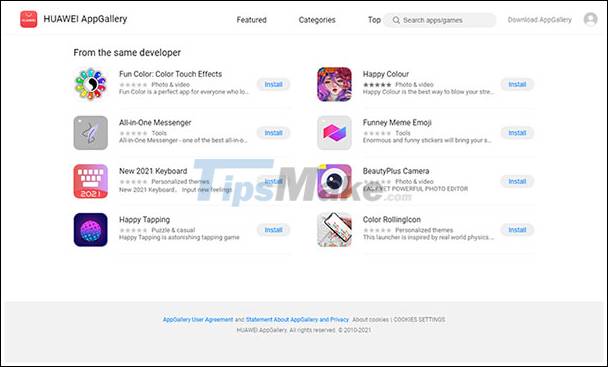
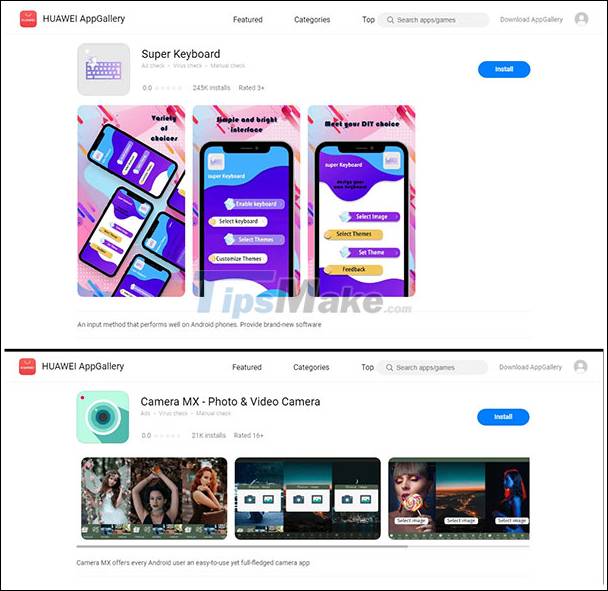
Notably, 8 of these come from the same developer (Shanxi Kuailaipai Network Technology Co., Ltd.) and 2 from another. According to statistics, these 10 apps have been downloaded by more than 538,000 Huawei users.
The Doctor Web side has informed Huawei and the Chinese company has now removed all 10 of these apps from AppGallery. If you own one of the above apps, you need to immediately uninstall it from your device.
Also, you should double-check your entire transaction history to see if there were any suspicious payments you didn't recognize. Also, make sure to closely check the permissions you grant to every app installed on your Android device.
Key Takeaways
Use the information above as a practical reference for warning: the joker malware has infected over 500,000 huawei. Review each step carefully, confirm any requirements, and choose the option that best fits your situation.
FAQ
What does this guide explain about Warning: the Joker Malware Has Infected over 500,000 Huawei?
It explains the main concepts, practical considerations, and useful steps related to warning: the joker malware has infected over 500,000 huawei without requiring advanced knowledge.
Who can benefit from learning about Warning: the Joker Malware Has Infected over 500,000 Huawei?
This information is useful for readers who want a clear overview, practical guidance, and reliable steps related to warning: the joker malware has infected over 500,000 huawei.
What should I check before applying this information?
Review the requirements, confirm that your device, software, or situation matches the instructions, and back up important data before making major changes.
Related Articles
 Malware Joker: What It Is and How to Fight It?7 minutes read
 What Is Joker Malware? the Most Effective Way to Protect Against Joker Malware7 minutes read
 More Than 9 Million Android Devices Infected with Malicious4 minutes read
 Joker Malware: Complete Guide3 minutes read
 Android Users Need to Remove These 8 Malicious Joker Apps4 minutes read
 5 Million Samsung, OPPO, Vivo Smartphones. Are Infected with Malware: How to Check4 minutes read
Reader Comments 0
Sign in with email or Google to join the discussion.