Table of Contents
This guide covers the new eee PC 1000he and aspire one are available in vietnam with practical context and easy-to-follow details. Use it to understand the subject and apply the information confidently.
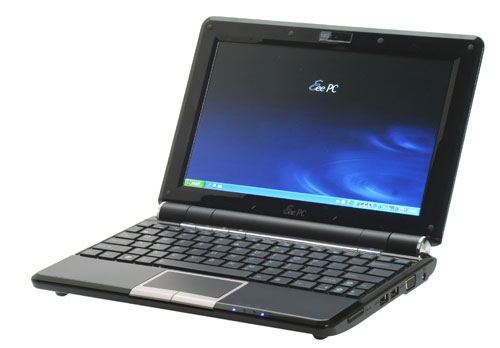 The Eee PC 1000HE has a long battery life Photo: Trustedreviews .
For nearly a year, the netbook market in Vietnam has become vibrant, most of the names such as Asus, Acer, HP and Dell have chosen this as a strategic market, bringing out new models. Both the 1000HE and Aspire One are 10 inches of new netbooks using Intel Atom N280 processors, clocking at 1. 66 GHz. Asus and Acer also choose Windows XP Home operating system, 160 GB hard drive to keep in. While the Eee netbook has a 10. 2-inch WSVGA LED backlit display, the second Aspire features a 10. 1-inch WSVGA, TFT LCD screen. Both have a resolution of 1024 x 600 pixels.
 The Acer Aspire One expands the screen bigger than the previous model.
Asus Eee PC 1000HE is impressed by the high capacity 8700 mAh battery, which says it works continuously for 9. 5 hours. However, the practice of continuous video playback, the 1000HE continuously running for more than 6 hours must be recharged. This is an impressive number for a netbook. In addition, Asus' new netbook has a neat keyboard design, MacBook-style with individual flat buttons. 1000HE has a 1. 3 Megapixel camera, weighs 1. 45 kg. Meanwhile, the Aspire One has a slightly lighter weight, 1. 33 kg, 6-cell battery, built-in Bluetooth connectivity. This is the second Acer netbook after the 9-inch model launched last year and sold very successfully.
FAQ
What should I check before following these steps?
Confirm device and software compatibility, save important data, and make sure you have the required permissions, files, and account access.
Why might the process not work?
Common causes include outdated software, missing permissions, incompatible hardware, an unstable connection, or completing a step in the wrong order.
Can I undo the changes if necessary?
That depends on the tool or setting. Use built-in restore options when available, keep a backup, and record the original configuration first.





Reader Comments 0
Sign in with email or Google to join the discussion.