Table of Contents
This guide covers the hp p6-2000 desktop set costs from 7. 6 million with practical context and easy-to-follow details. Use it to understand the subject and apply the information confidently.
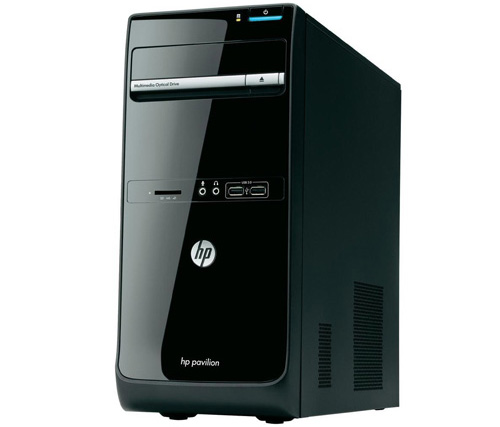 HP Pavillion P6-2000 case for vertical design.
HP Pavilion P6-2000 series is HP's strong focus on compact traditional design and new generation microprocessor apps based on Sandy Bridge technology platform. The products are designed in a stand-alone, lightweight and glossy black case.
All 3 models of the HP Pavilion P6-2000 series are equipped with new generation processors including 2. 6 GHz Pentium Core G620, 3MB cache and G840 2. 8GHz, 3MB cache. The model with the highest configuration is Intel Core i3-2120 processor with 3. 3GHz speed, 3MB cache. All models feature 2 GB RAM, up to 8 GB maximum upgrade and 500 GB hard drive.
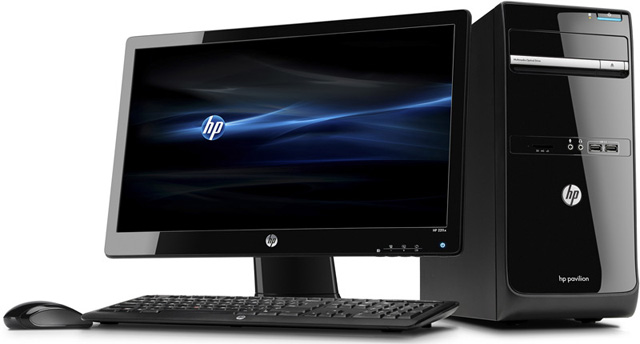 You can select the attached screen.
HP Pavilion P6-2000 is equipped with Gigabit LAN connector, 6-type memory card reader, DVI port and optical drive that can record LightScrible disc labels. It uses Free Dos operating system and is backed by a genuine one year warranty.
In addition, users can choose from two monitors HP Monitor S1932 Wide and HP Monitor LE1902X 18. 5-inch size with Wide 16: 9 standard, resolution of 1366 x 768. Particularly model LE1902 uses LED lamp technology Better brightness with 250cd / m2.
FAQ
What should I check before following these steps?
Confirm device and software compatibility, save important data, and make sure you have the required permissions, files, and account access.
Why might the process not work?
Common causes include outdated software, missing permissions, incompatible hardware, an unstable connection, or completing a step in the wrong order.
Can I undo the changes if necessary?
That depends on the tool or setting. Use built-in restore options when available, keep a backup, and record the original configuration first.
Related Articles
 The $ 1 Million Game on Steam Is Only for ''giants''3 minutes read
 Inspiron 17 Inch Costs from 9 to 50 Million3 minutes read
 GM Technology's 'MacBook Air' Costs Just Over 6 Million3 minutes read
 Toshiba Portege R830 Adds Red and Core i7 Chips4 minutes read
 ThinkPad Edge 11 in Vietnam Costs from 12. 5 Million5 minutes read
 Try These Wi-Fi Tips While on Vacation to Reduce Roaming Costs!8 minutes read
Reader Comments 0
Sign in with email or Google to join the discussion.