What you will learn
- State one observable deliverable.
- Provide only context that changes the answer.
- Define the audience and use situation.
- Write success criteria before generating the output.
What you need
- A real writing, analysis or planning task.
- The facts, notes or source material the AI should use.
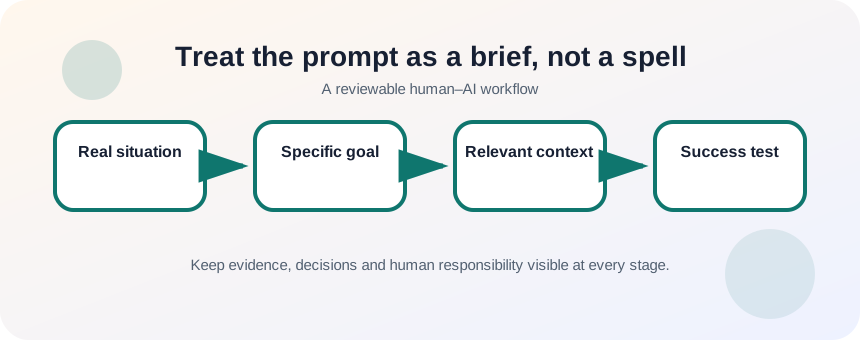
Treat the prompt as a brief, not a spell
OpenAI recommends clear, specific prompts with enough context for the model to understand the request, followed by iterative refinement when the first result misses the goal.
NIST’s Generative AI Profile emphasizes documenting intended use and managing risks in the context where an AI system is applied.
The strongest part of a prompt is usually not a role label. It is the combination of a concrete deliverable, relevant background, authoritative inputs and a test for success. A useful goal can be inspected: “Produce a 250-word email that confirms the delivery date and requests approval by Friday.” A weak goal cannot: “Make this better.”
Collect the minimum context that changes the output
Context should reduce ambiguity without burying the task. Include facts, constraints, definitions and examples that the model cannot infer safely. Exclude secrets, unrelated history and instructions that conflict with each other. If the source material is long, tell the model which section or facts control the answer.
- 1
Write the outcome in one sentence.
- 2
Name the audience and what they already know.
- 3
List the facts that must appear.
- 4
Identify the source material the answer must follow.
- 5
Remove private or irrelevant details.
- 6
Write two conditions that would make the result unacceptable.
Build the prompt in a reviewable order
A reliable order is: situation, goal, source material, constraints, output format and success criteria. Put the task before decorative style instructions. When the model should not add facts, say so directly and require it to mark missing information.
- 1
Open with the real situation.
- 2
State the single deliverable.
- 3
Paste or attach the approved facts.
- 4
Define the reader and purpose.
- 5
Add exclusions such as “do not invent dates.”
- 6
Specify the format and length.
- 7
Finish with a checklist the response must satisfy.
Judge the result against the brief
Do not revise the prompt by adding random adjectives. Compare the output with each success criterion. If the facts are correct but the audience level is wrong, change the audience guidance. If the output invents details, strengthen the source boundary. If the structure is wrong, define the sections. One targeted change teaches you more than rewriting the entire prompt.
- The deliverable is observable and singular.
- The response can distinguish supplied facts from missing information.
- Every success criterion can be checked by a reviewer.
Rewrite a vague prompt into a working brief
Use a real task and compare the weak and improved outputs.
- 1
Write the vague prompt you might normally use.
- 2
Run it and save the result.
- 3
Create a goal, audience and source-material block.
- 4
Add constraints and success criteria.
- 5
Run the improved prompt.
- 6
Compare factual fidelity, relevance and revision effort.
Common mistakes to avoid
- Starting with a long persona but no deliverable.
- Providing contradictory goals.
- Assuming the model knows private project context.
- Adding sensitive information that does not affect the answer.
Key takeaways
- A prompt is a brief with an outcome and evidence.
- Relevant context reduces ambiguity; excess context creates noise and risk.
- Success criteria make iteration targeted.
Frequently asked questions
Do I need “Act as an expert”?
Not usually. A defined task, audience, source material and success test are more useful than a generic role label.
How much context is enough?
Include the information that changes the answer or prevents a dangerous assumption. Remove unrelated history and secrets.
Sources and further reading
Ready to continue?
Mark the lesson complete so your Learning Path progress stays current on this device.