Table of Contents
Install GTA Vice City through Steam or the Rockstar Games Launcher, use an original disc if you own one, and troubleshoot common Windows issues.
Use an official copy: The original GTA Vice City listing is no longer sold on Steam, while the Definitive Edition is available through Steam and the trilogy is sold through the Rockstar Store. Avoid unofficial “free download” installers.
Are you ready to immerse yourself in the harsh underworld of Vice City on your PC? Grand Theft Auto: Vice City, often abbreviated as GTA Vice City, is a classic open-world action-adventure game that has captured the hearts of gamers for years. In this comprehensive guide, you'll get step-by-step instructions on how to install and launch GTA Vice City on your computer. Whether you're a fan looking to relive old memories or a new player eager to explore the streets of Vice City, we have a guide for you. The steps below cover we're about to embark on a thrilling journey through the criminal underworld of Vice City!
Minimum requirements for installing GTA Vice City on PC
Before diving into Vice City, it's essential to ensure your PC meets the game's system requirements. To play GTA Vice City on PC, your system must meet the following minimum requirements:
- Operating system: Windows XP, Vista, 7, 8, or 10
- Processor: Intel Pentium III 1GHz
- Memory: 128 MB RAM
- Graphics: DirectX 9.0 compatible graphics card
- Storage: 1.55 GB of free hard drive space
- Sound card: DirectX-compatible sound card
installing GTA Vice City on Windows using Steam
Step 1: Click on the download button for Grand Theft Auto: Vice City
Step 2: Select Buy on Steam
Step 3: The screen will switch to the shopping cart interface; click on "Purchase for myself" to buy the game for yourself.
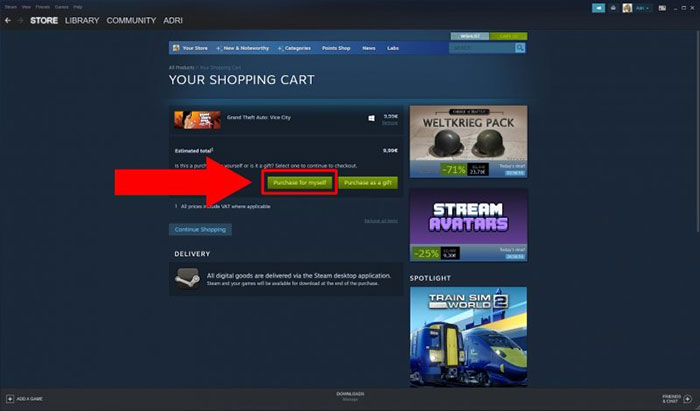
Step 4: On the next screen, select your payment method, enter your information, and click the Continue button.
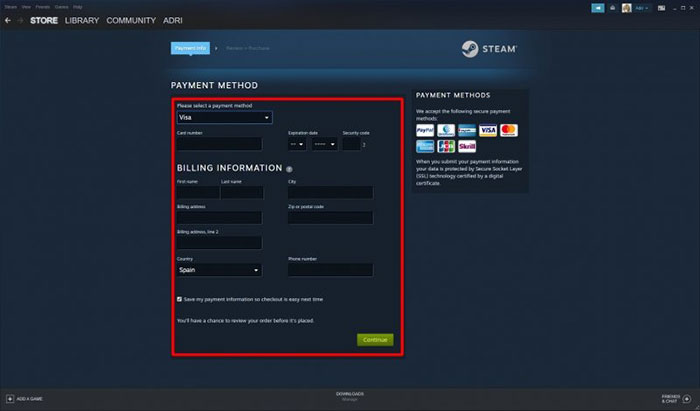
Step 5: After completing the game purchase, click on Library to open your game library.
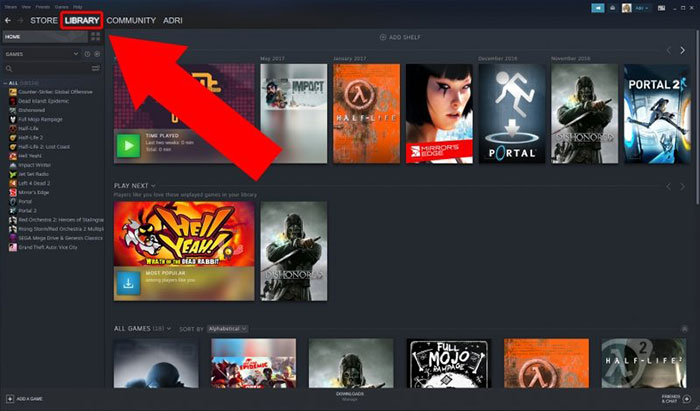
Step 6: On the left side, you will see a list of purchased games; click on Grand Theft Auto Vice City.
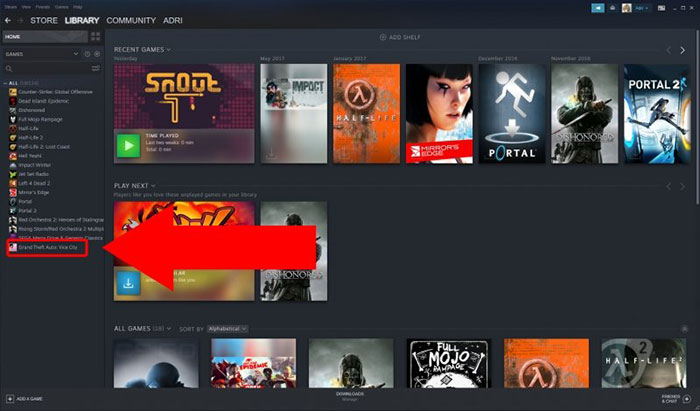
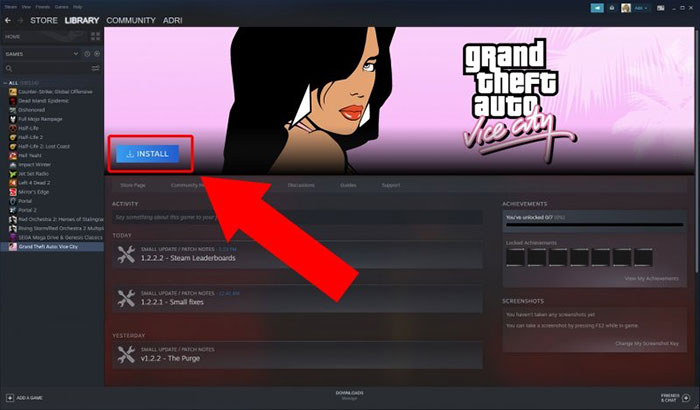
Step 7: Select Install to begin the installation on your computer.
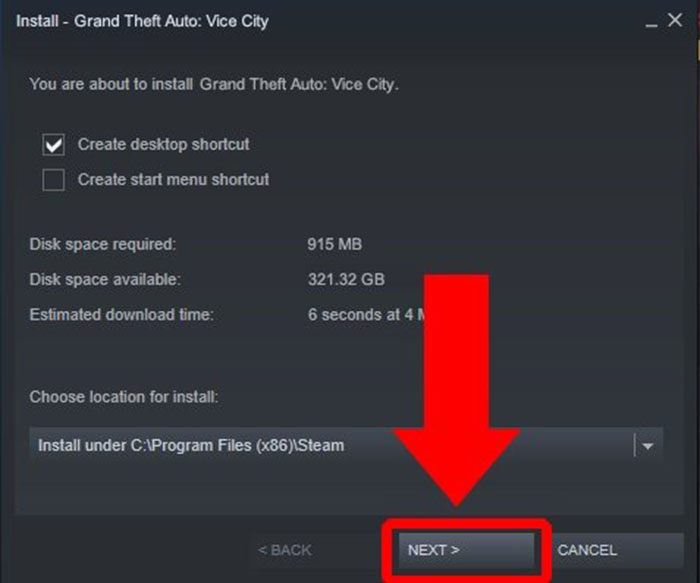
Step 8: A new dialog box will appear with information about the game's size and whether your device has enough hard drive space. If it meets the requirements, continue by clicking Next.
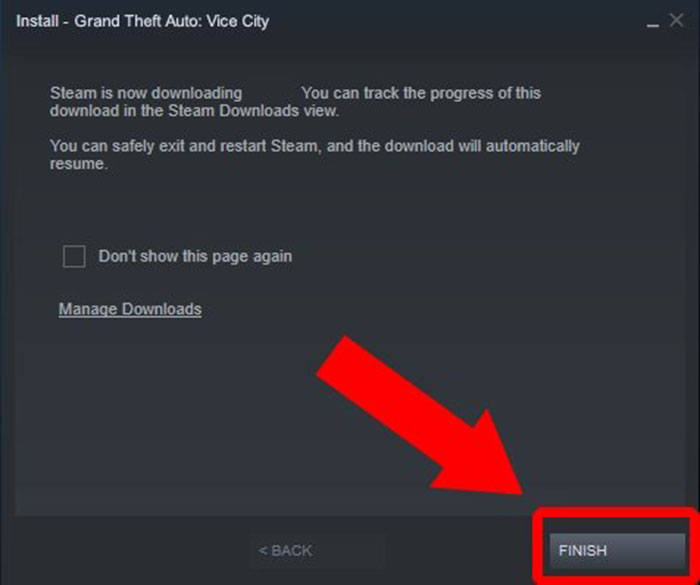
Step 9: Now, all you have to do is click Finish and wait for the game download and installation process to complete.
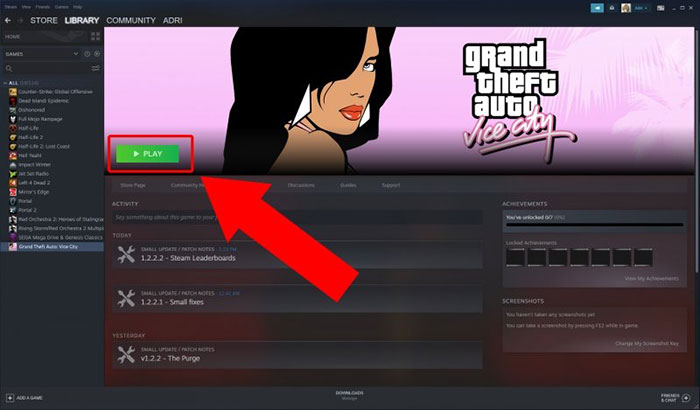
Step 10: After the download and installation process is complete, you can play GTA: Vice City by clicking the Play button.
Install GTA Vice City from the Rockstar game launcher
Step 1: From the Rockstar home screen, click on Store to search for GTA Vice City.
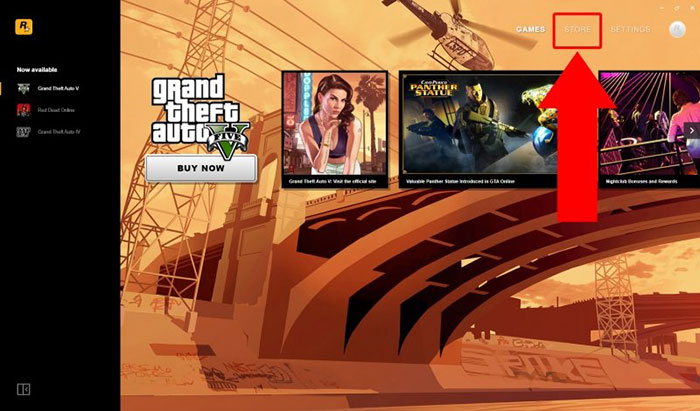
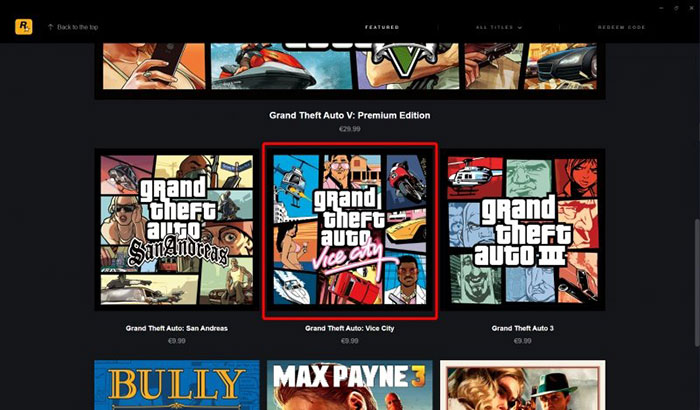
Step 2: Find Grand Theft Auto: Vice City and tap on it.
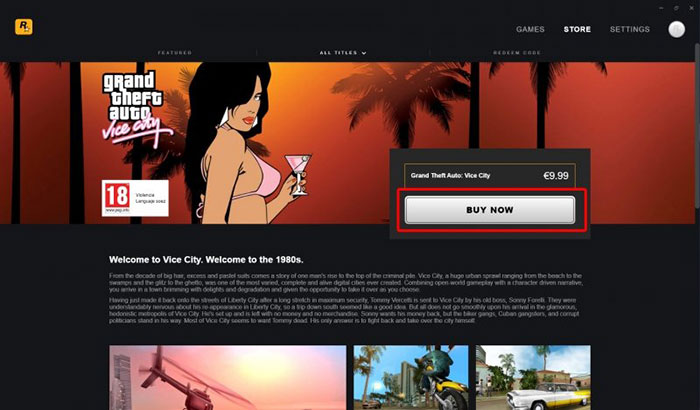
Step 3: The game page will open; begin the purchase process by clicking " Buy Now".
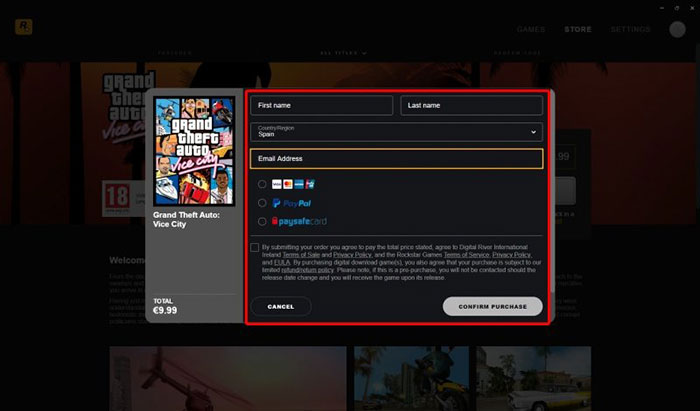
Step 4: Enter your bank information and confirm the payment by clicking Confirm Purchase.
Step 5: After completing the game purchase process, proceed to the installation step by clicking Go To Game.
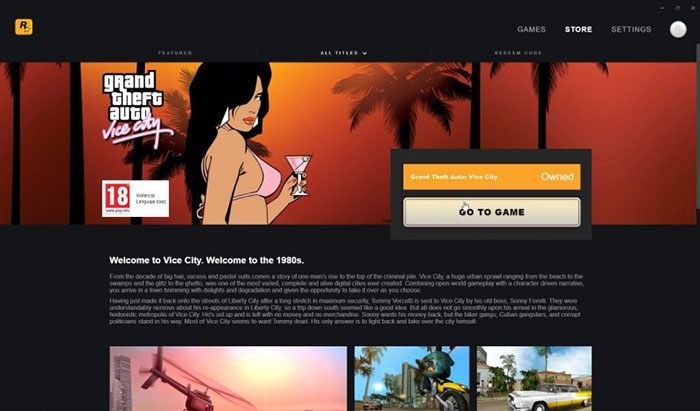
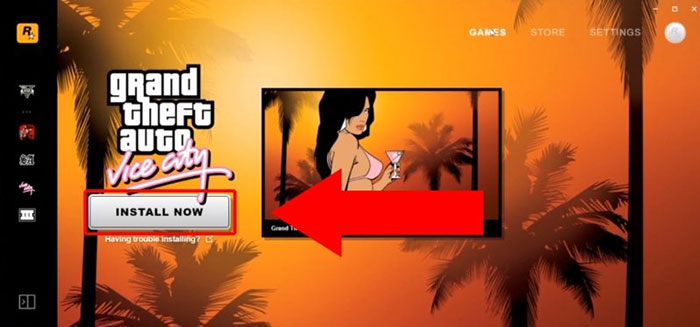
Step 6: Select Install Now.
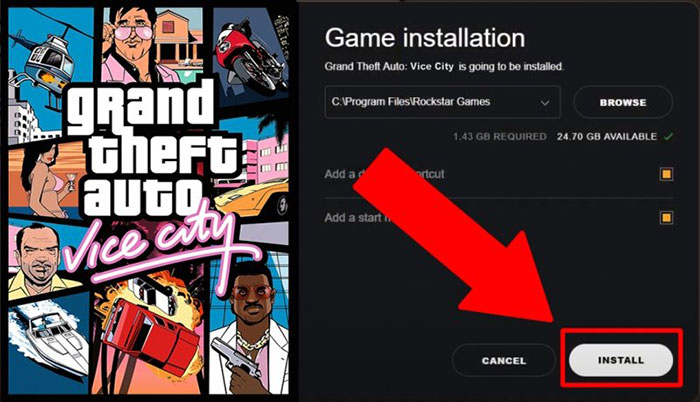
Step 7: Information about the required storage space and available hard drive space will appear. Click Install, and the game will begin downloading and installing.
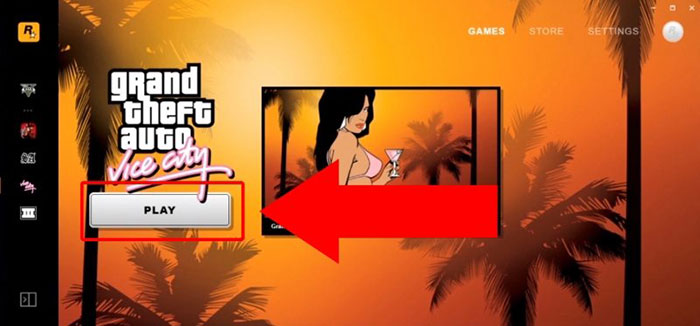
Once the download and installation are complete, click Play and start playing.
Install GTA Vice City from the original CD
If you own a Grand Theft Auto: Vice City CD, you can also install the game on your PC.
Step 1: First, insert CD 1 into your computer's CD drive, then double-click the game.
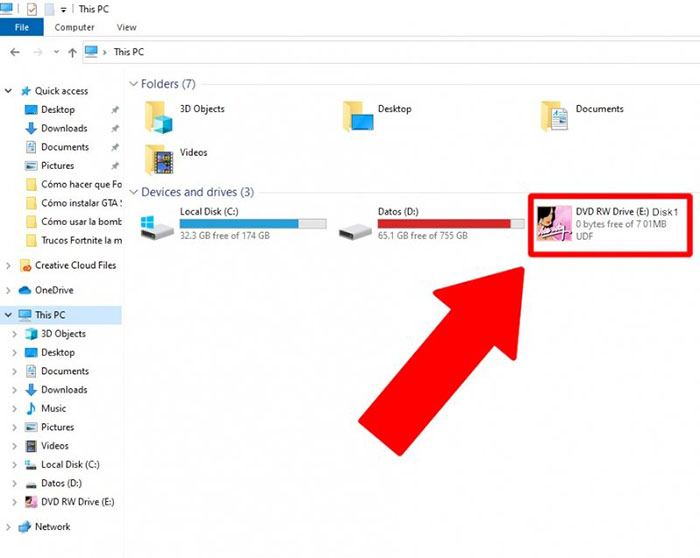
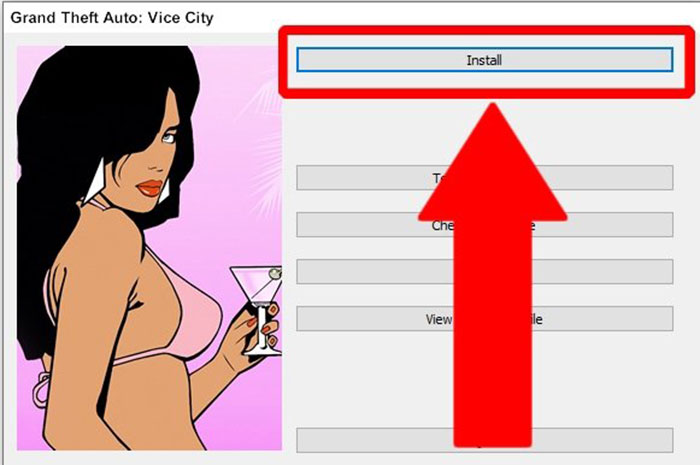
Step 2: A window will appear with an Install button; click on it to begin the installation process.
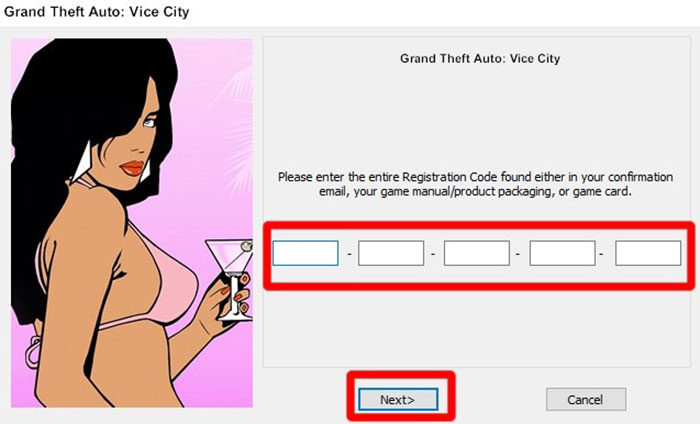
Step 3: In the following steps, you will have to click Next multiple times, as well as enter the game key.
Step 4: After the installation process begins, the game will prompt you to remove and insert the next CDs. Once complete, the GTA: Vice City icon will appear on your PC screen. Simply double-click it to start playing.
Troubleshooting GTA Vice City on PC
Encountering technical issues can be frustrating for players, but don't worry, this article will also address common problems such as crashes, graphics glitches, and controller configuration issues, and provide practical solutions to help everyone continue enjoying the game.
Common troubleshooting steps for GTA Vice City on PC include:
- Make sure your graphics card drivers are updated.
- Verify that the PC meets the minimum system requirements.
- Disable any background applications that might affect game performance.
- Check for official patches or updates on the Rockstar Games website.
- Adjust the graphics settings in the game to optimize performance on your computer's hardware.
Explore the world of GTA Vice City
Before embarking on your criminal adventure, let's explore the world of Vice City. Discover the setting, characters, and atmosphere inspired by 1980s Miami, which sets the stage for your upcoming adventures.
GTA Vice City is set in a fictional city inspired by 1980s Miami, Florida. The game's protagonist, Tommy Vercetti, is a former convict who is drawn into the criminal underworld of Vice City after a failed drug deal. The game's storyline is dramatic and engaging, and the city itself is full of diverse neighborhoods, landmarks, and unique characters.
The main gameplay style of GTA Vice City
- Mission: Progress in the game by completing various story missions, each with its own objective.
- Open world: Freely explore Vice City, searching for hidden items, vehicles, and side activities.
- Combat: Engage in gunfights, close combat, and car chases.
- Wanted Level: Avoid or evade police as your criminal activities increase your wanted level.
- Interaction: Interact with NPCs, visit shops, and engage with the dynamic city environment.
Mods and customizations in GTA Vice City:
Discover how to enhance your GTA Vice City experience with mods and customizations. Whether you want to change graphics, add new vehicles, or create your own missions, mods can help.
Mod and customization options in GTA Vice City include:
- Graphics enhancement: Install mods to improve graphics quality, including texture updates and visual effects.
- Vehicle Mods: Add new vehicles, custom skins, and upgrades to the game's extensive vehicle roster.
- Custom missions: Create and play your own missions, or download user-created missions for added variety in gameplay.
- Trainer Tools: Use trainer tools to fine-tune in-game settings, unlock features, and experiment with various gameplay elements.
Frequently Asked Questions
What are the PC system requirements to play GTA Vice City?
To play GTA Vice City on PC, you need at least Windows XP, Vista, 7, 8, or 10, an Intel Pentium III 1 GHz processor, 128 MB of RAM, and a DirectX 9.0-compatible graphics card.
Where can I download GTA Vice City for PC?
You can download GTA Vice City for PC from reputable sources such as the official Rockstar Games website, Steam, or other trusted online retailers.
Related Articles
 Fixed GTA Vice City Crash, Crashing on PC and Phone8 minutes readList of Codes GTA Vice City, Cheat Codes GTA Vice City9 minutes read
 GTA Vice City Command Codes, Grand Theft Auto: Vice City Cheats7 minutes read
 Fix Mouse Not Working Error in GTA Vice City on Windows 10: Step-by-Step Guide7 minutes read
 List of GTA Vice City Cheat Codes and the Latest Grand Theft Auto Cheats12 minutes read
 List of GTA Vice City Codes, Grand Theft Auto Cheats10 minutes read
Reader Comments 0
Sign in with email or Google to join the discussion.